

Intl 기타 API — Segmenter, PluralRules, DisplayNames
Intl.Segmenter로 텍스트를 분절하고, PluralRules로 복수형을 처리하며, DisplayNames·ListFormat·DurationFormat으로 국제화 UX를 완성하는 방법을 정리합니다.
지난 글에서 Intl.Collator로 로케일 인식 문자열 정렬을 다뤘습니다. 이번에는 Intl 생태계의 나머지 주요 API들 — Segmenter, PluralRules, DisplayNames, ListFormat, DurationFormat — 을 한 번에 정리합니다.
Intl.Segmenter
String.prototype.split이나 정규식으로 텍스트를 분리하면 이모지 합성 문자나 한글 같은 다중 코드 유닛 문자를 잘못 자르는 문제가 생깁니다. Intl.Segmenter는 유니코드 규칙을 따라 올바르게 분절합니다.
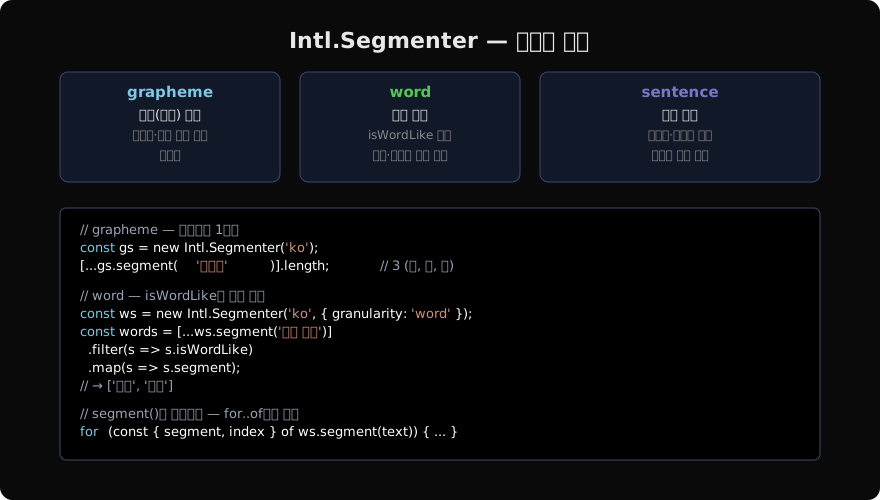
// '👨👩👧'는 4개의 코드 포인트지만 1개의 grapheme
const text = '안녕👨👩👧';
[...text].length; // 7 (코드 포인트 기준 — 잘못됨)
const seg = new Intl.Segmenter('ko', { granularity: 'grapheme' });
[...seg.segment(text)].length; // 3 (안, 녕, 👨👩👧)granularity 옵션
// word — 단어와 공백 모두 반환, isWordLike로 구분
const wordSeg = new Intl.Segmenter('en', { granularity: 'word' });
const words = [...wordSeg.segment('Hello, world!')]
  .filter(s => s.isWordLike)
  .map(s => s.segment);
// ['Hello', 'world']

// sentence
const sentSeg = new Intl.Segmenter('en', { granularity: 'sentence' });
[...sentSeg.segment('Hello! How are you? Fine.')].map(s => s.segment);
// ['Hello! ', 'How are you? ', 'Fine.']
각 세그먼트 객체는 { segment, index, input, isWordLike? } 형태입니다.
실무 활용: 검색 하이라이트
function highlight(text, query, locale = 'ko') {
  const seg = new Intl.Segmenter(locale, { granularity: 'grapheme' });
  const qSeg = new Intl.Segmenter(locale, { granularity: 'grapheme' });
  const textChars = [...seg.segment(text)].map(s => s.segment);
  const queryChars = [...qSeg.segment(query)].map(s => s.segment);
  // 이후 KMP나 단순 비교로 하이라이트 처리
  return textChars;
}
글자 수 카운트 (텍스트에디터 UX)
function countGraphemes(text, locale = 'ko') {
  const seg = new Intl.Segmenter(locale);
  let count = 0;
  for (const _ of seg.segment(text)) count++;
  return count;
}
countGraphemes('안녕👋');   // 3
countGraphemes('á');  // 1 (á — 합성 악센트)
Intl.PluralRules
언어마다 복수형 규칙이 다릅니다. 영어는 1개/그 외, 아랍어는 6가지 범주를 사용합니다.
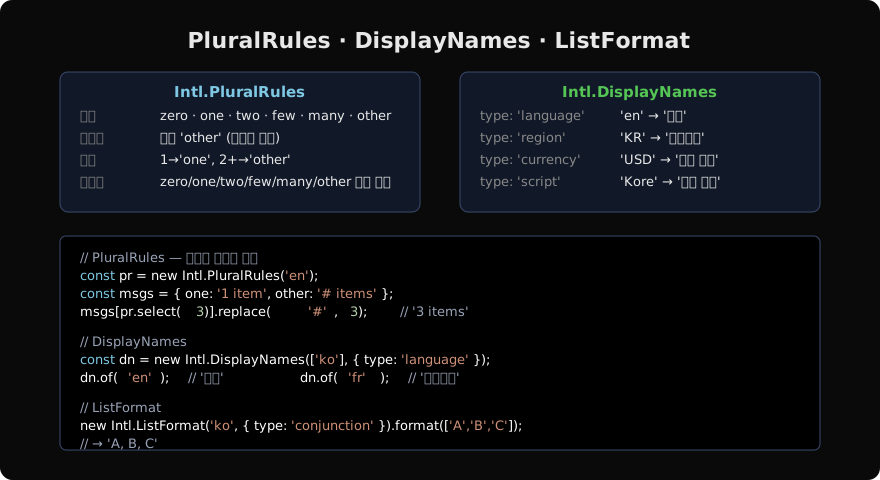
const pr = new Intl.PluralRules('en');
pr.select(0); // 'other'
pr.select(1); // 'one'
pr.select(2); // 'other'

const prAr = new Intl.PluralRules('ar');
prAr.select(0);  // 'zero'
prAr.select(1);  // 'one'
prAr.select(2);  // 'two'
prAr.select(5);  // 'few'
prAr.select(11); // 'many'
prAr.select(100);// 'other'
복수형 메시지 패턴
const messages = {
  ko: { other: '{count}개의 알림' },
  en: { one: '{count} notification', other: '{count} notifications' },
};

function formatCount(count, locale) {
  const pr = new Intl.PluralRules(locale);
  const category = pr.select(count);
  const template = messages[locale][category] ?? messages[locale].other;
  return template.replace('{count}', count);
}

formatCount(1, 'en'); // '1 notification'
formatCount(5, 'en'); // '5 notifications'
formatCount(3, 'ko'); // '3개의 알림'
ordinal (서수)
const ordPr = new Intl.PluralRules('en', { type: 'ordinal' });
const suffixes = { one: 'st', two: 'nd', few: 'rd', other: 'th' };
function ordinal(n) {
  return n + suffixes[ordPr.select(n)];
}
ordinal(1);  // '1st'
ordinal(2);  // '2nd'
ordinal(3);  // '3rd'
ordinal(21); // '21st'
Intl.DisplayNames
로케일 코드·통화 코드·지역 코드를 사람이 읽을 수 있는 이름으로 변환합니다.
const dn = new Intl.DisplayNames(['ko'], { type: 'language' });
dn.of('en');   // '영어'
dn.of('fr');   // '프랑스어'
dn.of('zh-Hant'); // '중국어(번체)'

const region = new Intl.DisplayNames(['ko'], { type: 'region' });
region.of('US'); // '미국'
region.of('KR'); // '대한민국'
region.of('JP'); // '일본'

const currency = new Intl.DisplayNames(['ko'], { type: 'currency' });
currency.of('USD'); // '미국 달러'
currency.of('EUR'); // '유로'
currency.of('KRW'); // '대한민국 원'

const script = new Intl.DisplayNames(['ko'], { type: 'script' });
script.of('Hang'); // '한글'
script.of('Latn'); // '라틴 문자'
언어 선택 드롭다운, 통화 목록, 지역 설정 UI를 만들 때 하드코딩 없이 동적으로 현지화된 이름을 제공할 수 있습니다.
Intl.ListFormat
배열을 사람이 읽기 좋은 목록 문자열로 변환합니다.
const items = ['사과', '바나나', '체리'];

new Intl.ListFormat('ko', { type: 'conjunction' }).format(items);
// '사과, 바나나, 체리'

new Intl.ListFormat('en', { type: 'conjunction' }).format(['cat', 'dog', 'bird']);
// 'cat, dog, and bird'

new Intl.ListFormat('en', { type: 'disjunction' }).format(['cat', 'dog']);
// 'cat or dog'

new Intl.ListFormat('en', { type: 'unit', style: 'short' }).format(['3ft', '7in']);
// '3ft, 7in'

// formatToParts — 각 부분을 개별 처리
new Intl.ListFormat('en').formatToParts(['a', 'b', 'c']);
// [
//   { type: 'element', value: 'a' },
//   { type: 'literal', value: ', ' },
//   { type: 'element', value: 'b' },
//   { type: 'literal', value: ', and ' },
//   { type: 'element', value: 'c' },
// ]
Intl.DurationFormat (최신)
지속 시간(duration)을 로케일별로 포맷합니다. Chrome 129+, Node.js 22+에서 사용 가능합니다.
const df = new Intl.DurationFormat('ko', { style: 'long' });
df.format({ hours: 2, minutes: 30, seconds: 15 });
// '2시간 30분 15초'

const dfEn = new Intl.DurationFormat('en', { style: 'short' });
dfEn.format({ hours: 1, minutes: 45 });
// '1 hr., 45 min.'
실무 팁: 한 번만 생성, 재사용
// i18n.js — 앱 전역 공유 인스턴스
const locale = navigator.language ?? 'ko-KR';

export const listFmt = new Intl.ListFormat(locale, { type: 'conjunction' });
export const pluralRules = new Intl.PluralRules(locale);
export const displayNames = new Intl.DisplayNames([locale], { type: 'language' });
export const segmenter = new Intl.Segmenter(locale, { granularity: 'word' });
Intl 인스턴스 생성은 ICU 데이터 로드를 포함하므로 반드시 싱글턴으로 관리합니다.
지난 글: Intl.Collator — 로케일 인식 문자열 정렬
다음 글: URL · URLSearchParams — 브라우저 URL 파싱 API
읽어주셔서 감사합니다. 😊
PALDYN / ARTICLE AI
글의 개념, 수식, 코드에 대해 물어보세요.
질문과 관련된 문단을 골라 답변의 문맥으로 사용합니다.생각 중 · 0초