

지식
JavaScript
URL · URLSearchParams — 브라우저 URL 파싱 API
URL 생성자로 URL을 파싱·조작하고, URLSearchParams로 쿼리스트링을 다루는 표준 API를 실무 패턴과 함께 정리합니다.
지난 글에서 Intl 기타 API를 살펴봤습니다. 이번에는 URL을 파싱·조작하는 표준 API인 URL과 URLSearchParams를 다룹니다. 문자열 조작이나 정규식으로 URL을 분해하던 시대는 끝났습니다.
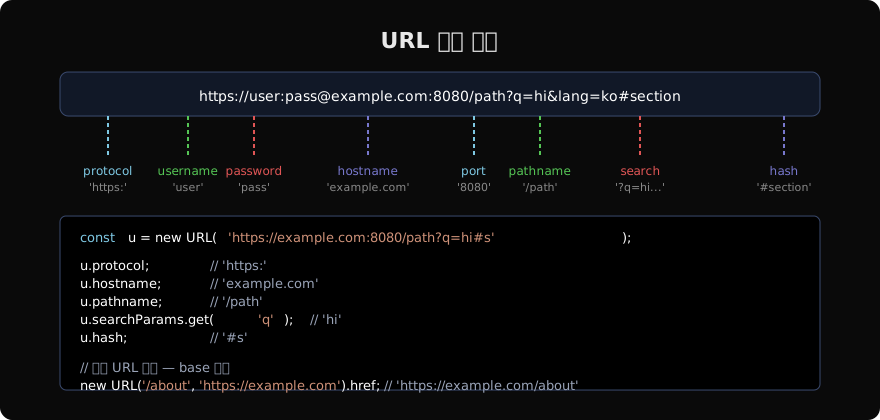
URL 생성자
const u = new URL('https://example.com:8080/path?q=hello&lang=ko#section');

u.protocol; // 'https:'
u.hostname; // 'example.com'
u.port;     // '8080'
u.host;     // 'example.com:8080' (hostname + port)
u.pathname; // '/path'
u.search;   // '?q=hello&lang=ko'
u.hash;     // '#section'
u.href;     // 전체 URL 문자열
u.origin;   // 'https://example.com:8080'
잘못된 URL이면 TypeError를 던집니다.
상대 URL 파싱
// 두 번째 인자로 base URL 제공
new URL('/about', 'https://example.com').href;
// 'https://example.com/about'

new URL('../images/logo.png', 'https://example.com/blog/post').href;
// 'https://example.com/images/logo.png'

// 현재 페이지 기준 — 브라우저 환경
new URL('/api/users', location.href).href;
URL 속성 수정
URL 인스턴스는 모든 속성이 읽기/쓰기 가능합니다.
const u = new URL('https://example.com/old-path?a=1');

u.pathname = '/new-path';
u.searchParams.set('a', '2');
u.hash = 'top';

console.log(u.href);
// 'https://example.com/new-path?a=2#top'
수정하면 href가 자동으로 업데이트됩니다.
URLSearchParams
생성 방법
// 문자열에서
const sp1 = new URLSearchParams('q=hello&lang=ko');

// 객체에서
const sp2 = new URLSearchParams({ q: 'hello', lang: 'ko' });

// 배열에서 (중복 키 지원)
const sp3 = new URLSearchParams([['tag', 'js'], ['tag', 'web']]);

// URL.searchParams로 접근 (실시간 연동)
const u = new URL('https://example.com?q=hello');
const sp4 = u.searchParams; // URLSearchParams 인스턴스u.searchParams를 수정하면 u.href에 즉시 반영됩니다.
주요 메서드
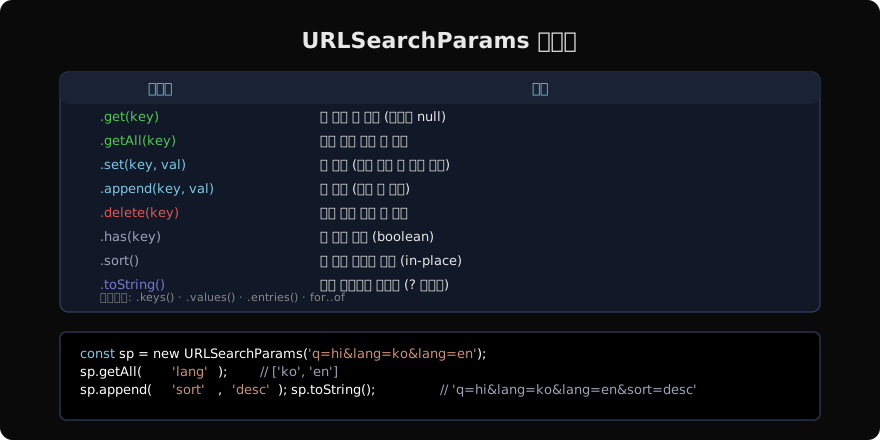
const sp = new URLSearchParams('q=hi&tag=js&tag=web');

// 읽기
sp.get('q');          // 'hi'
sp.get('missing');    // null
sp.getAll('tag');     // ['js', 'web']
sp.has('q');          // true

// 쓰기
sp.set('q', 'world'); // q=world (기존 대체)
sp.append('tag', 'ts'); // tag 세 번째 추가
sp.delete('tag');     // tag 전부 삭제

// 정렬 및 직렬화
sp.sort(); // 키 기준 사전식 정렬
sp.toString(); // 'q=world' (? 없이)
이터레이션
const sp = new URLSearchParams('a=1&b=2&c=3');

for (const [key, value] of sp) {
  console.log(key, value);
}
// a 1 / b 2 / c 3

[...sp.keys()];    // ['a', 'b', 'c']
[...sp.values()];  // ['1', '2', '3']
[...sp.entries()]; // [['a','1'], ['b','2'], ['c','3']]
인코딩 처리
URLSearchParams는 자동으로 퍼센트 인코딩을 처리합니다.
const sp = new URLSearchParams({ q: '안녕 세계', emoji: '👋' });
sp.toString();
// 'q=%EC%95%88%EB%85%95+%EC%84%B8%EA%B3%84&emoji=%F0%9F%91%8B'
// 공백은 + 로 인코딩됨 (application/x-www-form-urlencoded 표준)

// 반대로 읽을 때 자동 디코딩
new URLSearchParams('q=%EC%95%88%EB%85%95').get('q'); // '안녕'
실무 패턴
API URL 조립
function buildApiUrl(base, params) {
  const url = new URL(base);
  Object.entries(params).forEach(([k, v]) => {
    if (v != null) url.searchParams.set(k, String(v));
  });
  return url.toString();
}

buildApiUrl('https://api.example.com/search', {
  q: '안녕',
  page: 1,
  limit: 20,
  sort: null, // null은 제외
});
// 'https://api.example.com/search?q=%EC%95%88%EB%85%95&page=1&limit=20'
쿼리스트링 → 객체 변환
function parseQuery(search = location.search) {
  return Object.fromEntries(new URLSearchParams(search));
}
parseQuery('?page=2&sort=desc');
// { page: '2', sort: 'desc' }
중복 키는 Object.fromEntries에서 마지막 값만 남습니다. 중복 키를 유지해야 하면 직접 이터레이션하세요.
URL 유효성 검사
function isValidUrl(str) {
  try {
    new URL(str);
    return true;
  } catch {
    return false;
  }
}
isValidUrl('https://example.com'); // true
isValidUrl('not-a-url');           // false
URL.canParse (Chrome 120+, Node.js 22+)
// try-catch 없이 유효성 확인
URL.canParse('https://example.com'); // true
URL.canParse('bad url');             // false
Node.js에서의 URL
Node.js는 브라우저와 동일한 WHATWG URL API를 제공합니다.
import { URL, URLSearchParams } from 'node:url';
// 또는 전역으로 사용 (Node.js 10+)
const u = new URL('https://example.com');import.meta.url을 base로 사용하면 상대 경로에서 절대 경로를 쉽게 얻을 수 있습니다.
// ESM 환경에서 __dirname 대체
const dir = new URL('.', import.meta.url).pathname;
// '/home/user/project/src/'
지난 글: Intl 기타 API — Segmenter, PluralRules, DisplayNames
다음 글: TextEncoder · TextDecoder — 텍스트와 이진 데이터 변환
읽어주셔서 감사합니다. 😊
PALDYN / ARTICLE AI
글의 개념, 수식, 코드에 대해 물어보세요.
질문과 관련된 문단을 골라 답변의 문맥으로 사용합니다.생각 중 · 0초