

TextEncoder · TextDecoder — 텍스트와 이진 데이터 변환
TextEncoder로 문자열을 UTF-8 바이트로 변환하고, TextDecoder로 다양한 인코딩의 바이트를 문자열로 복원하는 표준 API와 스트리밍 활용법을 정리합니다.
지난 글에서 URL 파싱 API를 살펴봤습니다. 이번에는 문자열과 이진 데이터(바이트) 사이를 변환하는 TextEncoder와 TextDecoder를 다룹니다. WebSocket, WASM, 파일 처리 등 이진 API를 다룰 때 반드시 알아야 하는 도구입니다.
왜 필요한가
JavaScript 문자열은 UTF-16 기반이지만, 네트워크·파일 시스템·WASM은 바이트 단위로 데이터를 주고받습니다. atob / btoa 함수는 Base64 전용이고, 한글 같은 다국어 문자를 직접 변환할 수 없습니다. TextEncoder와 TextDecoder는 이 간극을 메우는 표준 API입니다.
// 한글 → UTF-8 바이트 변환
const enc = new TextEncoder();
const bytes = enc.encode('안녕');
// Uint8Array(6) [236, 149, 136, 235, 133, 149]
// 한글 1글자 = UTF-8 3바이트

// 바이트 → 문자열
const dec = new TextDecoder();
dec.decode(bytes); // '안녕'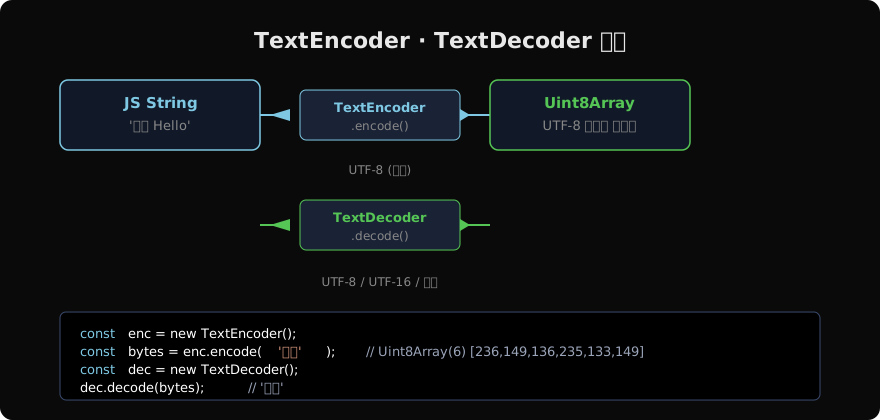
TextEncoder
TextEncoder는 항상 UTF-8 인코딩을 사용합니다. 생성자 인자는 없습니다.
const enc = new TextEncoder();
enc.encoding; // 'utf-8' (항상)

// encode(string) → Uint8Array
enc.encode('Hello'); // Uint8Array(5) [72, 101, 108, 108, 111]
enc.encode('😀');    // Uint8Array(4) [240, 159, 152, 128]
enc.encode('');      // Uint8Array(0) []
encodeInto — 제로 카피
encode()는 호출마다 새 Uint8Array를 할당합니다. 고성능 경로에서는 encodeInto()로 기존 버퍼에 직접 씁니다.
const buffer = new Uint8Array(100);
const enc = new TextEncoder();

const { read, written } = enc.encodeInto('안녕 Hello', buffer);
// read: 8 (처리한 코드 유닛 수)
// written: 12 (기록된 바이트 수)

// 버퍼가 부족하면 중간에 잘림
const small = new Uint8Array(4);
const r = enc.encodeInto('안녕', small);
// r.written = 3 (첫 글자만 들어감)
// r.read = 1 (1개 코드 유닛 처리)
TextDecoder
TextDecoder는 다양한 인코딩을 지원합니다.
// 기본: UTF-8
const dec = new TextDecoder();
dec.encoding; // 'utf-8'

// EUC-KR (레거시 시스템)
const eucDecoder = new TextDecoder('euc-kr');

// UTF-16 LE (Windows 환경)
const utf16Decoder = new TextDecoder('utf-16le');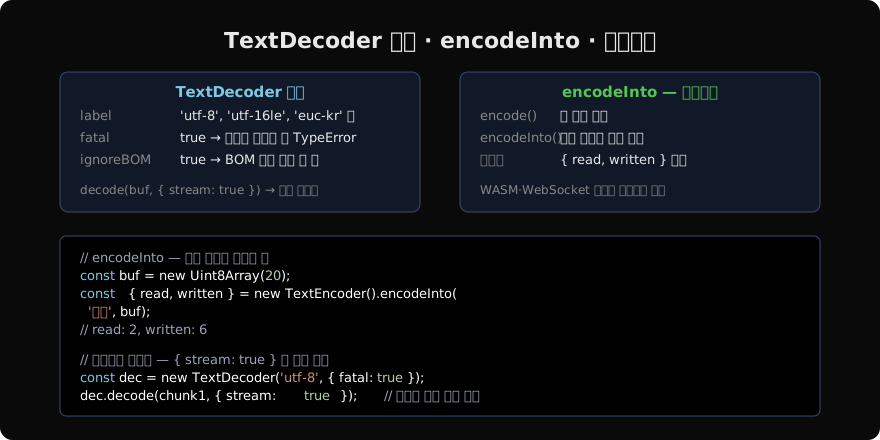
옵션
// fatal: true → 잘못된 바이트 시 TypeError 발생
const strictDec = new TextDecoder('utf-8', { fatal: true });
try {
  strictDec.decode(new Uint8Array([0xFF, 0xFE])); // TypeError!
} catch (e) {
  console.error('잘못된 UTF-8');
}

// fatal: false (기본) → 잘못된 바이트를 U+FFFD (?) 로 대체
const lenientDec = new TextDecoder();
lenientDec.decode(new Uint8Array([0xFF])); // '?'

// ignoreBOM: true → UTF-8/16 BOM 문자를 결과에 포함
const bomDec = new TextDecoder('utf-8', { ignoreBOM: true });
스트리밍 디코딩
네트워크에서 청크 단위로 데이터를 받을 때, 한 청크의 끝에서 멀티바이트 문자가 잘릴 수 있습니다. { stream: true } 옵션으로 상태를 유지합니다.
const dec = new TextDecoder('utf-8');

// chunk1 끝에서 '녕'의 첫 번째 바이트만 받은 상황
const chunk1 = new Uint8Array([236, 149, 136, 235]); // '안' + '녕' 첫 바이트
const chunk2 = new Uint8Array([133, 149]);             // '녕' 나머지

dec.decode(chunk1, { stream: true }); // '안' (235는 유보)
dec.decode(chunk2);                   // '녕' (유보된 235와 합쳐 복원)
stream: true 없이 청크를 디코딩하면 잘린 바이트가 ?로 대체되어 데이터 손실이 발생합니다.
Streams API와 통합
async function streamDecode(response) {
  const dec = new TextDecoder();
  const reader = response.body.getReader();
  let result = '';

  while (true) {
    const { done, value } = await reader.read();
    if (done) break;
    result += dec.decode(value, { stream: true });
  }
  result += dec.decode(); // 버퍼 플러시
  return result;
}
실무 패턴
WebSocket 이진 메시지 처리
const ws = new WebSocket('wss://example.com');
ws.binaryType = 'arraybuffer';

const enc = new TextEncoder();
const dec = new TextDecoder();

// 전송
ws.send(enc.encode(JSON.stringify({ type: 'ping' })));

// 수신
ws.onmessage = (e) => {
  const text = dec.decode(e.data);
  const msg = JSON.parse(text);
};
파일 해시 전처리
async function hashString(text) {
  const enc = new TextEncoder();
  const bytes = enc.encode(text);
  const hashBuf = await crypto.subtle.digest('SHA-256', bytes);
  return Array.from(new Uint8Array(hashBuf))
    .map(b => b.toString(16).padStart(2, '0'))
    .join('');
}
hashString('안녕').then(console.log);crypto.subtle.digest는 BufferSource(ArrayBuffer, TypedArray)를 입력받으므로 TextEncoder로 변환이 필수입니다.
WASM 메모리에 문자열 쓰기
function writeStringToWasm(wasm, ptr, text) {
  const enc = new TextEncoder();
  const bytes = enc.encode(text + '\0'); // null 종단
  const mem = new Uint8Array(wasm.memory.buffer);
  mem.set(bytes, ptr);
}
Base64 변환 (TextEncoder 기반)
function toBase64(text) {
  const bytes = new TextEncoder().encode(text);
  let binary = '';
  bytes.forEach(b => (binary += String.fromCharCode(b)));
  return btoa(binary);
}

function fromBase64(b64) {
  const binary = atob(b64);
  const bytes = Uint8Array.from(binary, c => c.charCodeAt(0));
  return new TextDecoder().decode(bytes);
}

toBase64('안녕');   // '7JWM65WZ'
fromBase64('7JWM65WZ'); // '안녕'
지원 인코딩
TextDecoder가 지원하는 주요 인코딩:
| 레이블 | 설명 |
|---|---|
utf-8 | 기본값, 웹 표준 |
utf-16le | Windows/NTFS 환경 |
utf-16be | 빅엔디안 UTF-16 |
euc-kr | 레거시 한국어 |
iso-8859-1 | 레거시 서유럽 |
windows-1252 | 레거시 Windows |
TextEncoder는 항상 UTF-8만 지원합니다. 다른 인코딩으로 출력이 필요하면 서드파티 라이브러리(iconv-lite 등)를 사용해야 합니다.
지난 글: URL · URLSearchParams — 브라우저 URL 파싱 API
다음 글: Blob · File · FileReader — 파일과 이진 데이터 다루기
읽어주셔서 감사합니다. 😊
PALDYN / ARTICLE AI
글의 개념, 수식, 코드에 대해 물어보세요.
질문과 관련된 문단을 골라 답변의 문맥으로 사용합니다.생각 중 · 0초