

Deployment progressDeadlineSeconds와 배포 타임아웃
Kubernetes Deployment의 progressDeadlineSeconds 필드가 배포 타임아웃을 어떻게 결정하는지, ProgressDeadlineExceeded 오류를 감지하고 대응하는 방법을 설명합니다.
지난 글에서 maxSurge와 maxUnavailable로 롤링 업데이트의 속도와 안전성을 제어하는 방법을 다뤘습니다. 이번에는 배포가 일정 시간 안에 완료되지 않을 때 이를 감지하는 progressDeadlineSeconds 필드와, 이와 연동되는 minReadySeconds를 설명합니다.
progressDeadlineSeconds란
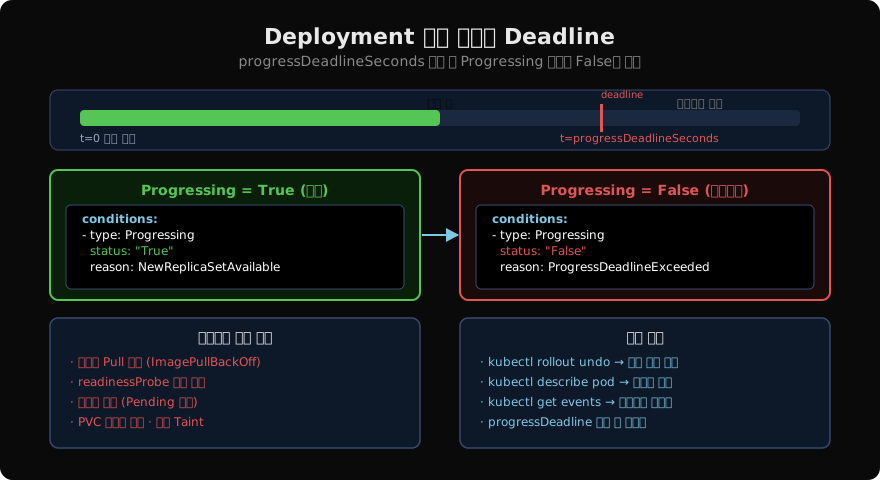
progressDeadlineSeconds는 Deployment가 새 ReplicaSet을 활성화하는 데 허용되는 최대 시간입니다. 이 시간 안에 배포가 완료되지 않으면 Deployment의 .status.conditions에 Progressing: False 조건이 기록되고, reason: ProgressDeadlineExceeded가 설정됩니다.
기본값은 600초(10분)입니다.
spec:
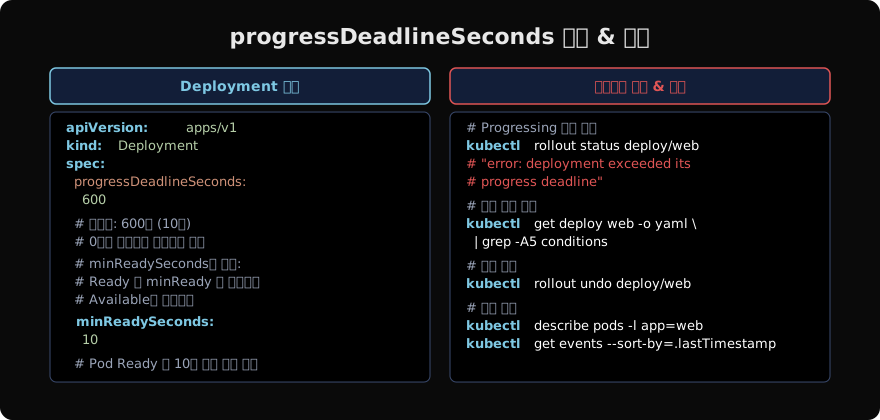
  progressDeadlineSeconds: 600  # 기본값
  minReadySeconds: 0             # 기본값: 즉시 Available로 간주
Deployment 조건(Conditions)
Deployment는 세 가지 조건 타입을 가집니다.
| 조건 타입 | 의미 |
|---|---|
Available | 요청한 수의 Pod가 minReadySeconds 이상 Ready 상태 |
Progressing | 업데이트가 진행 중이거나 완료됨 |
ReplicaFailure | ReplicaSet 생성/삭제 실패 |
정상 배포가 완료되면 Progressing: True, reason: NewReplicaSetAvailable입니다. 타임아웃이 발생하면 Progressing: False, reason: ProgressDeadlineExceeded로 바뀝니다.
minReadySeconds와의 관계
minReadySeconds는 Pod가 Ready 상태가 된 후 몇 초 동안 안정적으로 유지돼야 Available로 카운트되는지를 정의합니다. 기본값은 0(즉시 Available)입니다.
spec:
  progressDeadlineSeconds: 300
  minReadySeconds: 30  # Ready 후 30초 안정 유지 시 Available로 카운트
minReadySeconds: 30으로 설정하면 각 Pod가 Ready 후 30초를 더 대기해야 하므로, 전체 배포 시간이 길어집니다. progressDeadlineSeconds는 이 대기 시간을 포함한 전체를 커버해야 합니다.
계산 예: replicas: 10, maxSurge: 1, maxUnavailable: 0, minReadySeconds: 30이면 최소 배포 시간은 10×(Pod 시작 시간 + 30초)입니다. 이 값보다 progressDeadlineSeconds를 크게 설정해야 합니다.
타임아웃 감지 방법
# kubectl rollout status로 즉시 확인 (타임아웃 시 오류 반환)
kubectl rollout status deployment/web
# error: deployment "web" exceeded its progress deadline

# 조건 상세 확인
kubectl get deployment web -o yaml | grep -A10 conditions

# 결과:
# - lastTransitionTime: "2026-06-02T10:30:00Z"
#   lastUpdateTime: "2026-06-02T10:30:00Z"
#   message: ReplicaSet "web-7d9f8c" has timed out progressing.
#   reason: ProgressDeadlineExceeded
#   status: "False"
#   type: Progressing
CI/CD 파이프라인에서 kubectl rollout status는 타임아웃 시 exit code 1을 반환하므로 배포 실패를 자동으로 감지할 수 있습니다.
타임아웃 주요 원인과 대응
# 1. 원인 파악: Pod 상태 확인
kubectl describe pods -l app=web
kubectl get events --sort-by=.lastTimestamp | tail -20

# 2. 주요 원인별 확인 포인트
# ImagePullBackOff: 이미지 태그/레지스트리 인증 확인
kubectl get pod web-xxx -o yaml | grep -A5 containerStatuses

# readinessProbe 실패: 프로브 설정과 애플리케이션 health endpoint 확인
kubectl describe pod web-xxx | grep -A10 "Readiness"

# Pending 지속: 리소스 부족 또는 Taint 확인
kubectl describe pod web-xxx | grep -A10 Events

# 3. 즉시 롤백
kubectl rollout undo deployment/web
progressDeadlineSeconds 설정 가이드
# 짧은 배포 (소규모, 빠른 시작 앱)
spec:
  progressDeadlineSeconds: 120

# 일반적인 웹 서비스
spec:
  progressDeadlineSeconds: 600   # 기본값

# 대규모 또는 시작이 느린 앱
spec:
  progressDeadlineSeconds: 1800  # 30분

# 타임아웃 없음 (권장하지 않음: 영구적으로 stuck 가능)
spec:
  progressDeadlineSeconds: 0
운영 환경에서는 실제 배포 소요 시간을 측정한 뒤 여유분(30~50%)을 더한 값으로 설정합니다. 너무 짧게 설정하면 정상적인 배포도 타임아웃으로 실패하고, 너무 길게 설정하면 실제 문제를 늦게 감지합니다.
배포 완료 후 조건 초기화
롤백이나 재배포 후에도 이전의 ProgressDeadlineExceeded 조건이 남아 있을 수 있습니다. kubectl rollout status로 현재 상태를 재확인하세요.
# 롤백 완료 후 상태 확인
kubectl rollout undo deployment/web
kubectl rollout status deployment/web
# deployment "web" successfully rolled out

# 조건이 다시 True로 변경됨
kubectl get deployment web -o jsonpath='{.status.conditions[?(@.type=="Progressing")].status}'
# True
지난 글: maxSurge와 maxUnavailable 심층 분석
다음 글: 쿠버네티스 Deployment 배포 전략 완전 정복
읽어주셔서 감사합니다. 😊
PALDYN / ARTICLE AI
글의 개념, 수식, 코드에 대해 물어보세요.
질문과 관련된 문단을 골라 답변의 문맥으로 사용합니다.생각 중 · 0초