

쿠버네티스 Deployment 배포 전략 완전 정복
Rolling Update, Recreate, Blue-Green, Canary 네 가지 배포 전략의 동작 방식, 장단점, 구현 방법을 비교하고 상황별 최적 전략 선택 기준을 제시합니다.
지난 글에서 progressDeadlineSeconds와 배포 타임아웃을 다뤘습니다. 이번에는 Kubernetes에서 사용 가능한 주요 배포 전략 네 가지를 비교합니다. 각 전략의 트레이드오프를 이해하면 서비스 특성에 맞는 배포 방식을 선택할 수 있습니다.
네 가지 배포 전략 개요
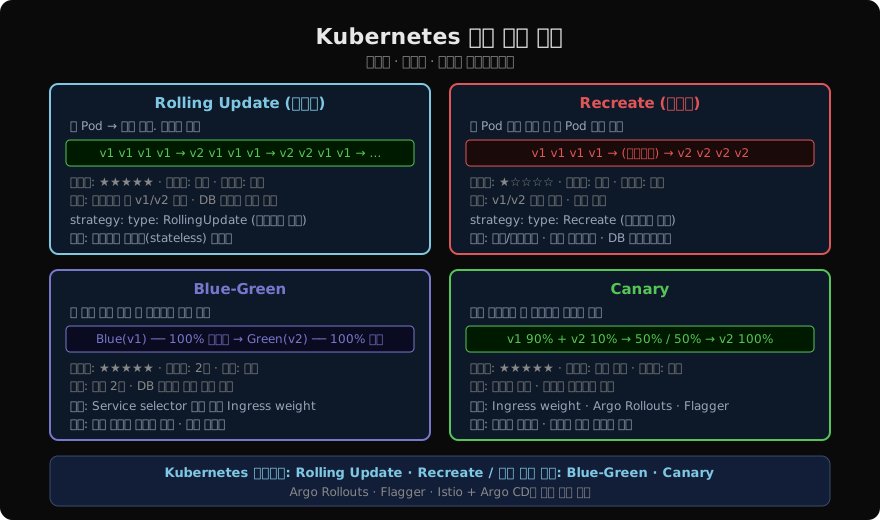
Kubernetes 네이티브로 지원하는 전략은 RollingUpdate와 Recreate 두 가지입니다. Blue-Green과 Canary는 Service selector 조작, Ingress weight, 또는 Argo Rollouts 같은 도구로 구현합니다.
1. Rolling Update (기본값)
기존 Pod를 순차적으로 교체합니다. maxSurge와 maxUnavailable로 속도와 가용성을 조절합니다.
spec:
  strategy:
    type: RollingUpdate
    rollingUpdate:
      maxSurge: 1
maxUnavailable: 0주의: 업데이트 중 v1과 v2가 동시에 트래픽을 받습니다. DB 스키마 변경이 있는 경우 하위 호환성(backward compatibility)이 보장되어야 합니다. API 변경이 breaking change라면 v1 → 스키마 마이그레이션 → v2 순서로 단계별 배포가 필요합니다.
2. Recreate
모든 기존 Pod를 종료한 후 새 Pod를 일괄 생성합니다.
spec:
  strategy:
    type: Recreate
다운타임이 발생하지만 v1/v2 혼재가 없고 구현이 단순합니다. 개발 환경이나 DB 마이그레이션을 포함한 대규모 변경에 적합합니다.
실제 사용 예: Singleton 컴포넌트(파일 락 사용, 중복 실행 불가), 상태 파일을 공유하는 서비스.
3. Blue-Green 배포
두 개의 동일한 환경(Blue=현재, Green=신버전)을 동시에 운영하고, Service selector만 바꿔 트래픽을 즉시 전환합니다.
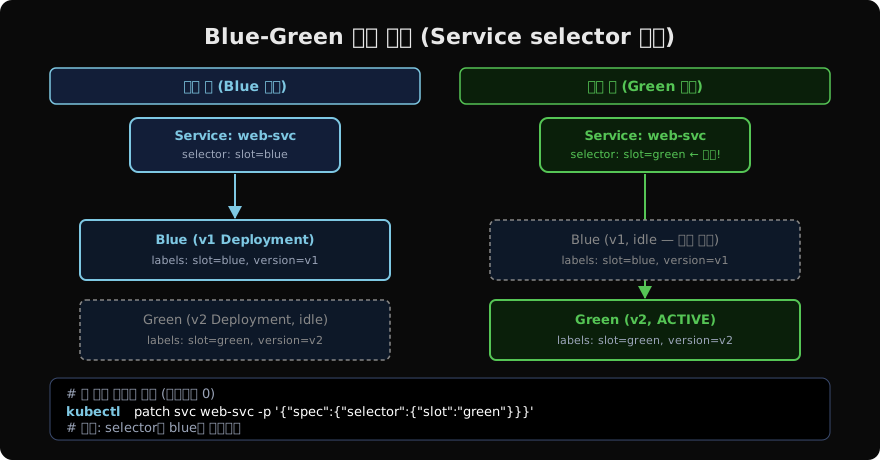
# Blue Deployment (v1, 현재 활성)
kubectl apply -f web-blue.yaml   # labels: slot=blue, version=v1

# Green Deployment (v2, 사전 준비)
kubectl apply -f web-green.yaml  # labels: slot=green, version=v2

# Green 완전히 Ready 확인 후 한 줄로 전환
kubectl patch svc web-svc \
  -p '{"spec":{"selector":{"slot":"green"}}}'

# 문제 발생 시 즉각 롤백 (Blue 여전히 살아 있음)
kubectl patch svc web-svc \
  -p '{"spec":{"selector":{"slot":"blue"}}}'
Blue와 Green에 대한 별도 Deployment YAML 예시입니다.
# web-blue.yaml
apiVersion: apps/v1
kind: Deployment
metadata:
  name: web-blue
spec:
  replicas: 3
  selector:
    matchLabels:
      app: web
      slot: blue
  template:
    metadata:
      labels:
        app: web
        slot: blue
        version: v1
    spec:
      containers:
      - name: web
        image: nginx:1.25
---
# web-green.yaml
apiVersion: apps/v1
kind: Deployment
metadata:
  name: web-green
spec:
  replicas: 3
  selector:
    matchLabels:
      app: web
      slot: green
  template:
    metadata:
      labels:
        app: web
        slot: green
        version: v2
    spec:
      containers:
      - name: web
        image: nginx:1.26
리소스가 2배 필요하지만 롤백이 즉각적(Service selector 재전환)이라는 것이 최대 장점입니다.
4. Canary 배포
전체 트래픽의 일부만 새 버전으로 보내 문제를 조기에 감지합니다. Kubernetes 네이티브로는 replicas 비율 조정으로 구현하고, 고급 트래픽 제어는 Ingress나 서비스 메시를 사용합니다.
# 단순 구현: 10% Canary (replicas 비율 활용)
# v1: 9 replicas, v2: 1 replica → 10%가 v2로 라우팅
kubectl scale deployment web-v1 --replicas=9
kubectl scale deployment web-v2 --replicas=1

# 메트릭 정상 확인 후 50%로 증가
kubectl scale deployment web-v1 --replicas=5
kubectl scale deployment web-v2 --replicas=5

# 완전 전환
kubectl scale deployment web-v1 --replicas=0
kubectl scale deployment web-v2 --replicas=10
정밀한 트래픽 비율 제어는 NGINX Ingress의 canary annotation 또는 Argo Rollouts를 사용합니다.
# NGINX Ingress canary annotation
apiVersion: networking.k8s.io/v1
kind: Ingress
metadata:
  name: web-canary
  annotations:
    nginx.ingress.kubernetes.io/canary: "true"
    nginx.ingress.kubernetes.io/canary-weight: "10"  # 10% 트래픽
spec:
  rules:
  - host: app.example.com
    http:
      paths:
      - path: /
        pathType: Prefix
        backend:
          service:
            name: web-v2-svc
            port:
              number: 80
전략 선택 가이드
| 상황 | 권장 전략 |
|---|---|
| 대부분의 stateless 웹 서비스 | Rolling Update |
| DB 스키마 등 breaking change 포함 | Recreate |
| 즉각 롤백이 필수인 금융/결제 | Blue-Green |
| 대규모 사용자 대상 점진적 출시 | Canary |
| 개발/스테이징 환경 | Recreate |
| SLA 99.99% 이상 요구 | Blue-Green + 자동 모니터링 |
Argo Rollouts 소개
Argo Rollouts는 Kubernetes Deployment를 대체하는 커스텀 리소스로, Blue-Green과 Canary 배포를 선언적으로 정의하고 메트릭 기반 자동 프로모션/롤백을 제공합니다.
apiVersion: argoproj.io/v1alpha1
kind: Rollout
spec:
  strategy:
    canary:
      steps:
      - setWeight: 10
      - pause: {duration: 5m}
      - setWeight: 50
      - pause: {duration: 10m}
      - setWeight: 100
      analysis:
        templates:
        - templateName: success-rate  # Prometheus 메트릭 기반 검증
자동으로 에러율이 임계값을 초과하면 롤백합니다. 다음 글에서 Argo Rollouts와 Progressive Delivery를 더 자세히 다룰 예정입니다.
지난 글: Deployment progressDeadlineSeconds와 배포 타임아웃
읽어주셔서 감사합니다. 😊
PALDYN / ARTICLE AI
글의 개념, 수식, 코드에 대해 물어보세요.
질문과 관련된 문단을 골라 답변의 문맥으로 사용합니다.생각 중 · 0초