

지식
Linux
CVE 모니터링 — 취약점 추적과 패치 전략
CVE·CVSS 이해, Ubuntu USN·RHSA 구독, unattended-upgrades·dnf-automatic 자동 패치, Trivy·OpenVAS 스캔, 커널 라이브 패치(kpatch·livepatch) 전략을 설명합니다.
지난 글에서 최소 권한 원칙을 시스템에 적용하는 방법을 살펴봤습니다. 이번에는 CVE 모니터링 — 공개된 취약점을 추적하고 신속하게 패치를 적용하는 전략을 다룹니다. 아무리 강화된 시스템도 알려진 취약점을 방치하면 공격 표면이 됩니다.
CVE와 CVSS 이해
CVE(Common Vulnerabilities and Exposures)는 공개된 보안 취약점의 표준 식별자입니다. CVE-2024-3094처럼 연도와 일련번호로 구성됩니다.
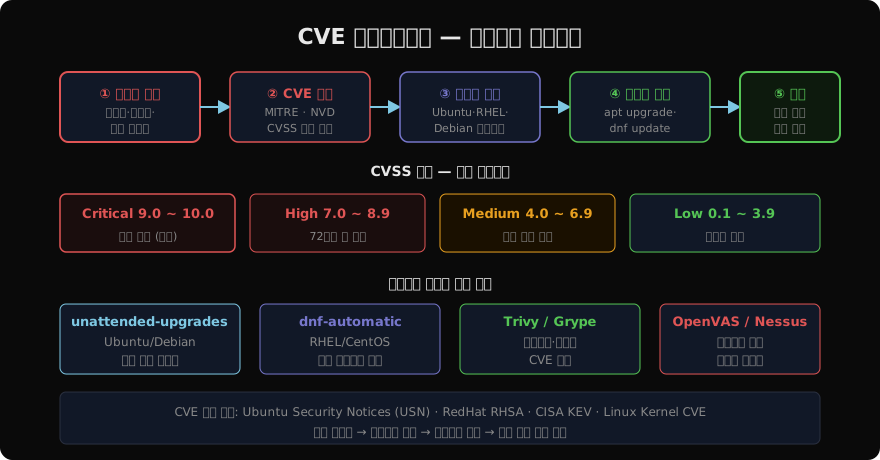
CVSS(Common Vulnerability Scoring System)는 취약점의 심각도를 0~10점으로 측정합니다. 패치 우선순위를 결정하는 데 사용합니다.
CVE 알림 구독
Ubuntu Security Notices (USN)
# Ubuntu Pro (무료 개인 사용)로 ESM 보안 업데이트 포함
sudo pro enable esm-infra
sudo pro enable esm-apps

# USN 이메일 구독: https://ubuntu.com/security/notices/rss.xml
# 또는 RSS 피드 활용
RHEL/CentOS 보안 공지
# 사용 가능한 보안 권고 목록
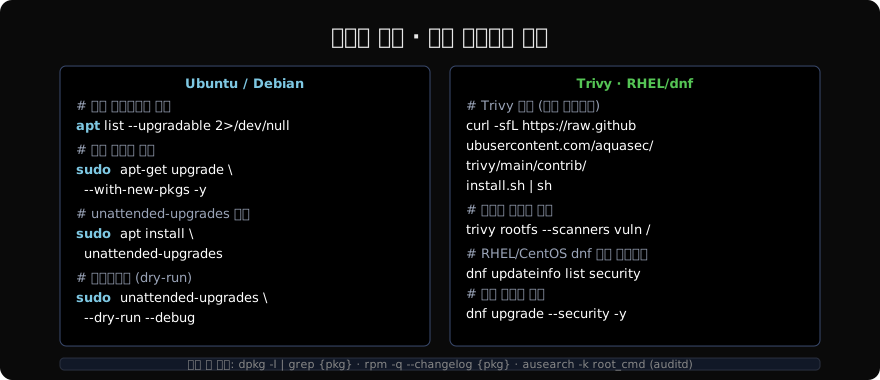
dnf updateinfo list security

# 특정 CVE 정보 확인
dnf updateinfo info --cve CVE-2024-3094

# 심각도별 확인
dnf updateinfo list --severity Critical
CVE 데이터베이스 직접 조회
# debian-security-check (Debian 계열)
sudo apt install devscripts
debsecan

# 커널 CVE 확인 (현재 커널 버전 기준)
uname -r
# https://www.linuxkernelcves.com/ 에서 버전별 CVE 조회
자동 보안 업데이트
Ubuntu — unattended-upgrades
sudo apt install unattended-upgrades apt-listchanges

# 기본 설정 활성화
sudo dpkg-reconfigure -plow unattended-upgrades

# /etc/apt/apt.conf.d/50unattended-upgrades 편집
Unattended-Upgrade::Allowed-Origins {
"${distro_id}:${distro_codename}-security";
"${distro_id}ESMApps:${distro_codename}-apps-security";
};
Unattended-Upgrade::AutoFixInterruptedDpkg "true";
Unattended-Upgrade::Remove-Unused-Kernel-Packages "true";
Unattended-Upgrade::Automatic-Reboot "false"; # 재부팅은 수동
Unattended-Upgrade::Mail "admin@example.com";# 즉시 테스트
sudo unattended-upgrades --dry-run --debug
# 로그 확인
sudo cat /var/log/unattended-upgrades/unattended-upgrades.logRHEL/CentOS — dnf-automatic
sudo dnf install dnf-automatic

# /etc/dnf/automatic.conf 편집
[commands]
upgrade_type = security # security만 (default: default)
apply_updates = yes # 자동 적용
random_sleep = 360 # 분산 적용
[emitters]
emit_via = email
email_to = admin@example.comsudo systemctl enable --now dnf-automatic-install.timer시스템 취약점 스캔
Trivy — 패키지·컨테이너 스캔
# 설치 (apt)
sudo apt install wget
wget -qO - https://aquasecurity.github.io/trivy-repo/deb/public.key | \
    sudo apt-key add -
echo "deb https://aquasecurity.github.io/trivy-repo/deb $(lsb_release -sc) main" | \
    sudo tee /etc/apt/sources.list.d/trivy.list
sudo apt update && sudo apt install trivy

# 시스템 전체 스캔
trivy rootfs --scanners vuln /

# 컨테이너 이미지 스캔
trivy image ubuntu:24.04

# JSON 출력 (CI/CD 연동용)
trivy rootfs --format json --output report.json /
Grype — 빠른 패키지 스캔
# 설치
curl -sSfL https://raw.githubusercontent.com/anchore/grype/main/install.sh | sh -s -- -b /usr/local/bin

# 스캔
grype /
grype ubuntu:24.04
OpenVAS / Greenbone
# Docker로 OpenVAS 실행
docker run -d -p 443:443 --name openvas greenbone/community-edition

# 웹 UI: https://localhost (admin/admin 초기 비밀번호 변경)
커널 라이브 패치 (재부팅 없이 패치)
커널 취약점은 보통 재부팅이 필요합니다. 라이브 패치 솔루션을 사용하면 재부팅 없이 커널 핫픽스를 적용합니다.
Ubuntu Livepatch
# Ubuntu Pro 계정 필요 (무료 5대까지)
sudo pro enable livepatch

# 상태 확인
sudo pro status
sudo canonical-livepatch status --verbose
RHEL — kpatch
# RHEL에서 kpatch
sudo dnf install kpatch-patch

# 적용 가능한 패치 확인
kpatch list

# 패치 적용
kpatch load /path/to/kpatch-module.ko

# 재부팅 후에도 유지
sudo systemctl enable kpatch
패치 검증 워크플로우
# 1. 취약점 확인
apt-cache show <패키지명> | grep CVE
# 또는
rpm -q --changelog <패키지명> | grep CVE

# 2. 변경사항 확인
apt-get --just-print upgrade

# 3. 스테이징 환경 먼저 적용
# 4. 프로덕션 적용
sudo apt upgrade -y

# 5. 패치 후 버전 검증
dpkg -l | grep <패키지명>
apt-cache policy <패키지명>

# 6. auditd 로그로 변경 확인
sudo ausearch -k root_cmd -ts today | grep apt
패치 관리 자동화 원칙
| 우선순위 | CVSS 범위 | 목표 패치 시간 | 방법 |
|---|---|---|---|
| Critical | 9.0 ~ 10.0 | 24시간 이내 | 즉시 수동 패치 |
| High | 7.0 ~ 8.9 | 72시간 이내 | 우선 처리 |
| Medium | 4.0 ~ 6.9 | 월별 | 자동 업데이트 |
| Low | 0.1 ~ 3.9 | 분기별 | 일반 업그레이드 |
모든 패치는 스테이징 → 카나리 → 프로덕션 순서로 배포하고, 패치 전후 애플리케이션 동작을 검증합니다.
지난 글: 권한 강화 — 최소 권한 원칙으로 공격 표면 줄이기
다음 글: 마운트 유형 완전 정리
읽어주셔서 감사합니다. 😊
PALDYN / ARTICLE AI
글의 개념, 수식, 코드에 대해 물어보세요.
질문과 관련된 문단을 골라 답변의 문맥으로 사용합니다.생각 중 · 0초