

LLM 평가 파이프라인: 자동화된 품질 보장
LLM 출력을 자동으로 측정하는 평가 파이프라인을 구축합니다. Exact Match부터 LLM-as-Judge, RAGAS까지 다양한 메트릭을 CI/CD에 통합하는 실전 방법을 다룹니다.
지난 글에서 프롬프트를 버전 관리하고 A/B 테스트하는 방법을 다뤘다. A/B 테스트의 핵심은 “어떻게 측정하는가”다. LLM 출력을 자동으로 평가하는 평가 파이프라인(Eval Pipeline) 은 LLMOps의 핵심 인프라다.
전통 ML에서는 정확도·F1·RMSE처럼 답이 명확한 수치로 모델을 평가한다. LLM의 어려움은 출력이 자연어라는 데 있다. “이 요약이 좋은가?”는 단순한 정답/오답이 없다. 그렇다고 사람이 매번 평가할 수는 없다. 평가 파이프라인은 이 갭을 자동화로 메운다.
평가 파이프라인 구조
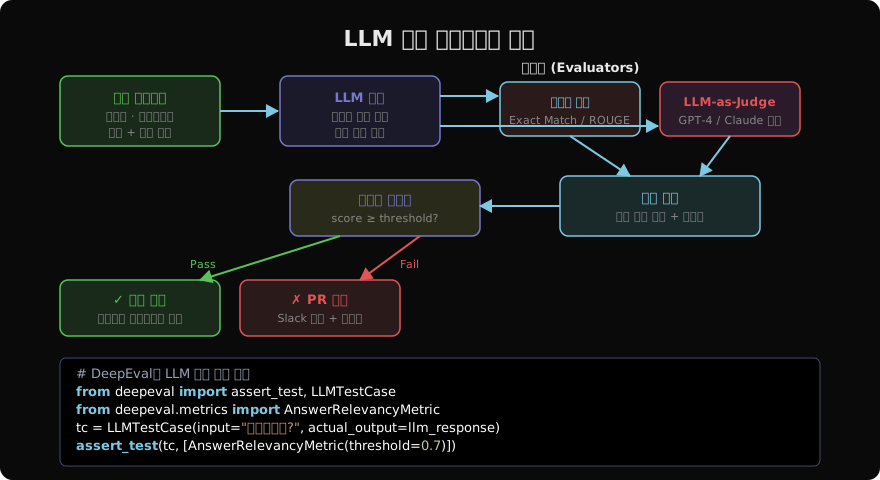
평가 파이프라인은 세 요소로 구성된다.
평가 데이터셋(골든셋): 입력과 기대 출력이 쌍으로 정의된 테스트 케이스 모음이다. 처음에는 20~50개로 시작하고, 프로덕션 로그에서 실패 케이스를 꾸준히 추가해 키운다.
평가자(Evaluator): 실제 출력과 기대치를 비교하는 모듈이다. 메트릭마다 다른 평가자를 사용한다.
임계값 게이트: 종합 점수가 기준선을 통과해야 PR merge나 프롬프트 승격을 허용한다.
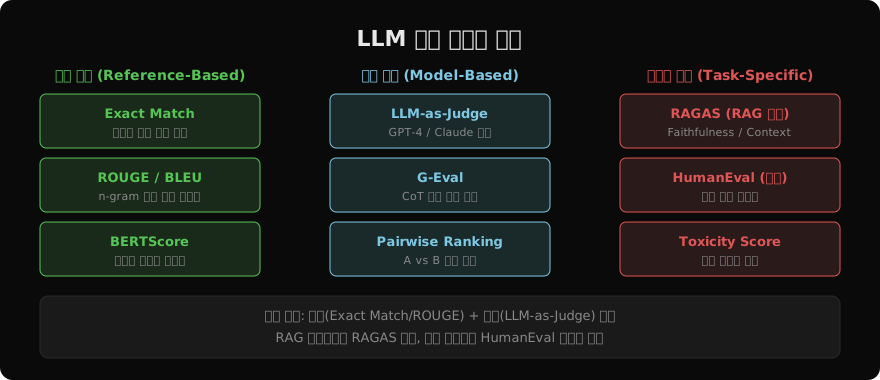
LLM 평가 메트릭 분류
메트릭별 구현
1. Exact Match / 키워드 포함
가장 단순하지만 특정 도메인에서 매우 유용하다.
def exact_match(prediction: str, reference: str) -> float:
    return 1.0 if prediction.strip() == reference.strip() else 0.0

def keyword_coverage(prediction: str, keywords: list[str]) -> float:
    pred_lower = prediction.lower()
    hits = sum(1 for kw in keywords if kw.lower() in pred_lower)
    return hits / len(keywords)

# 예: 법률 문서 요약에서 필수 용어 포함 여부
score = keyword_coverage(
    prediction=llm_output,
    keywords=["손해배상", "계약 해지", "소멸시효"],
)
2. LLM-as-Judge
사람 평가를 LLM으로 대체하는 방식이다. 채점 기준을 프롬프트로 정의하면 일관된 평가가 가능하다.
import anthropic
import json

judge = anthropic.Anthropic()

def llm_judge(
    question: str,
    response: str,
    rubric: str,
    max_score: int = 5,
) -> dict:
    prompt = f"""
당신은 LLM 응답 품질 평가 전문가입니다.

[평가 기준]
{rubric}

[질문]
{question}

[응답]
{response}

위 기준으로 {max_score}점 만점으로 평가하고 JSON으로 응답하세요:
{{"score": <점수>, "reason": "<이유>", "improvements": ["<개선점1>"]}}
"""
    result = judge.messages.create(
        model="claude-sonnet-4-6",
        max_tokens=512,
        messages=[{"role": "user", "content": prompt}],
    )
    return json.loads(result.content[0].text)

# 사용 예
score = llm_judge(
    question="파이썬 데코레이터를 설명해주세요",
    response=llm_response,
    rubric="1) 정확성 2) 예제 포함 3) 이해하기 쉬운 설명",
)
print(f"점수: {score['score']}/5, 이유: {score['reason']}")
3. RAGAS (RAG 시스템 전용)
from ragas import evaluate
from ragas.metrics import (
    faithfulness,        # 답변이 컨텍스트에 근거하는가
    answer_relevancy,    # 답변이 질문과 관련 있는가
    context_precision,   # 검색된 컨텍스트의 정밀도
    context_recall,      # 필요한 정보가 컨텍스트에 있는가
)
from datasets import Dataset

data = {
    "question": ["파이썬이란?", "LLM이란?"],
    "answer": [rag_answers[0], rag_answers[1]],
    "contexts": [retrieved_chunks[0], retrieved_chunks[1]],
    "ground_truth": ["파이썬은 인터프리터 언어...", "LLM은 대규모 언어 모델..."],
}
dataset = Dataset.from_dict(data)

result = evaluate(
    dataset=dataset,
    metrics=[faithfulness, answer_relevancy, context_precision, context_recall],
)
print(result)
# {'faithfulness': 0.92, 'answer_relevancy': 0.87, ...}
4. DeepEval 통합 테스트
import pytest
from deepeval import assert_test
from deepeval.metrics import (
    AnswerRelevancyMetric,
    FaithfulnessMetric,
    HallucinationMetric,
)
from deepeval.test_case import LLMTestCase

@pytest.fixture
def qa_bot():
    from src.bot import QABot
    return QABot()

@pytest.mark.parametrize("question,context", [
    ("환불 정책이 뭔가요?", "30일 이내 환불 가능합니다."),
    ("배송 기간은?", "3~5 영업일 소요됩니다."),
])
def test_qa_bot_faithfulness(qa_bot, question, context):
    answer = qa_bot.answer(question, context=context)
    test_case = LLMTestCase(
        input=question,
        actual_output=answer,
        retrieval_context=[context],
    )
    assert_test(test_case, [
        AnswerRelevancyMetric(threshold=0.7),
        FaithfulnessMetric(threshold=0.8),
        HallucinationMetric(threshold=0.2),
    ])
골든셋 구축 전략
초기 골든셋은 도메인 전문가가 직접 작성한다. 이후에는 세 가지 소스에서 지속 보강한다.
# 프로덕션 로그에서 평가 케이스 수집
def harvest_hard_cases(production_logs: list[dict], n: int = 20) -> list[dict]:
    """사용자가 재질문하거나 피드백이 부정적인 케이스를 골든셋으로"""
    hard_cases = []
    for log in production_logs:
        if log.get("user_feedback") == "bad" or log.get("followup_count") >= 2:
            hard_cases.append({
                "input": log["question"],
                "expected": log["expert_correction"],  # 전문가가 수정한 답변
                "category": log["category"],
            })
    return hard_cases[:n]
CI/CD 통합
# .github/workflows/eval.yml
name: LLM Eval Pipeline
on:
  pull_request:
    paths: ["prompts/**", "src/llm/**"]

jobs:
  eval:
    runs-on: ubuntu-latest
    steps:
      - uses: actions/checkout@v4
      - name: Install dependencies
        run: pip install deepeval ragas pytest
      - name: Run evaluation suite
        run: |
          pytest tests/eval/ -v \
            --eval-threshold=0.75 \
            --html=eval-report.html
        env:
          ANTHROPIC_API_KEY: ${{ secrets.ANTHROPIC_API_KEY }}
      - name: Upload eval report
        uses: actions/upload-artifact@v4
        with:
          name: eval-report
          path: eval-report.html
      - name: Comment PR with scores
        uses: actions/github-script@v7
        with:
          script: |
            const score = require('./eval-results.json');
            github.rest.issues.createComment({
              issue_number: context.issue.number,
              body: `## 평가 결과\n- 답변 관련성: ${score.relevancy}\n- 충실도: ${score.faithfulness}`
            })
회귀 감지
새 모델이나 프롬프트 변경 후 기존보다 성능이 낮아지는 회귀(Regression) 를 자동 감지한다.
def detect_regression(
    baseline_scores: dict,
    new_scores: dict,
    tolerance: float = 0.03,
) -> list[str]:
    regressions = []
    for metric, baseline in baseline_scores.items():
        new = new_scores.get(metric, 0)
        if new < baseline - tolerance:
            regressions.append(
                f"{metric}: {baseline:.3f} → {new:.3f} (↓{baseline - new:.3f})"
            )
    return regressions

# CI에서 호출
regressions = detect_regression(
    baseline_scores={"faithfulness": 0.91, "relevancy": 0.88},
    new_scores={"faithfulness": 0.86, "relevancy": 0.89},
)
if regressions:
    raise Exception(f"성능 회귀 감지:\n" + "\n".join(regressions))
지난 글: LLM 프롬프트 관리: 버전, 테스트, 배포까지
다음 글: LLMOps 관측성: 프로덕션 LLM 시스템 들여다보기
읽어주셔서 감사합니다. 😊