

LLMOps 관측성: 프로덕션 LLM 시스템 들여다보기
Langfuse와 분산 트레이싱으로 LLM 애플리케이션의 내부를 투명하게 관측하는 방법을 다룹니다. 트레이스 설계, 핵심 메트릭 수집, 대시보드 구성, 이상 알림까지 실전 코드와 함께 정리합니다.
지난 글에서 평가 파이프라인으로 LLM 출력 품질을 자동으로 측정하는 방법을 살펴봤다. 평가가 “배포 전 검증”이라면, 관측성(Observability) 은 “배포 후 감시”다. 프로덕션에서 LLM이 어떻게 동작하는지 실시간으로 파악하는 능력이다.
블랙박스 LLM 시스템은 문제가 생겨도 원인을 찾을 수 없다. 응답이 느려졌을 때 “LLM API 레이턴시가 높아진 건지, 검색 단계가 느려진 건지, 컨텍스트가 너무 길어진 건지” 알 수 없다면 개선이 불가능하다. 관측성은 이 블랙박스를 투명하게 만든다.
관측성 스택 구조
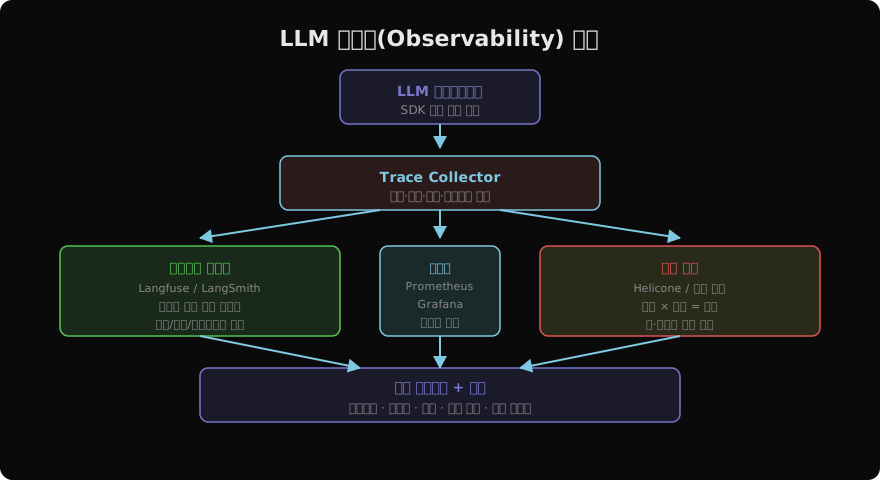
LLM 관측성 스택은 세 레이어를 쌓는다.
트레이스(Trace): 단일 요청의 전체 생애주기를 기록한다. 입력 프롬프트, 검색된 컨텍스트, LLM 호출 결과, 후처리 단계가 하나의 트레이스로 연결된다.
메트릭(Metrics): 레이턴시·에러율·토큰 사용량 같은 수치 지표를 시계열로 수집한다. 대시보드와 알림의 기반이 된다.
비용(Cost): 토큰 사용량에 단가를 곱해 요청별·기능별·팀별 비용을 추적한다.
분산 트레이스 설계
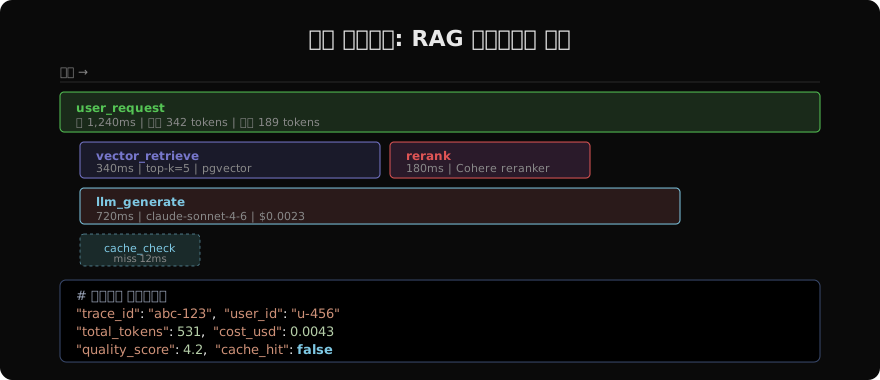
트레이스는 루트 스팬 → 자식 스팬 계층으로 설계한다. RAG 파이프라인이라면 user_request 루트 아래 vector_retrieve, rerank, llm_generate 자식 스팬을 둔다.
from langfuse import Langfuse
from langfuse.decorators import observe, langfuse_context
import anthropic

lf = Langfuse()
claude = anthropic.Anthropic()

@observe()  # 자동으로 스팬 생성
def retrieve_chunks(query: str, top_k: int = 5) -> list[str]:
    langfuse_context.update_current_observation(
        metadata={"top_k": top_k, "backend": "pgvector"},
    )
    return vector_db.search(query, k=top_k)

@observe()
def rerank(query: str, chunks: list[str]) -> list[str]:
    return cohere_reranker.rerank(query, chunks)

@observe()
def generate_answer(question: str, context: str) -> str:
    response = claude.messages.create(
        model="claude-sonnet-4-6",
        max_tokens=1024,
        messages=[{
            "role": "user",
            "content": f"컨텍스트: {context}\n\n질문: {question}"
        }],
    )
    langfuse_context.update_current_observation(
        usage={
            "input": response.usage.input_tokens,
            "output": response.usage.output_tokens,
        },
    )
    return response.content[0].text

@observe(name="rag_pipeline")  # 루트 트레이스
def answer_question(question: str) -> str:
    langfuse_context.update_current_trace(
        tags=["rag", "v2"],
        metadata={"user_id": get_current_user()},
    )
    chunks = retrieve_chunks(question)
    ranked = rerank(question, chunks)
    context = "\n\n".join(ranked[:3])
    return generate_answer(question, context)
핵심 메트릭 수집
from prometheus_client import Counter, Histogram, Gauge
import time

# 메트릭 정의
llm_requests_total = Counter(
    "llm_requests_total",
    "Total LLM API calls",
    ["model", "status", "feature"],
)
llm_latency_seconds = Histogram(
    "llm_latency_seconds",
    "LLM response time",
    ["model", "feature"],
    buckets=[0.5, 1, 2, 5, 10, 30],
)
llm_tokens_total = Counter(
    "llm_tokens_total",
    "Total tokens used",
    ["model", "type"],  # type: input/output
)
llm_cost_usd = Counter(
    "llm_cost_usd_total",
    "Total LLM cost in USD",
    ["model", "feature"],
)

PRICES_PER_M = {
    "claude-sonnet-4-6": {"input": 3.0, "output": 15.0},
    "claude-haiku-4-5": {"input": 0.8, "output": 4.0},
}

def tracked_llm_call(model: str, feature: str, messages: list) -> str:
    start = time.time()
    try:
        response = claude.messages.create(
            model=model, max_tokens=1024, messages=messages
        )
        latency = time.time() - start

        in_tok = response.usage.input_tokens
        out_tok = response.usage.output_tokens
        price = PRICES_PER_M.get(model, {"input": 3.0, "output": 15.0})
        cost = (in_tok * price["input"] + out_tok * price["output"]) / 1_000_000

        llm_requests_total.labels(model=model, status="success", feature=feature).inc()
        llm_latency_seconds.labels(model=model, feature=feature).observe(latency)
        llm_tokens_total.labels(model=model, type="input").inc(in_tok)
        llm_tokens_total.labels(model=model, type="output").inc(out_tok)
        llm_cost_usd.labels(model=model, feature=feature).inc(cost)

        return response.content[0].text
    except Exception as e:
        llm_requests_total.labels(model=model, status="error", feature=feature).inc()
        raise
이상 감지와 알림
# 알림 규칙 예시 (Prometheus AlertManager)
# rules/llm_alerts.yml
ALERT_RULES = """
groups:
  - name: llm_alerts
    rules:
      - alert: HighLLMLatency
        expr: histogram_quantile(0.99, llm_latency_seconds) > 10
        for: 5m
        annotations:
          summary: "LLM P99 레이턴시 10초 초과"

      - alert: HighErrorRate
        expr: rate(llm_requests_total{status="error"}[5m]) / rate(llm_requests_total[5m]) > 0.05
        for: 2m
        annotations:
          summary: "LLM 에러율 5% 초과"

      - alert: CostSpike
        expr: increase(llm_cost_usd_total[1h]) > 50
        annotations:
          summary: "시간당 LLM 비용 $50 초과"
"""
품질 점수 실시간 추적
# 프로덕션 요청의 일부를 샘플링해 품질 평가
import random

def sample_and_evaluate(question: str, answer: str, sample_rate: float = 0.05):
    if random.random() > sample_rate:
        return  # 5%만 평가 (비용 절감)

    score = llm_judge(question=question, answer=answer)

    # Langfuse에 품질 점수 기록
    lf.score(
        trace_id=get_current_trace_id(),
        name="quality",
        value=score["score"] / 5.0,  # 0~1 정규화
        comment=score["reason"],
    )

    # 임계값 이하면 Slack 알림
    if score["score"] < 2:
        send_slack_alert(
            channel="#llm-quality",
            message=f"⚠️ 낮은 품질 응답 감지\n질문: {question[:100]}\n점수: {score['score']}/5",
        )
Langfuse 대시보드 활용
Langfuse 대시보드에서 확인해야 할 핵심 지표들이다.
| 지표 | 설명 | 경고 기준 |
|---|---|---|
| P50/P99 레이턴시 | 응답 시간 분포 | P99 > 5초 |
| 에러율 | API 호출 실패 비율 | > 1% |
| 토큰/요청 | 평균 프롬프트 길이 추세 | 갑작스런 증가 |
| 비용/시간 | 시간별 누적 비용 | 예산 대비 비율 |
| 품질 점수 | LLM-as-Judge 평균 | < 3.5/5 |
| 캐시 히트율 | 시맨틱 캐시 효율 | < 20% (개선 여지) |
로그 구조화
비정형 로그는 분석이 어렵다. LLM 관련 이벤트는 구조화된 JSON으로 기록한다.
import structlog

log = structlog.get_logger()

def log_llm_event(
    event_type: str,
    model: str,
    input_tokens: int,
    output_tokens: int,
    latency_ms: float,
    **kwargs,
):
    log.info(
        event_type,
        model=model,
        input_tokens=input_tokens,
        output_tokens=output_tokens,
        latency_ms=round(latency_ms, 2),
        cost_usd=round((input_tokens * 3 + output_tokens * 15) / 1_000_000, 6),
        **kwargs,
    )

# 출력 예:
# {"event": "llm_call", "model": "claude-sonnet-4-6",
#  "input_tokens": 342, "output_tokens": 189,
#  "latency_ms": 1240.5, "cost_usd": 0.004}
지난 글: LLM 평가 파이프라인: 자동화된 품질 보장
다음 글: LLM 비용 추적: 토큰 낭비 없이 운영하기
읽어주셔서 감사합니다. 😊