

[Nexacro N] 다중 파일 업로드
Nexacro N에서 FileUpload 컴포넌트의 multiple 모드를 활용해 여러 파일을 순차적으로 업로드하는 패턴, 파일 목록 Dataset 관리, 상태별 UI 반영 방법을 설명합니다.
지난 글에서 FileUpload 컴포넌트의 기본 구조와 단일 파일 업로드 패턴을 살펴보았다. 실무에서는 첨부 파일을 여러 개 한 번에 등록하는 요구가 많다. 이 글은 Nexacro N에서 다중 파일을 Dataset에 관리하며 순차적으로 업로드하는 패턴을 다룬다.
multiple 모드 활성화
FileUpload 컴포넌트의 multiple 속성을 "true"로 설정하면 파일 선택 다이얼로그에서 여러 파일을 동시에 선택할 수 있다.
<FileUpload id="fileUpload"
    multiple="true"
    filter="*.pdf;*.xlsx;*.jpg;*.png"
    maxfilesize="10485760"
    onfileadd="fileUpload_onfileadd"
onuploadcompleted="fileUpload_onuploadcompleted"/>maxfilesize는 파일당 최대 크기(byte)다. 10MB는 10 * 1024 * 1024 = 10485760이다.
파일 목록 Dataset 구성
선택된 파일을 Dataset에 저장해 Grid로 표시하고 상태를 관리한다.
// 파일 추가 이벤트
function fileUpload_onfileadd(obj, e) {
    var nCount = obj.getFileCount();
    this.dsFileQueue.clearData();
    for (var i = 0; i < nCount; i++) {
        var nRow = this.dsFileQueue.addRow();
        this.dsFileQueue.setColumn(nRow, "FILE_NM", obj.getFileName(i));
        this.dsFileQueue.setColumn(nRow, "FILE_SIZE", obj.getFileSize(i));
        this.dsFileQueue.setColumn(nRow, "STATUS", "대기");
        this.dsFileQueue.setColumn(nRow, "FILE_IDX", i);
    }
}getFileName(index), getFileSize(index)로 각 파일의 정보를 읽어 Dataset에 행을 추가한다.
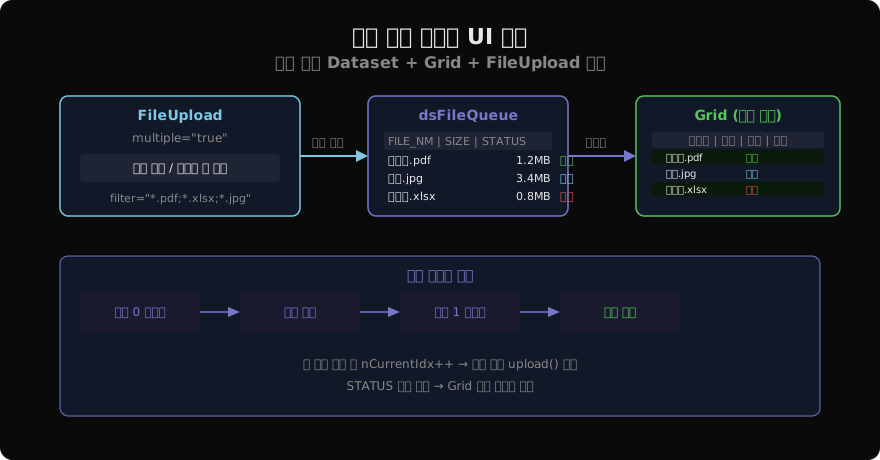
순차 업로드 구현
동시에 여러 파일을 전송하면 서버 부하가 커질 수 있다. 실무에서는 한 파일씩 순차적으로 업로드하는 패턴이 안전하다.
var nCurrentIdx = 0;

function fn_startUpload() {
    if (this.fileUpload.getFileCount() == 0) {
        this.gfn_alert("업로드할 파일이 없습니다.");
        return;
    }
    nCurrentIdx = 0;
    this.fn_uploadNext();
}

function fn_uploadNext() {
    if (nCurrentIdx >= this.fileUpload.getFileCount()) {
        this.gfn_alert("모든 파일 업로드가 완료되었습니다.");
        this.fn_search();
        return;
    }
    // 현재 파일 상태를 "업로드 중"으로 변경
    this.dsFileQueue.setColumn(nCurrentIdx, "STATUS", "업로드 중");
    this.fileUpload.uploadURL = "/upload/file";
    this.fileUpload.uploadFile(nCurrentIdx);
}

function fileUpload_onuploadcompleted(obj, e) {
    if (e.errcode == 0) {
        this.dsFileQueue.setColumn(nCurrentIdx, "STATUS", "완료");
    } else {
        this.dsFileQueue.setColumn(nCurrentIdx, "STATUS", "오류");
    }
    nCurrentIdx++;
    this.fn_uploadNext();
}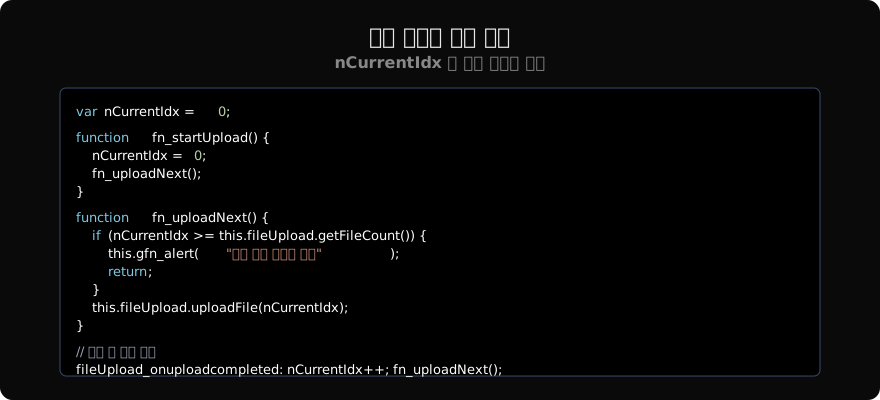
uploadFile(index)는 특정 인덱스의 파일만 전송한다. 완료 콜백에서 nCurrentIdx를 증가시키고 fn_uploadNext()를 재호출하는 재귀 패턴으로 순차 처리를 구현한다.
파일 개별 삭제
Grid에서 특정 파일을 업로드 전에 제거하는 기능도 필요하다.
// Grid 삭제 버튼 onclick
function grdFiles_oncellclick(obj, e) {
    if (e.celltype == "body" && e.col == 3) {  // 삭제 버튼 컬럼
        var nIdx = this.dsFileQueue.getColumn(e.row, "FILE_IDX");
        this.fileUpload.removeFile(nIdx);
        this.dsFileQueue.deleteRow(e.row);
    }
}removeFile(index)로 FileUpload 내부 큐에서도 파일을 제거한다. Dataset만 삭제하면 실제 업로드 큐와 불일치가 발생한다.
파일 크기 표시 형식
Dataset에 저장된 바이트 단위 크기를 사람이 읽기 좋은 형식으로 변환한다.
function fn_formatFileSize(nBytes) {
    if (nBytes < 1024)       return nBytes + " B";
    if (nBytes < 1048576)    return (nBytes / 1024).toFixed(1) + " KB";
    return (nBytes / 1048576).toFixed(1) + " MB";
}
Grid 셀의 displaytype 속성 대신 스크립트로 변환 후 Dataset에 저장하거나, Grid의 oncellrender 이벤트에서 표시 텍스트를 가공할 수 있다.
업로드 실패 재시도
네트워크 문제로 실패한 파일을 재시도하는 패턴이다.
function btn_retry_onclick(obj, e) {
    // STATUS가 "오류"인 행만 재업로드
    for (var i = 0; i < this.dsFileQueue.rowcount; i++) {
        if (this.dsFileQueue.getColumn(i, "STATUS") == "오류") {
            this.dsFileQueue.setColumn(i, "STATUS", "대기");
        }
    }
    nCurrentIdx = 0;
    this.fn_uploadRetry();
}

function fn_uploadRetry() {
    // STATUS가 "대기"인 파일만 업로드
    while (nCurrentIdx < this.dsFileQueue.rowcount) {
        var sStatus = this.dsFileQueue.getColumn(nCurrentIdx, "STATUS");
        if (sStatus == "대기") {
            var nIdx = this.dsFileQueue.getColumn(nCurrentIdx, "FILE_IDX");
            this.fileUpload.uploadFile(nIdx);
            return;
        }
        nCurrentIdx++;
    }
    this.gfn_alert("재시도 완료");
}
정리
다중 파일 업로드는 FileUpload의 multiple 모드 + Dataset 상태 관리 + 순차 uploadFile() 호출의 조합으로 구현한다. Dataset과 Grid를 통해 파일별 업로드 상태를 실시간으로 표시하면 사용자 경험을 크게 향상시킬 수 있다.
지난 글: 파일 업로드·다운로드
다음 글: 파일 업로드 진행률
읽어주셔서 감사합니다. 😊
PALDYN / ARTICLE AI
글의 개념, 수식, 코드에 대해 물어보세요.
질문과 관련된 문단을 골라 답변의 문맥으로 사용합니다.생각 중 · 0초