

Form Actions — 폼과 Server Action 연결
HTML form의 action 속성에 Server Action을 직접 연결하는 방법을 설명합니다. useFormStatus로 pending 상태를 처리하고, next/form 컴포넌트와 기본 form의 차이, 파일 업로드 처리까지 다룹니다.
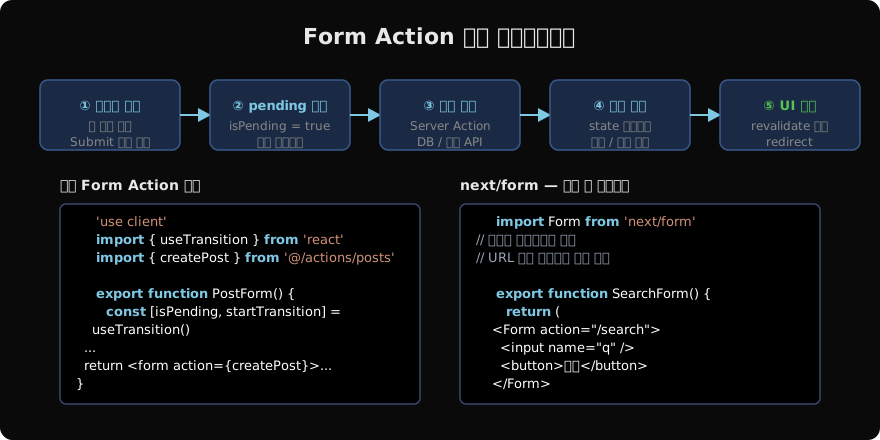
지난 글에서 Server Action의 개념과 선언 방법을 살펴봤습니다. 이번 글에서는 HTML <form>과 Server Action을 연결하는 구체적인 방법, 그리고 폼 제출 중 상태를 처리하는 useFormStatus 훅을 자세히 다룹니다.
form action 속성에 Server Action 연결
HTML <form>의 action 속성에 문자열 URL 대신 Server Action 함수를 직접 넘길 수 있습니다. Next.js는 이를 자동으로 POST 요청으로 처리합니다.
// app/contact/page.tsx
import { sendMessage } from '@/app/actions/contact'

export default function ContactPage() {
  return (
    <form action={sendMessage}>
      <input name="name" placeholder="이름" required />
      <input name="email" type="email" placeholder="이메일" required />
      <textarea name="message" placeholder="메시지" required />
      <button type="submit">보내기</button>
    </form>
  )
}
// app/actions/contact.ts
'use server'
import { redirect } from 'next/navigation'
export async function sendMessage(formData: FormData) {
const name = formData.get('name') as string
const email = formData.get('email') as string
const message = formData.get('message') as string
await sendEmail({ name, email, message })
redirect('/contact/success')
}이 방식은 JavaScript가 비활성화된 환경에서도 정상 동작합니다(점진적 향상, Progressive Enhancement).
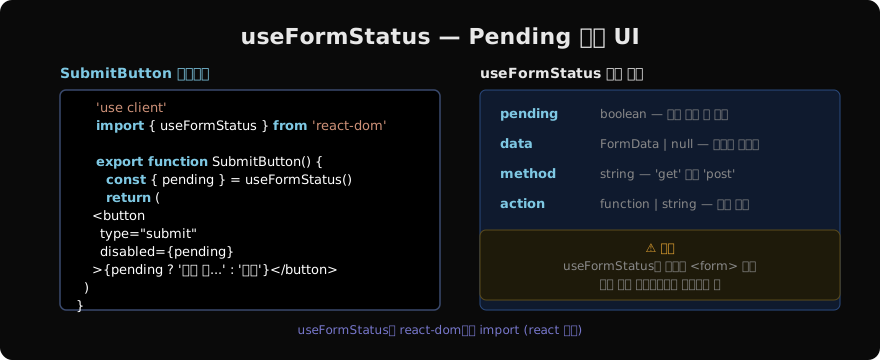
useFormStatus — 폼 제출 중 상태 처리
useFormStatus는 React 19에서 도입된 훅으로, 부모 <form>의 제출 상태를 추적합니다. 반드시 react-dom에서 import해야 하며, <form> 안의 자식 컴포넌트에서만 호출해야 합니다.
// app/components/submit-button.tsx
'use client'

import { useFormStatus } from 'react-dom'

export function SubmitButton({ label }: { label: string }) {
  const { pending } = useFormStatus()

  return (
    <button
      type="submit"
      disabled={pending}
      className={pending ? 'opacity-50 cursor-not-allowed' : ''}
    >
      {pending ? '처리 중...' : label}
    </button>
  )
}
// app/contact/page.tsx
import { SubmitButton } from '@/components/submit-button'
export default function ContactPage() {
return (
<form action={sendMessage}>
<input name="email" type="email" />
<SubmitButton label="보내기" /> {/* form 안에 배치 */}
</form>
)
}
파일 업로드 처리
<input type="file">도 FormData를 통해 Server Action으로 전달할 수 있습니다.
// app/uploads/page.tsx
export default function UploadPage() {
  return (
    <form action={uploadFile} encType="multipart/form-data">
      <input name="file" type="file" accept="image/*" />
      <button type="submit">업로드</button>
    </form>
  )
}
// app/actions/upload.ts
'use server'
import { writeFile } from 'fs/promises'
import path from 'path'
export async function uploadFile(formData: FormData) {
const file = formData.get('file') as File
if (!file) return { error: '파일을 선택하세요' }
const bytes = await file.arrayBuffer()
const buffer = Buffer.from(bytes)
const filename = `${Date.now()}-${file.name}`
await writeFile(path.join(process.cwd(), 'public/uploads', filename), buffer)
return { success: true, filename }
}next/form 컴포넌트
Next.js 15에서 도입된 next/form은 HTML <form>을 확장한 컴포넌트입니다. 검색 폼처럼 URL 쿼리 파라미터를 업데이트해야 할 때 특히 유용합니다.
import Form from 'next/form'

export function SearchForm() {
  return (
    <Form action="/search">
      <input name="q" placeholder="검색어 입력" />
      <button type="submit">검색</button>
    </Form>
  )
}next/form은 다음 기능을 추가로 제공합니다:
- 소프트 네비게이션: 전체 페이지 리로드 없이 URL을 업데이트합니다
- 스크롤 위치 복원: 제출 후 스크롤 위치를 유지합니다
- prefetch: 인접 라우트를 미리 로드합니다
버튼의 formAction으로 다중 액션 처리
하나의 폼에서 버튼마다 다른 Server Action을 실행하려면 formAction 속성을 사용합니다.
export default function PostEditor() {
  return (
    <form>
      <textarea name="content" />
      <button formAction={saveDraft}>임시저장</button>
      <button formAction={publishPost}>발행</button>
    </form>
  )
}
각 버튼의 formAction이 부모 <form>의 action보다 우선 적용됩니다.
지난 글: Server Actions — 서버에서 실행되는 함수
다음 글: useActionState — 액션 상태 관리
읽어주셔서 감사합니다. 😊
PALDYN / ARTICLE AI
글의 개념, 수식, 코드에 대해 물어보세요.
질문과 관련된 문단을 골라 답변의 문맥으로 사용합니다.생각 중 · 0초