

Server Actions — 서버에서 실행되는 함수
Next.js Server Actions의 개념과 선언 방법을 소개합니다. 'use server' 지시어, 인라인 vs 모듈 패턴, FormData 처리, revalidatePath 연동까지 Server Action의 기본을 코드와 함께 설명합니다.
지난 글에서 Edge Runtime과 Node.js Runtime의 차이를 살펴봤습니다. 이번 글부터는 Next.js 앱 개발에서 가장 핵심적인 서버 기능인 Server Actions를 본격적으로 다룹니다. Server Actions를 사용하면 별도의 API 라우트를 만들지 않고도 클라이언트에서 서버 함수를 직접 호출할 수 있습니다.
Server Actions란
Server Actions는 'use server' 지시어가 붙은 비동기 서버 함수입니다. 클라이언트가 호출하면 Next.js가 자동으로 POST 요청으로 변환해 서버에서 실행합니다. DB 뮤테이션, 파일 처리, 이메일 발송 등 서버 사이드 로직을 처리한 뒤 캐시를 재검증하거나 리다이렉트를 수행할 수 있습니다.
기존 방식에서는 API 라우트(/api/posts)를 만들고, 클라이언트에서 fetch('/api/posts', { method: 'POST' })로 호출했습니다. Server Actions를 사용하면 이 과정 전체를 함수 하나로 대체합니다.
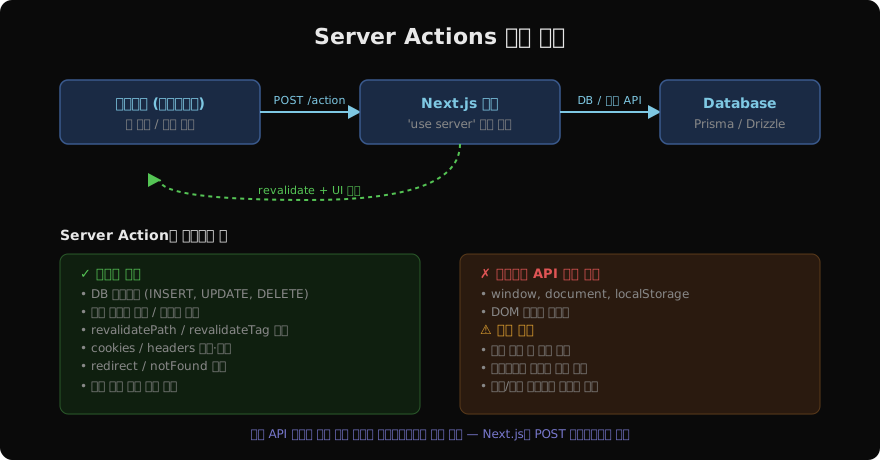
‘use server’ 지시어
Server Action을 만드는 방법은 두 가지입니다.
방법 1 — 함수 내부에 인라인으로 선언 (Server Component 전용)
// app/posts/new/page.tsx
import { revalidatePath } from 'next/cache'
import { db } from '@/lib/db'

export default function NewPostPage() {
  async function createPost(formData: FormData) {
    'use server'
    const title = formData.get('title') as string
    await db.post.create({ data: { title } })
    revalidatePath('/posts')
  }

  return (
    <form action={createPost}>
      <input name="title" placeholder="제목" />
      <button type="submit">작성</button>
    </form>
  )
}
방법 2 — 파일 최상단에 선언 (Client Component에서도 사용 가능)
// app/actions/posts.ts
'use server'

import { revalidatePath } from 'next/cache'
import { db } from '@/lib/db'

export async function createPost(formData: FormData) {
  const title = formData.get('title') as string
  await db.post.create({ data: { title } })
  revalidatePath('/posts')
}

export async function deletePost(id: string) {
  await db.post.delete({ where: { id } })
  revalidatePath('/posts')
}
파일 최상단에 'use server'를 선언하면 해당 파일의 모든 exported 함수가 Server Action이 됩니다.
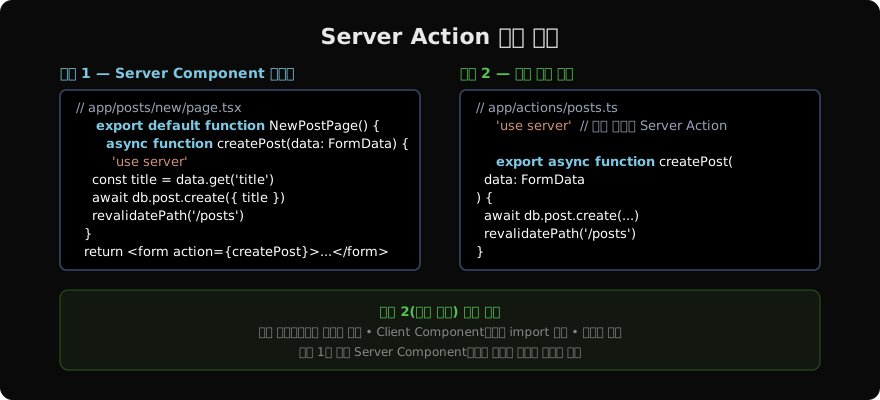
Client Component에서 Server Action 사용
Server Action을 Client Component에서 import해서 사용할 수 있습니다. 이 경우 반드시 별도 모듈(패턴 2)로 만들어야 합니다.
// app/components/post-form.tsx
'use client'

import { createPost } from '@/app/actions/posts'

export function PostForm() {
  return (
    <form action={createPost}>
      <input name="title" placeholder="제목" />
      <button type="submit">작성</button>
    </form>
  )
}
<form action={serverAction}>에 Server Action을 직접 넘기면 HTML <form>의 점진적 향상(Progressive Enhancement)을 지원합니다. JavaScript가 비활성화된 환경에서도 폼이 동작합니다.
FormData 말고 일반 인자 전달하기
bind를 사용하면 FormData 외의 인자를 Server Action에 전달할 수 있습니다.
// app/posts/[id]/page.tsx
import { deletePost } from '@/app/actions/posts'

export default function PostPage({ params }: { params: { id: string } }) {
  const deletePostById = deletePost.bind(null, params.id)

  return (
    <form action={deletePostById}>
      <button type="submit">삭제</button>
    </form>
  )
}
또는 직접 함수를 만들어 인자를 클로저로 캡처할 수도 있습니다.
async function deletePostById() {
  'use server'
  await db.post.delete({ where: { id: params.id } })
  revalidatePath('/posts')
}
revalidatePath와 revalidateTag
Server Action 실행 후 UI를 최신 상태로 만들려면 캐시를 재검증해야 합니다.
'use server'

import { revalidatePath, revalidateTag } from 'next/cache'
import { redirect } from 'next/navigation'

export async function updatePost(id: string, formData: FormData) {
  const title = formData.get('title') as string
  await db.post.update({ where: { id }, data: { title } })

  // 특정 경로의 캐시 무효화
  revalidatePath(`/posts/${id}`)

  // 또는 태그 기반 무효화
  revalidateTag('posts')

  // 처리 후 리다이렉트
  redirect(`/posts/${id}`)
}revalidatePath는 해당 경로의 전체 캐시를, revalidateTag는 해당 태그로 표시된 fetch 캐시를 무효화합니다.
Server Action의 반환값
Server Action은 직렬화 가능한 값을 반환할 수 있습니다. 이 반환값은 다음 글에서 다룰 useActionState를 통해 클라이언트에서 활용할 수 있습니다.
'use server'

export async function createPost(prevState: unknown, formData: FormData) {
  const title = formData.get('title') as string

  if (!title || title.length < 2) {
    return { error: '제목은 2자 이상이어야 합니다' }
  }

  await db.post.create({ data: { title } })
  revalidatePath('/posts')
  return { success: true }
}
이 패턴은 검증 오류를 클라이언트에 전달할 때 자주 사용합니다.
지난 글: Edge Runtime vs Node.js Runtime — 실행 환경 선택 가이드
다음 글: Form Actions — 폼과 Server Action 연결
읽어주셔서 감사합니다. 😊
PALDYN / ARTICLE AI
글의 개념, 수식, 코드에 대해 물어보세요.
질문과 관련된 문단을 골라 답변의 문맥으로 사용합니다.생각 중 · 0초