

Node.js ESM · ES 모듈 완전 가이드
Node.js에서 ES Modules 사용 방법, .mjs 확장자와 package.json type 필드, import/export 문법, import.meta.url로 __dirname 대체, Top-Level Await, CJS와의 상호운용성까지 정리합니다.
지난 글에서 CommonJS의 require() 시스템을 살펴봤습니다. 이번에는 Node.js의 ES Modules(ESM) 를 다룹니다. Node 12(LTS)부터 안정적으로 지원되며, 브라우저 ESM과 같은 사양을 따릅니다.
ESM 활성화 방법
Node.js에서 ESM을 사용하는 방법은 두 가지입니다.
// 방법 1: package.json에 type 필드 추가
{
  "name": "my-app",
  "type": "module"  // 모든 .js 파일이 ESM으로 처리됨
}
// 방법 2: 파일 확장자를 .mjs로 사용
// utils.mjs — type 필드 없어도 ESM으로 처리
export function add(a, b) { return a + b; }반대로 "type": "module" 환경에서 CJS를 사용하려면 .cjs 확장자를 씁니다.
기본 import/export 문법
// math.js (named export)
export function add(a, b) { return a + b; }
export function sub(a, b) { return a - b; }
export const PI = 3.14159;

// utils.js (default + named export)
export default class Logger {
  log(msg) { console.log(`[LOG] ${msg}`); }
}
export const VERSION = '2.0.0';

// app.js
import { add, sub, PI } from './math.js'; // 반드시 확장자 포함
import Logger, { VERSION } from './utils.js';

const logger = new Logger();
logger.log(add(2, 3)); // [LOG] 5
CJS와 다르게 ESM에서는 import 경로에 확장자를 반드시 명시해야 합니다.
ESM vs CJS 핵심 차이
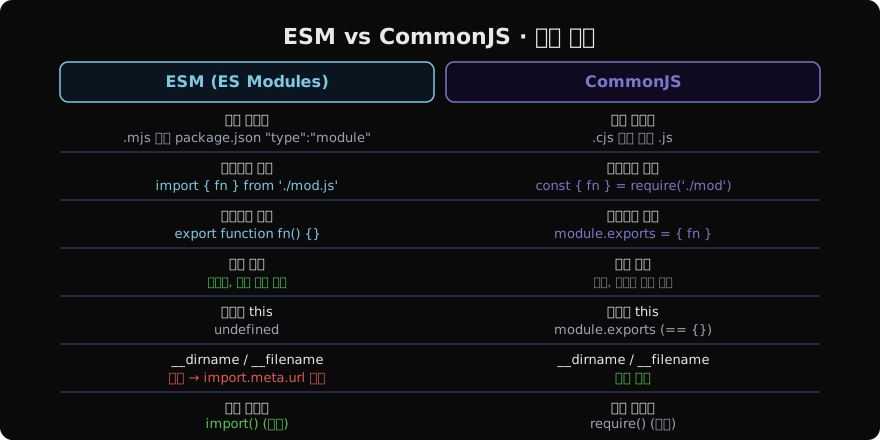
ESM 로드 파이프라인 — Live Binding
ESM은 3단계 파이프라인으로 로드됩니다.
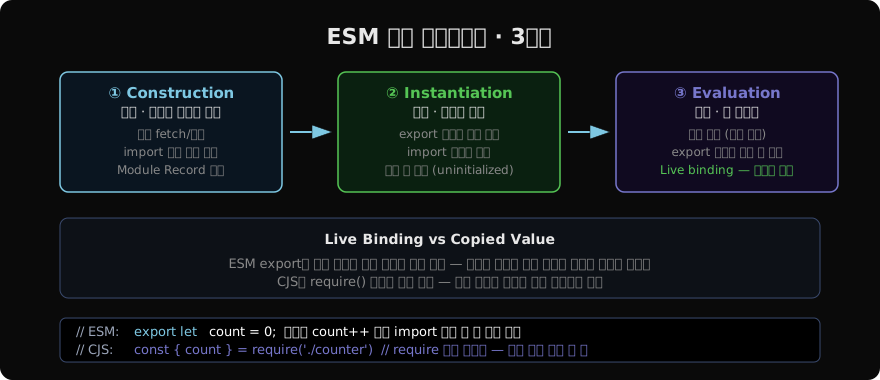
CJS는 require() 시점에 값을 복사하지만, ESM은 Live Binding을 사용합니다. 내보낸 모듈에서 값이 바뀌면 가져온 쪽에서도 새 값을 볼 수 있습니다.
// counter.js
export let count = 0;
export function increment() { count++; }

// app.js
import { count, increment } from './counter.js';

console.log(count); // 0
increment();
console.log(count); // 1 — Live Binding이므로 변경 반영됨
import.meta — 모듈 메타데이터
ESM에서는 __dirname과 __filename이 없습니다. 대신 import.meta.url을 사용합니다.
// ESM에서 __dirname, __filename 대체
import { fileURLToPath } from 'url';
import { dirname, join } from 'path';

const __filename = fileURLToPath(import.meta.url);
const __dirname = dirname(__filename);

console.log(__filename); // /home/user/app.js
console.log(__dirname);  // /home/user

// 절대 경로 구성
const configPath = join(__dirname, 'config.json');
Node 21.2+ 에서는 import.meta.dirname과 import.meta.filename이 직접 지원됩니다.
// Node 21.2+
console.log(import.meta.dirname);  // /home/user
console.log(import.meta.filename); // /home/user/app.js
Top-Level Await
ESM에서는 모듈 최상위에서 await을 사용할 수 있습니다.
// config.js — TLA(Top-Level Await)
const response = await fetch('https://api.example.com/config');
export const config = await response.json();
// 이 모듈을 import하면 config가 준비될 때까지 대기 후 사용 가능

// server.js
import { config } from './config.js'; // TLA가 완료된 후 실행
console.log(config.port); // 데이터 준비 보장됨
동적 import()
조건부 로딩이나 지연 로딩에 사용합니다. CJS의 require()처럼 동적으로 사용할 수 있지만, Promise를 반환합니다.
// 조건부 로딩
async function loadModule(isDev) {
  if (isDev) {
    const { DevTools } = await import('./devtools.js');
    return new DevTools();
  }
  return null;
}

// 에러 처리
try {
  const module = await import('./optional-plugin.js');
  module.init();
} catch {
  console.warn('플러그인 없이 실행');
}
CJS ↔ ESM 상호운용성
// ESM에서 CJS 가져오기 — default import로만 가능
import lodash from 'lodash'; // named import 불가, default만
const { map, filter } = lodash; // 구조 분해는 가능

// ESM에서 require 사용 — createRequire
import { createRequire } from 'module';
const require = createRequire(import.meta.url);
const pkg = require('./package.json'); // JSON 가져오기
// CJS에서 ESM 가져오기 — 동기 require 불가
// async import()를 사용해야 함
async function run() {
const { myFunc } = await import('./esm-module.mjs');
myFunc();
}
run();package.json exports 필드 — 패키지 진입점 제어
{
  "name": "my-lib",
  "type": "module",
  "exports": {
    ".": {
      "import": "./dist/index.mjs",
      "require": "./dist/index.cjs"
    },
    "./utils": {
      "import": "./dist/utils.mjs",
      "require": "./dist/utils.cjs"
    }
  }
}
exports 필드를 정의하면 외부에서 접근 가능한 진입점을 명시적으로 제어할 수 있습니다. ESM과 CJS 빌드를 동시에 제공하는 패키지에서 표준 패턴입니다.
import assertions / attributes
// JSON 모듈 임포트 (Node 20+, --experimental-json-modules)
import data from './data.json' with { type: 'json' };
console.log(data.version);

// 일반적으로는 fs나 createRequire를 사용
import { readFileSync } from 'fs';
const data = JSON.parse(readFileSync('./data.json', 'utf8'));
지난 글: CommonJS & require() · Node.js 모듈 시스템
다음 글: fs · path · os · 파일 시스템과 환경 API
읽어주셔서 감사합니다. 😊
PALDYN / ARTICLE AI
글의 개념, 수식, 코드에 대해 물어보세요.
질문과 관련된 문단을 골라 답변의 문맥으로 사용합니다.생각 중 · 0초