

지식
JavaScript
fs · path · os · 파일 시스템과 환경 API
Node.js fs 모듈의 콜백/동기/Promise API 분류, fs.promises 패턴, 파일 스트림, path 모듈의 join·resolve·dirname·basename, os 모듈의 플랫폼·CPU·메모리 정보 조회를 정리합니다.
지난 글에서 Node.js ESM의 import/export 문법과 CJS 상호운용성을 살펴봤습니다. 이번에는 서버 개발에서 매일 사용하는 fs, path, os 모듈을 정리합니다.
fs 모듈 — 3가지 API 스타일
Node.js의 fs 모듈은 같은 기능을 세 가지 스타일로 제공합니다.
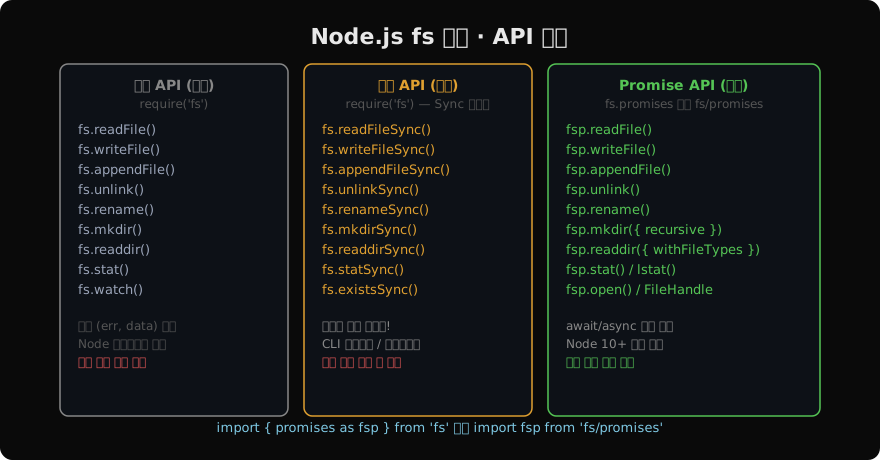
권장: fs/promises 를 사용하세요. 콜백 API는 레거시 코드에서만 유지하고, 동기 API는 CLI 도구나 모듈 초기화처럼 이벤트 루프 블로킹이 허용되는 경우에만 사용합니다.
fs.promises — 기본 파일 작업
import { promises as fsp } from 'fs';
// 또는: import fsp from 'fs/promises';

// 파일 읽기
const content = await fsp.readFile('./data.json', 'utf-8');
const parsed = JSON.parse(content);

// 파일 쓰기
await fsp.writeFile('./output.json', JSON.stringify(parsed, null, 2), 'utf-8');

// 파일 추가
await fsp.appendFile('./log.txt', `${new Date().toISOString()} 로그\n`);

// 파일 삭제
await fsp.unlink('./temp.txt');

// 디렉토리 생성 (중첩 가능)
await fsp.mkdir('./dist/assets/images', { recursive: true });

// 디렉토리 목록 (Dirent 객체 포함)
const entries = await fsp.readdir('./src', { withFileTypes: true });
for (const entry of entries) {
  if (entry.isDirectory()) console.log('📁', entry.name);
  else console.log('📄', entry.name);
}

// 파일 정보
const stats = await fsp.stat('./package.json');
console.log('크기:', stats.size, 'bytes');
console.log('수정일:', stats.mtime);
console.log('디렉토리?:', stats.isDirectory());
대용량 파일 — 스트림으로 처리
수백 MB 파일을 readFile로 읽으면 메모리에 전부 올라갑니다. 스트림을 사용하면 청크 단위로 처리합니다.
import { createReadStream, createWriteStream } from 'fs';
import { pipeline } from 'stream/promises';
import { createGzip } from 'zlib';

// 파일을 읽으면서 gzip 압축하여 저장
await pipeline(
  createReadStream('./large-file.log'),
  createGzip(),
  createWriteStream('./large-file.log.gz')
);
console.log('압축 완료');
fs.watch — 파일 변경 감지
import { watch } from 'fs';

// 디렉토리 변경 감지
const watcher = watch('./src', { recursive: true }, (event, filename) => {
  console.log(`${event}: ${filename}`);
  // 출력 예: change: utils/math.js
});

// 감지 중단
setTimeout(() => watcher.close(), 10000);
path 모듈 — 경로 조작
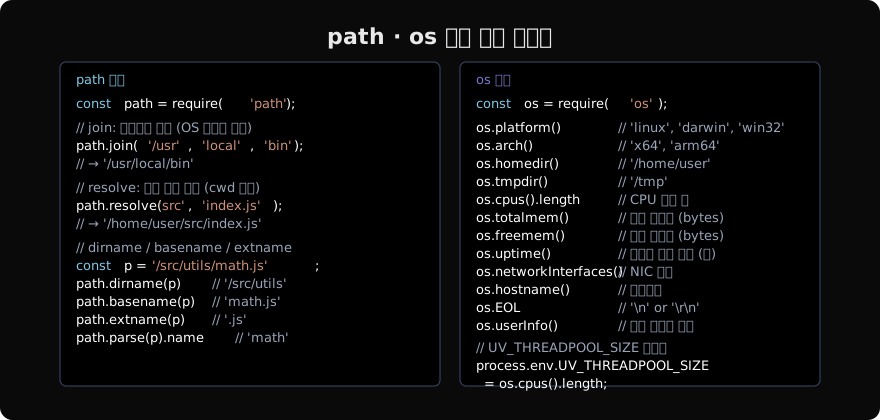
import path from 'path';

// join: 세그먼트를 OS 구분자로 연결 (정규화 포함)
path.join('/usr', 'local', '../bin', 'node');
// → '/usr/bin/node' (상위 디렉토리 정규화됨)

// resolve: 절대 경로 반환 (CWD 기준)
path.resolve('src', 'index.js');
// → '/home/user/project/src/index.js'

// 파일 경로 분해
const p = '/project/src/utils/math.test.js';
path.dirname(p);         // '/project/src/utils'
path.basename(p);        // 'math.test.js'
path.basename(p, '.js'); // 'math.test'
path.extname(p);         // '.js'

// parse / format (역변환)
const parsed = path.parse(p);
// { root: '/', dir: '/project/src/utils', base: 'math.test.js', ext: '.js', name: 'math.test' }
const rebuilt = path.format(parsed); // '/project/src/utils/math.test.js'

// 상대 경로 계산
path.relative('/project/src', '/project/dist/index.js');
// → '../dist/index.js'

// Windows와 POSIX 명시적 선택
path.win32.join('C:\\Users', 'docs'); // 'C:\\Users\\docs'
path.posix.join('/usr', 'local');     // '/usr/local'
os 모듈 — 시스템 정보
import os from 'os';

// 실행 환경 확인
console.log(os.platform()); // 'linux', 'darwin', 'win32'
console.log(os.arch());     // 'x64', 'arm64'
console.log(os.release());  // 커널 버전

// 경로
console.log(os.homedir()); // '/home/user'
console.log(os.tmpdir());  // '/tmp'

// 하드웨어 정보
const cpus = os.cpus();
console.log(`CPU: ${cpus.length}코어, ${cpus[0].model}`);
console.log(`전체 메모리: ${(os.totalmem() / 1024 ** 3).toFixed(1)} GB`);
console.log(`여유 메모리: ${(os.freemem() / 1024 ** 3).toFixed(1)} GB`);

// 네트워크 (서버 IP 조회)
const nets = os.networkInterfaces();
for (const [name, addrs] of Object.entries(nets)) {
  for (const addr of addrs) {
    if (addr.family === 'IPv4' && !addr.internal) {
      console.log(`${name}: ${addr.address}`);
    }
  }
}
파일 존재 여부 확인 패턴
import { access, constants } from 'fs/promises';

async function fileExists(filePath) {
  try {
    await access(filePath, constants.F_OK);
    return true;
  } catch {
    return false;
  }
}

// constants.R_OK — 읽기 가능
// constants.W_OK — 쓰기 가능
// constants.X_OK — 실행 가능
const canRead = await access('./config.json', constants.R_OK)
  .then(() => true)
.catch(() => false);fs.existsSync()는 동기이므로 비동기 컨텍스트에서는 access()를 사용하세요.
파일 핸들(FileHandle) — 저수준 제어
const fh = await fsp.open('./data.bin', 'r+'); // r+=읽기+쓰기
try {
  const buf = Buffer.alloc(8);
  await fh.read(buf, 0, 8, 0); // offset 0에서 8바이트 읽기
  console.log(buf.readUInt32BE(0)); // 빅엔디안 uint32
  await fh.write(Buffer.from([0x01, 0x02]), 0, 2, 4); // offset 4에 2바이트 쓰기
} finally {
  await fh.close();
}
지난 글: Node.js ESM · ES 모듈 완전 가이드
다음 글: Buffer & Stream · 바이너리 데이터와 스트리밍
읽어주셔서 감사합니다. 😊
PALDYN / ARTICLE AI
글의 개념, 수식, 코드에 대해 물어보세요.
질문과 관련된 문단을 골라 답변의 문맥으로 사용합니다.생각 중 · 0초