

Core Web Vitals — LCP·INP·CLS 완전 가이드
Google의 Core Web Vitals — LCP(로딩), INP(상호작용), CLS(안정성) 세 지표의 의미, 좋음·나쁨 기준, web-vitals 라이브러리로 측정하는 방법, 각 지표별 개선 전략을 정리합니다.
지난 글에서 크리티컬 CSS와 웹 폰트 최적화로 렌더 블로킹을 제거하는 방법을 살펴봤습니다. 이번에는 Google이 검색 순위 신호로 채택한 Core Web Vitals — LCP, INP, CLS 세 가지 지표를 다룹니다. 이 지표들은 실제 사용자 경험을 수치로 측정하는 방법이자, 웹 성능 최적화의 목표로 삼기에 가장 적합한 지표들입니다.
Core Web Vitals 개요
Core Web Vitals는 Google이 2020년 도입한 세 가지 사용자 경험 지표입니다. 2021년부터 Google 검색 순위 신호에 포함되어 SEO와도 직결됩니다.
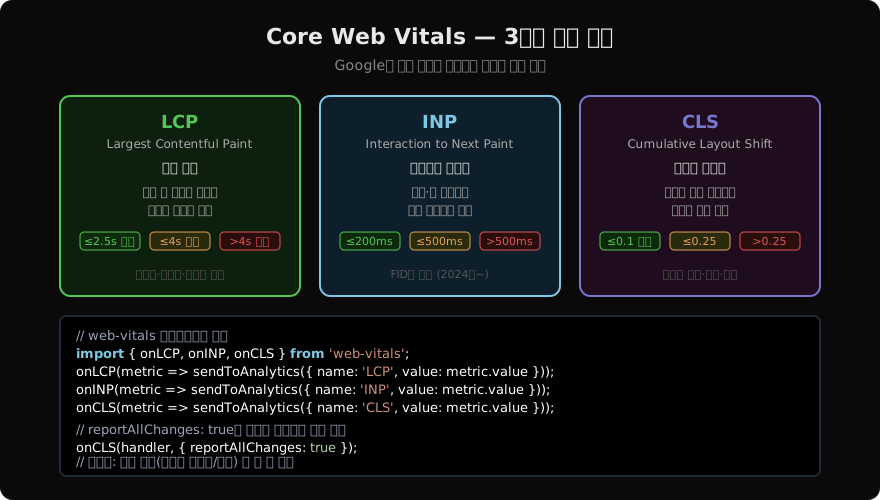
LCP — Largest Contentful Paint
페이지 로드 시 가장 큰 콘텐츠 요소가 화면에 렌더되는 시점입니다. 히어로 이미지, 대형 텍스트 블록, 비디오 포스터 등이 LCP 후보가 됩니다.
// LCP 요소 확인 — PerformanceObserver
new PerformanceObserver((entryList) => {
  const entries = entryList.getEntries();
  const lastEntry = entries[entries.length - 1];
  console.log('LCP 요소:', lastEntry.element);
  console.log('LCP 시간:', lastEntry.startTime, 'ms');
}).observe({ type: 'largest-contentful-paint', buffered: true });
LCP 개선 핵심
<!-- ✅ 히어로 이미지: fetchpriority="high", loading="eager" -->
<img
  src="hero.webp"
  alt="히어로"
  fetchpriority="high"
  loading="eager"
  width="1200"
  height="600"
>

<!-- ✅ 폰트 프리로드 — 텍스트가 LCP 요소인 경우 -->
<link rel="preload" href="/fonts/main.woff2" as="font" type="font/woff2" crossorigin>
LCP 이미지에 loading="lazy"를 절대 쓰면 안 됩니다. 지연 로딩은 LCP 요소가 아닌 폴드 아래 이미지에만 적용합니다.
INP — Interaction to Next Paint
사용자의 클릭·키 입력·탭 등 모든 상호작용 중 가장 느린 응답 시간을 대표 값으로 삼습니다. 2024년 3월 FID(First Input Delay)를 대체했습니다.
// 긴 태스크 식별 — PerformanceObserver
new PerformanceObserver((entryList) => {
  for (const entry of entryList.getEntries()) {
    if (entry.duration > 50) {
      console.warn(`긴 태스크: ${entry.duration.toFixed(1)}ms`, entry);
    }
  }
}).observe({ type: 'longtask', buffered: true });
INP 개선: 긴 태스크 분할
// ❌ 50ms 이상 메인 스레드 점유 → INP 악화
function processAll(items) {
  items.forEach(item => heavyProcess(item)); // 500ms
}

// ✅ scheduler.yield()로 태스크 분할 (Chrome 115+)
async function processAllYield(items) {
  for (const item of items) {
    heavyProcess(item);
    await scheduler.yield(); // 다음 입력 처리 기회 양보
  }
}

// scheduler.yield() 폴백
const yieldToMain = () =>
  new Promise(resolve => setTimeout(resolve, 0));
이벤트 핸들러에서 무거운 동기 작업을 하면 해당 작업이 완료될 때까지 다음 렌더가 지연됩니다. scheduler.yield()로 작업을 분할해 브라우저가 중간에 렌더를 처리할 기회를 줍니다.
CLS — Cumulative Layout Shift
페이지 수명 동안 예기치 않은 레이아웃 이동의 누적 점수입니다. 이미지가 뒤늦게 로드되어 텍스트가 밀리거나, 광고가 삽입되어 버튼이 이동하는 현상입니다.
// CLS 원인 찾기
new PerformanceObserver((entryList) => {
  for (const entry of entryList.getEntries()) {
    if (!entry.hadRecentInput) { // 사용자 입력 후 500ms 이내는 제외
      console.log('레이아웃 시프트:', entry.value, entry.sources);
    }
  }
}).observe({ type: 'layout-shift', buffered: true });
CLS 개선: 크기 예약
<!-- ✅ 이미지에 width·height 명시 → 브라우저가 공간 미리 확보 -->
<img src="product.jpg" alt="상품" width="400" height="300" loading="lazy">

<!-- ✅ aspect-ratio로 동적 콘텐츠 공간 확보 -->
<div style="aspect-ratio: 16/9; background: #f0f0f0;">
  <img src="video-thumbnail.jpg" alt="" style="width: 100%; height: 100%; object-fit: cover;">
</div>
/* ✅ 폰트 폴백 크기 조정 — CLS 없이 swap */
@font-face {
font-family: 'Pretendard Fallback';
src: local('Apple SD Gothic Neo'), local('Malgun Gothic');
size-adjust: 97%; /* 폴백 폰트와 웹 폰트의 크기 맞춤 */
ascent-override: 90%;
}web-vitals 라이브러리로 실제 측정
import { onLCP, onINP, onCLS, onFCP, onTTFB } from 'web-vitals';

function sendToAnalytics({ name, value, rating, id }) {
  navigator.sendBeacon('/analytics', JSON.stringify({
    metric: name,
    value: Math.round(name === 'CLS' ? value * 1000 : value),
    rating, // 'good' | 'needs-improvement' | 'poor'
    id,
    url: location.href,
    userAgent: navigator.userAgent,
  }));
}

onLCP(sendToAnalytics);
onINP(sendToAnalytics);
onCLS(sendToAnalytics);
web-vitals 라이브러리는 Google의 공식 구현으로, 브라우저 API를 추상화해 각 지표를 정확하게 측정합니다. rating 필드로 좋음/개선필요/나쁨을 즉시 알 수 있습니다.
개선 전략 요약
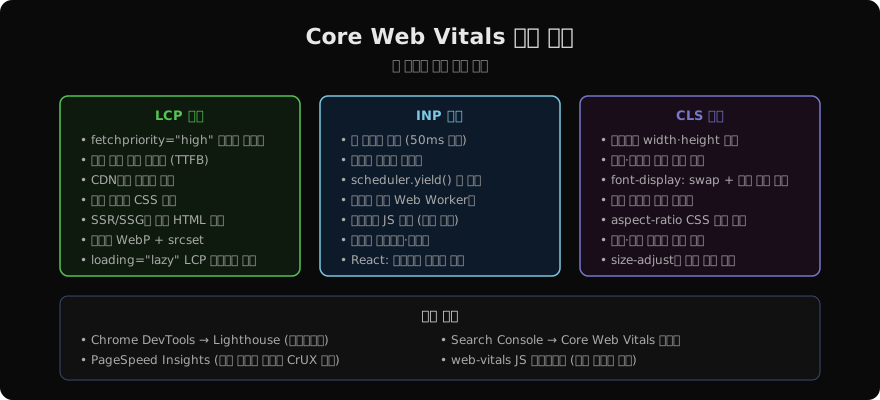
측정 도구 활용
- Lighthouse: DevTools → Lighthouse 탭. 시뮬레이션 환경에서 점수를 제공합니다.
- PageSpeed Insights: 실제 사용자 데이터(CrUX)와 시뮬레이션 데이터를 모두 제공합니다.
- Google Search Console: Core Web Vitals 보고서로 실제 사용자 기준 통과/실패를 사이트 전체에서 확인합니다.
- web-vitals JS: 실제 사용자 데이터를 직접 수집해 자체 분석 시스템에 전송합니다.
정리
| 지표 | 측정 대상 | 좋음 기준 |
|---|---|---|
| LCP | 가장 큰 요소 렌더 시간 | ≤2.5s |
| INP | 상호작용 → 다음 렌더 | ≤200ms |
| CLS | 레이아웃 이동 누적 점수 | ≤0.1 |
지난 글: 크리티컬 CSS와 폰트 — 렌더 블로킹 제거
다음 글: Lighthouse와 WebPageTest — 성능 측정 도구 완전 정복
읽어주셔서 감사합니다. 😊
PALDYN / ARTICLE AI
글의 개념, 수식, 코드에 대해 물어보세요.
질문과 관련된 문단을 골라 답변의 문맥으로 사용합니다.생각 중 · 0초