

LLM 비용 최적화: 더 저렴하게, 더 빠르게
LLM API 비용의 구조를 이해하고 프롬프트 캐싱, 모델 라우팅, 응답 캐싱, 배치 처리, 더 작은 모델 선택, 토큰 절약 기법으로 비용을 80%까지 줄이는 실전 전략.
지난 글에서 FastAPI, Docker, Prometheus를 조합해 LLM 서비스를 프로덕션에 배포하는 방법을 살펴봤다. 이번에는 배포된 서비스를 더 저렴하게 운영하는 전략을 다룬다. LLM API 비용은 단순해 보이지만 조금만 파고들면 80% 이상 절감이 가능한 구조가 숨어있다. 프롬프트 캐싱부터 모델 라우팅, 배치 API, 토큰 절약 기법까지 실전에서 검증된 여섯 가지 전략을 하나씩 짚는다.
LLM API 비용 구조
Claude와 GPT-4 같은 LLM API 비용은 단순한 공식을 따른다.
총비용 = (입력 토큰 수 × 입력 단가) + (출력 토큰 수 × 출력 단가)예를 들어 Claude claude-sonnet-4-6은 입력 $3/1M, 출력 $15/1M이다. 시스템 프롬프트 2000 토큰, 사용자 메시지 500 토큰, 히스토리 1000 토큰이 포함된 요청에서 500 토큰을 출력한다면:
# 실제 비용 계산
input_tokens = 2000 + 500 + 1000  # = 3500
output_tokens = 500

cost_per_request = (input_tokens / 1_000_000 * 3.0) + (output_tokens / 1_000_000 * 15.0)
# = 0.0105 + 0.0075 = $0.018 per request

daily_requests = 10_000
monthly_cost = cost_per_request * daily_requests * 30
print(f"월 비용: ${monthly_cost:,.0f}")  # $5,400/월
월 5400달러. 여기서 최적화 여지가 어디에 있는지 보면, 입력 토큰이 3500개 중 2000개(57%)가 반복되는 시스템 프롬프트다. 이것이 프롬프트 캐싱이 가장 효과적인 이유다.
6가지 최적화 전략 개요
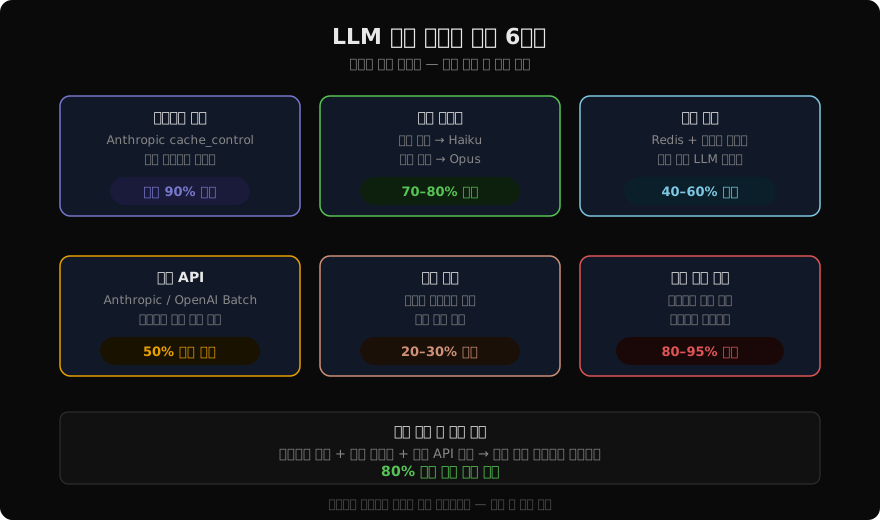
각 전략은 독립적으로 적용할 수 있고, 조합하면 효과가 누적된다. 가장 먼저 적용할 전략은 프롬프트 캐싱이다. 코드 변경이 최소화되면서 효과가 가장 크다.
프롬프트 캐싱
Anthropic의 프롬프트 캐싱은 반복되는 컨텍스트(시스템 프롬프트, RAG 문서, 긴 히스토리)를 서버 측 KV 캐시에 저장한다. 캐시 히트 시 입력 토큰 비용이 90% 절감된다.
import anthropic

client = anthropic.Anthropic()

# 시스템 프롬프트 캐싱 — cache_control 추가
def create_cached_request(user_message: str, conversation_history: list) -> str:
    """프롬프트 캐싱을 적용한 API 호출."""
    response = client.messages.create(
        model="claude-sonnet-4-6",
        max_tokens=1024,
        system=[
            {
                "type": "text",
                "text": LONG_SYSTEM_PROMPT,  # 2000+ 토큰의 시스템 프롬프트
                "cache_control": {"type": "ephemeral"},  # 캐싱 마크
            }
        ],
        messages=[
            # RAG 검색 결과도 캐싱 가능
            {
                "role": "user",
                "content": [
                    {
                        "type": "text",
                        "text": RETRIEVED_CONTEXT,  # 1000+ 토큰의 검색 결과
                        "cache_control": {"type": "ephemeral"},
                    },
                    {"type": "text", "text": user_message},
                ],
            },
            *conversation_history,
        ],
    )

    # 캐시 사용 여부 확인
    usage = response.usage
    print(f"입력: {usage.input_tokens}토큰")
    print(f"캐시 생성: {usage.cache_creation_input_tokens}토큰")
    print(f"캐시 읽기: {usage.cache_read_input_tokens}토큰")

    return response.content[0].text

# 캐시 효율 계산
def calculate_cache_savings(usage):
    """캐시 절감액 계산."""
    # 캐시 읽기는 일반 입력의 10% 가격
    normal_cost = usage.input_tokens / 1_000_000 * 3.0
    cached_cost = (
        (usage.input_tokens - usage.cache_read_input_tokens) / 1_000_000 * 3.0
        + usage.cache_read_input_tokens / 1_000_000 * 0.3  # 캐시 읽기 단가
    )
    savings_pct = (1 - cached_cost / normal_cost) * 100
    return savings_pct
캐싱이 효과적이려면 캐시 가능한 부분이 메시지 앞쪽에 있어야 한다. Anthropic의 캐싱은 접두사 방식이므로 자주 바뀌는 사용자 메시지는 맨 뒤에 배치한다.
모델 라우팅
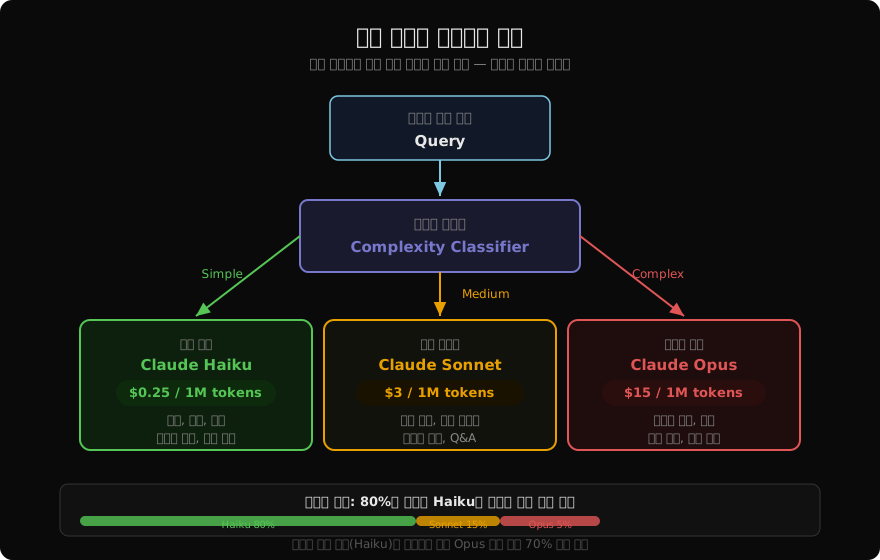
단순 쿼리에 Claude Opus를 쓰는 것은 택시로 마트 가는 것과 같다. 복잡도에 따라 모델을 자동으로 선택하면 품질을 유지하면서 비용을 70-80% 줄일 수 있다.
import anthropic
from enum import Enum

class QueryComplexity(Enum):
    SIMPLE = "simple"
    MEDIUM = "medium"
    COMPLEX = "complex"

# 모델 설정
MODELS = {
    QueryComplexity.SIMPLE: {
        "model": "claude-haiku-4-5",
        "price_per_1m_input": 0.25,
        "price_per_1m_output": 1.25,
    },
    QueryComplexity.MEDIUM: {
        "model": "claude-sonnet-4-6",
        "price_per_1m_input": 3.0,
        "price_per_1m_output": 15.0,
    },
    QueryComplexity.COMPLEX: {
        "model": "claude-opus-4-5",
        "price_per_1m_input": 15.0,
        "price_per_1m_output": 75.0,
    },
}

client = anthropic.Anthropic()

def classify_query_complexity(query: str) -> QueryComplexity:
    """Haiku로 복잡도를 분류 — 분류 비용 자체가 매우 저렴."""
    response = client.messages.create(
        model="claude-haiku-4-5",
        max_tokens=10,
        system=(
            "쿼리 복잡도를 판단하라. 반드시 simple/medium/complex 중 하나만 반환.\n"
            "simple: 분류, 번역, 요약, 키워드 추출, 감성 분석\n"
            "medium: 코드 생성, 분석 리포트, 다단계 추론\n"
            "complex: 복잡한 창작, 전략 수립, 심층 연구"
        ),
        messages=[{"role": "user", "content": query}],
    )
    label = response.content[0].text.strip().lower()
    try:
        return QueryComplexity(label)
    except ValueError:
        return QueryComplexity.MEDIUM  # 불확실하면 중간으로

def route_and_call(query: str, messages: list) -> dict:
    """복잡도 기반 자동 라우팅."""
    complexity = classify_query_complexity(query)
    config = MODELS[complexity]

    response = client.messages.create(
        model=config["model"],
        max_tokens=1024,
        messages=messages,
    )

    # 실제 비용 계산
    cost = (
        response.usage.input_tokens / 1_000_000 * config["price_per_1m_input"]
        + response.usage.output_tokens / 1_000_000 * config["price_per_1m_output"]
    )

    return {
        "content": response.content[0].text,
        "model_used": config["model"],
        "complexity": complexity.value,
        "cost_usd": cost,
    }
실제 서비스에서 80%의 쿼리가 Haiku로 처리된다면 분류기 비용(Haiku)을 포함해도 순수 Opus 대비 70% 이상 절감된다.
시맨틱 응답 캐싱
완전히 동일한 질문이 아니더라도 의미가 같으면 캐시된 답변을 재사용할 수 있다. Redis와 임베딩을 결합한 시맨틱 캐싱이다.
import numpy as np
from anthropic import Anthropic
import redis
import json
import hashlib

client = Anthropic()
r = redis.Redis(host="localhost", port=6379, decode_responses=True)

def get_embedding(text: str) -> list[float]:
    """텍스트를 임베딩 벡터로 변환 (실제로는 임베딩 모델 사용)."""
    # 예: OpenAI text-embedding-3-small, Cohere embed 등
    # 여기서는 의사 코드
    raise NotImplementedError("임베딩 모델 연결 필요")

def cosine_similarity(a: list[float], b: list[float]) -> float:
    a_arr = np.array(a)
    b_arr = np.array(b)
    return float(np.dot(a_arr, b_arr) / (np.linalg.norm(a_arr) * np.linalg.norm(b_arr)))

SIMILARITY_THRESHOLD = 0.92  # 92% 이상 유사도면 캐시 히트

def semantic_cache_get(query: str) -> str | None:
    """유사한 쿼리의 캐시된 응답을 반환."""
    query_emb = get_embedding(query)

    # Redis에서 캐시 항목 목록 조회
    cached_keys = r.keys("cache:emb:*")
    for key in cached_keys:
        cached_data = json.loads(r.get(key))
        similarity = cosine_similarity(query_emb, cached_data["embedding"])
        if similarity >= SIMILARITY_THRESHOLD:
            # TTL 갱신 (LRU 효과)
            r.expire(key, 3600)
            return cached_data["response"]
    return None

def semantic_cache_set(query: str, response: str, ttl: int = 3600):
    """응답을 임베딩과 함께 캐싱."""
    query_emb = get_embedding(query)
    cache_key = f"cache:emb:{hashlib.md5(query.encode()).hexdigest()}"
    r.setex(
        cache_key,
        ttl,
        json.dumps({"embedding": query_emb, "response": response, "query": query}),
    )

def cached_llm_call(query: str) -> tuple[str, bool]:
    """캐시 우선 조회 후 미스 시 LLM 호출."""
    # 캐시 확인
    cached = semantic_cache_get(query)
    if cached:
        return cached, True  # (응답, 캐시히트)

    # LLM 호출
    response = client.messages.create(
        model="claude-sonnet-4-6",
        max_tokens=1024,
        messages=[{"role": "user", "content": query}],
    )
    answer = response.content[0].text

    # 캐싱
    semantic_cache_set(query, answer)
    return answer, False
시맨틱 캐싱은 “오늘 날씨 어때?”, “날씨 알려줘”, “지금 날씨가 어떻게 돼?” 같은 의미적으로 동일한 쿼리를 하나로 처리한다. 유사도 임계값 0.92는 실험을 통해 조정한다. 너무 낮으면 다른 질문에 엉뚱한 답변을 반환할 수 있다.
배치 API (50% 즉시 할인)
실시간 응답이 필요 없는 작업(데이터 분석, 콘텐츠 생성, 레이블링)은 Batch API를 쓰면 50% 즉시 할인을 받는다. 최대 24시간 내에 처리된다.
import anthropic
import json

client = anthropic.Anthropic()

def create_batch_job(requests: list[dict]) -> str:
    """Anthropic Batch API로 대량 요청 처리."""
    # 요청 목록 포맷 변환
    batch_requests = [
        {
            "custom_id": f"req-{i}",
            "params": {
                "model": "claude-sonnet-4-6",
                "max_tokens": 512,
                "messages": [{"role": "user", "content": req["prompt"]}],
            },
        }
        for i, req in enumerate(requests)
    ]

    # 배치 생성
    batch = client.messages.batches.create(requests=batch_requests)
    print(f"배치 ID: {batch.id}")
    print(f"요청 수: {batch.request_counts.processing}")
    return batch.id

def wait_and_collect_results(batch_id: str) -> list[dict]:
    """배치 완료 대기 후 결과 수집."""
    import time

    while True:
        batch = client.messages.batches.retrieve(batch_id)
        if batch.processing_status == "ended":
            break
        print(f"처리 중... {batch.request_counts.processing}개 남음")
        time.sleep(60)  # 1분마다 확인

    # 결과 수집
    results = []
    for result in client.messages.batches.results(batch_id):
        if result.result.type == "succeeded":
            results.append({
                "id": result.custom_id,
                "content": result.result.message.content[0].text,
            })
        else:
            results.append({
                "id": result.custom_id,
                "error": result.result.error.type,
            })
    return results

# 사용 예시 — 10,000건 상품 설명 생성
product_requests = [
    {"prompt": f"상품명: {name}\n50자 이내 설명을 작성하라."}
    for name in product_names  # 10,000개
]

batch_id = create_batch_job(product_requests)
# 배치 생성 후 다른 작업 진행...
results = wait_and_collect_results(batch_id)

# 비용 비교
realtime_cost = 10_000 * 0.018  # $180
batch_cost = realtime_cost * 0.5  # $90 (50% 할인)
print(f"절감액: ${realtime_cost - batch_cost:.0f}")
토큰 절약 기법
입력 토큰을 줄이는 가장 직접적인 방법은 시스템 프롬프트 압축이다.
def compress_system_prompt(verbose_prompt: str) -> str:
    """시스템 프롬프트 압축 — 핵심만 남기기."""
    # 압축 전
    verbose = """
    당신은 친절하고 도움이 되는 AI 어시스턴트입니다. 사용자의 질문에 항상
    정중하게 답변하고, 모르는 것은 모른다고 솔직하게 말하며, 유해한 콘텐츠는
    절대 생성하지 않습니다. 응답은 명확하고 간결하게 작성하며, 필요한 경우
    예시를 들어 설명합니다.
    """  # ~85 토큰

    # 압축 후
    compressed = """
    친절한 AI 어시스턴트. 정중·간결·솔직. 유해 콘텐츠 금지.
    """  # ~20 토큰 (76% 절감)

    return compressed

# 출력 포맷 제약으로 토큰 절약
def constrained_output_prompt(task: str) -> str:
    """출력 포맷을 제약해 불필요한 토큰 제거."""
    return f"""
    {task}

    규칙:
    - JSON만 반환, 설명 금지
    - 최대 100자 이내
    - 형식: {{"result": "...", "confidence": 0.0-1.0}}
    """

# 대화 히스토리 압축
def compress_history(history: list[dict], max_tokens: int = 2000) -> list[dict]:
    """긴 대화 히스토리를 요약으로 압축."""
    # 최근 3개 메시지는 원본 유지
    recent = history[-6:]  # user/assistant 쌍 3개
    old = history[:-6]

    if not old:
        return recent

    # 오래된 히스토리 요약
    old_text = "\n".join(
        f"{'사용자' if m['role'] == 'user' else 'AI'}: {m['content'][:200]}"
        for m in old
    )

    summary_response = client.messages.create(
        model="claude-haiku-4-5",  # 요약은 Haiku로
        max_tokens=300,
        messages=[{
            "role": "user",
            "content": f"다음 대화를 100자 이내로 요약:\n{old_text}",
        }],
    )
    summary = summary_response.content[0].text

    compressed = [
        {"role": "user", "content": f"[이전 대화 요약: {summary}]"},
        {"role": "assistant", "content": "이전 대화 내용을 이해했습니다."},
        *recent,
    ]
    return compressed
출력 포맷을 JSON으로 제약하면 “물론이죠! 제가 분석한 결과는…” 같은 도입부 토큰을 제거할 수 있다. 응답당 평균 50-100 토큰 절약이 가능하다.
더 작은 모델 선택
가장 극적인 비용 절감 방법은 태스크에 맞는 더 작은 모델을 쓰는 것이다. Claude Opus($15/1M) 대신 Claude Haiku($0.25/1M)를 쓰면 60배 저렴하다.
# 태스크별 모델 선택 가이드
TASK_MODEL_MAP = {
    # Haiku로 충분한 태스크 ($0.25/1M input)
    "classification": "claude-haiku-4-5",
    "sentiment_analysis": "claude-haiku-4-5",
    "translation": "claude-haiku-4-5",
    "keyword_extraction": "claude-haiku-4-5",
    "summarization_short": "claude-haiku-4-5",
    "intent_detection": "claude-haiku-4-5",

    # Sonnet이 적합한 태스크 ($3/1M input)
    "code_generation": "claude-sonnet-4-6",
    "analysis_report": "claude-sonnet-4-6",
    "long_summarization": "claude-sonnet-4-6",
    "qa_with_context": "claude-sonnet-4-6",

    # Opus가 필요한 태스크 ($15/1M input)
    "complex_reasoning": "claude-opus-4-5",
    "creative_writing": "claude-opus-4-5",
    "strategy_planning": "claude-opus-4-5",
}

def benchmark_task(task_type: str, test_cases: list[dict]) -> dict:
    """여러 모델의 품질과 비용을 비교 벤치마크."""
    models = ["claude-haiku-4-5", "claude-sonnet-4-6"]
    results = {}

    for model in models:
        correct = 0
        total_cost = 0.0

        for case in test_cases:
            response = client.messages.create(
                model=model,
                max_tokens=256,
                messages=[{"role": "user", "content": case["prompt"]}],
            )
            answer = response.content[0].text

            # 정확도 평가 (태스크별 로직)
            if evaluate_answer(answer, case["expected"]):
                correct += 1

            # 비용 계산
            prices = {"claude-haiku-4-5": (0.25, 1.25), "claude-sonnet-4-6": (3.0, 15.0)}
            inp, out = prices[model]
            total_cost += (
                response.usage.input_tokens / 1_000_000 * inp
                + response.usage.output_tokens / 1_000_000 * out
            )

        results[model] = {
            "accuracy": correct / len(test_cases),
            "cost_per_100_requests": total_cost / len(test_cases) * 100,
        }

    return results
실제 서비스에 적용하기 전에 반드시 태스크별 벤치마크를 돌린다. 분류 태스크에서 Haiku가 Sonnet 대비 95% 이상의 정확도를 보이는 경우가 많다.
비용 모니터링과 예산 관리
from dataclasses import dataclass, field
from datetime import datetime, timedelta
import threading

@dataclass
class CostTracker:
    """실시간 비용 추적기."""
    daily_budget_usd: float = 100.0
    alert_threshold: float = 0.8  # 80% 사용 시 알림
    _costs: list[tuple] = field(default_factory=list)
    _lock: threading.Lock = field(default_factory=threading.Lock)

    def record(self, cost: float, model: str, user_id: str):
        """API 호출 비용 기록."""
        with self._lock:
            self._costs.append((datetime.now(), cost, model, user_id))

    def today_total(self) -> float:
        today = datetime.now().date()
        with self._lock:
            return sum(c for ts, c, _, _ in self._costs if ts.date() == today)

    def check_budget(self) -> dict:
        """예산 현황 반환."""
        used = self.today_total()
        pct = used / self.daily_budget_usd
        return {
            "used_usd": used,
            "budget_usd": self.daily_budget_usd,
            "usage_pct": pct * 100,
            "over_budget": pct > 1.0,
            "alert": pct >= self.alert_threshold,
        }

cost_tracker = CostTracker(daily_budget_usd=50.0)

# ROI 계산
def calculate_roi(
    monthly_api_cost: float,
    monthly_revenue_impact: float,
    optimization_dev_hours: float,
    dev_hourly_rate: float = 100.0,
) -> dict:
    """최적화 ROI 계산."""
    dev_cost = optimization_dev_hours * dev_hourly_rate
    monthly_savings = monthly_api_cost * 0.7  # 70% 절감 가정
    payback_months = dev_cost / monthly_savings

    return {
        "monthly_savings_usd": monthly_savings,
        "annual_savings_usd": monthly_savings * 12,
        "dev_investment_usd": dev_cost,
        "payback_months": payback_months,
        "roi_12m": (monthly_savings * 12 - dev_cost) / dev_cost * 100,
    }

# 예시
roi = calculate_roi(
    monthly_api_cost=5400,
    monthly_revenue_impact=0,
    optimization_dev_hours=40,
)
print(f"연간 절감: ${roi['annual_savings_usd']:,.0f}")
print(f"투자 회수: {roi['payback_months']:.1f}개월")
print(f"12개월 ROI: {roi['roi_12m']:.0f}%")
# 연간 절감: $45,360
# 투자 회수: 0.2개월
# 12개월 ROI: 10,340%
실전 적용 우선순위
여섯 가지 전략을 한 번에 다 적용할 필요는 없다. 비용 절감 효과와 구현 난이도를 기준으로 순서를 정한다.
| 우선순위 | 전략 | 구현 난이도 | 기대 절감 |
|---|---|---|---|
| 1 | 프롬프트 캐싱 | 낮음 | 50-90% |
| 2 | 모델 라우팅 | 중간 | 70-80% |
| 3 | 배치 API | 낮음 | 50% |
| 4 | 소형 모델 | 낮음 | 60-95% |
| 5 | 응답 캐싱 | 중간 | 40-60% |
| 6 | 토큰 압축 | 낮음 | 20-30% |
먼저 비용 분석부터 시작한다. 어떤 요청이 비용의 대부분을 차지하는지 로그로 확인한 뒤, 반복되는 시스템 프롬프트가 크다면 캐싱을 먼저, 쿼리 유형이 다양하다면 라우팅을 먼저 적용한다.
실제 서비스에서 이 전략들을 조합하면 월 5400달러였던 API 비용을 1000달러 이하로 줄인 사례가 여럿 있다. 중요한 것은 절감 전후를 정확히 측정하는 것이다. 비용 추적기를 먼저 붙이고, 기준선을 측정한 뒤, 전략을 하나씩 추가하며 효과를 검증한다.
지난 글: LLM 서비스 배포: API 서버부터 모니터링까지
읽어주셔서 감사합니다. 😊