

LLM 서비스 배포: API 서버부터 모니터링까지
FastAPI로 LLM API 서버를 구축하고, 스트리밍 응답, 요청 큐, 레이트 리미팅, 헬스체크, 로깅, 프로메테우스 메트릭 수집, Docker 컨테이너화까지 프로덕션 배포의 모든 것.
지난 글에서 프롬프트 이터레이션 전략을 통해 LLM의 품질을 끌어올리는 방법을 살펴봤다. 이번에는 그 모델을 실제 서비스로 내보내는 단계, 즉 프로덕션 배포를 다룬다. 로컬에서 잘 돌아가는 LLM 코드를 배포하는 것과 수천 명의 사용자가 동시에 쓰는 서비스를 운영하는 것은 전혀 다른 문제다. FastAPI 서버 구성부터 스트리밍 응답, 레이트 리미팅, 모니터링, Docker 컨테이너화까지 프로덕션에서 빠짐없이 필요한 요소를 하나씩 짚는다.
전체 아키텍처
프로덕션 LLM 서비스의 기본 구조는 단순하다. 클라이언트 요청이 nginx 로드 밸런서를 통해 다수의 FastAPI 인스턴스로 분산되고, 각 인스턴스는 GPU 백엔드(vLLM 또는 TGI)에 추론 요청을 보낸다. Redis는 레이트 리미팅과 캐싱을 담당하고, Prometheus는 모든 인스턴스의 메트릭을 수집한다.
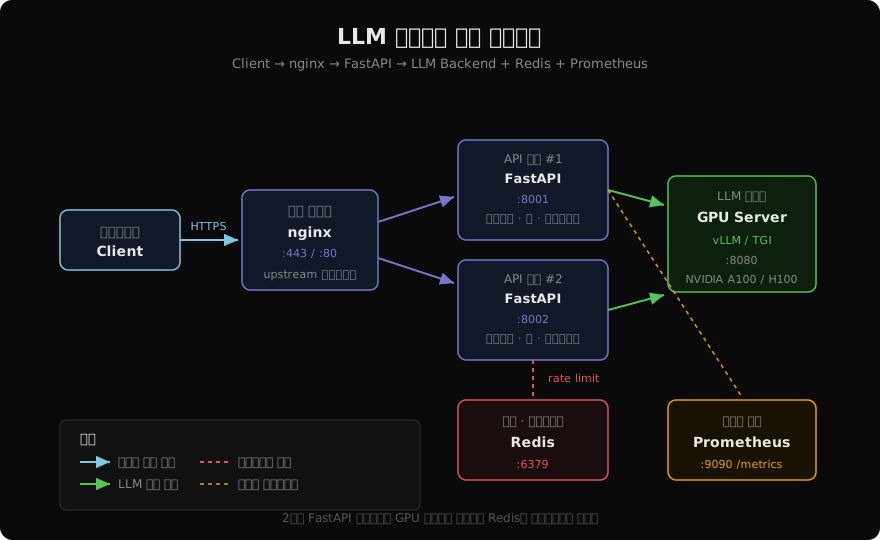
이 구조에서 핵심은 상태를 외부화하는 것이다. FastAPI 인스턴스 자체는 무상태(stateless)여야 한다. 레이트 리밋 카운터, 세션 데이터, 캐시는 모두 Redis에 저장한다. 그래야 인스턴스를 수평 확장할 때 일관성이 유지된다.
FastAPI 서버 구성
LLM API 서버의 진입점을 설계할 때 가장 먼저 고려할 사항은 동시성 모델이다. FastAPI는 async/await 기반이므로 I/O 바운드 작업(LLM API 호출, Redis 조회)에 유리하다. GPU 추론은 vLLM 같은 별도 프로세스에 위임하고 FastAPI는 프록시 역할만 한다.
from fastapi import FastAPI, HTTPException, Depends, Request
from fastapi.responses import StreamingResponse
from contextlib import asynccontextmanager
import asyncio
import redis.asyncio as aioredis
import httpx
import json
import time

# 전역 리소스 — 앱 시작 시 초기화
redis_client: aioredis.Redis | None = None
http_client: httpx.AsyncClient | None = None

@asynccontextmanager
async def lifespan(app: FastAPI):
    """앱 수명 주기: 시작 시 연결 풀 초기화, 종료 시 정리."""
    global redis_client, http_client
    redis_client = aioredis.from_url("redis://redis:6379", decode_responses=True)
    http_client = httpx.AsyncClient(timeout=120.0)
    yield
    # Graceful shutdown
    await redis_client.aclose()
    await http_client.aclose()

app = FastAPI(title="LLM API", version="1.0.0", lifespan=lifespan)

# 요청 모델
from pydantic import BaseModel, Field

class ChatRequest(BaseModel):
    messages: list[dict]
    model: str = "claude-sonnet-4-6"
    max_tokens: int = Field(default=1024, le=4096)
    stream: bool = True
    user_id: str  # 레이트 리미팅용
lifespan 컨텍스트 매니저를 쓰는 이유는 @app.on_event("startup")보다 명확하게 자원 수명을 관리할 수 있어서다. httpx 클라이언트와 Redis 연결을 앱 전체에서 재사용하면 매 요청마다 연결을 새로 여는 오버헤드를 피할 수 있다.
스트리밍 응답 구현 (SSE)
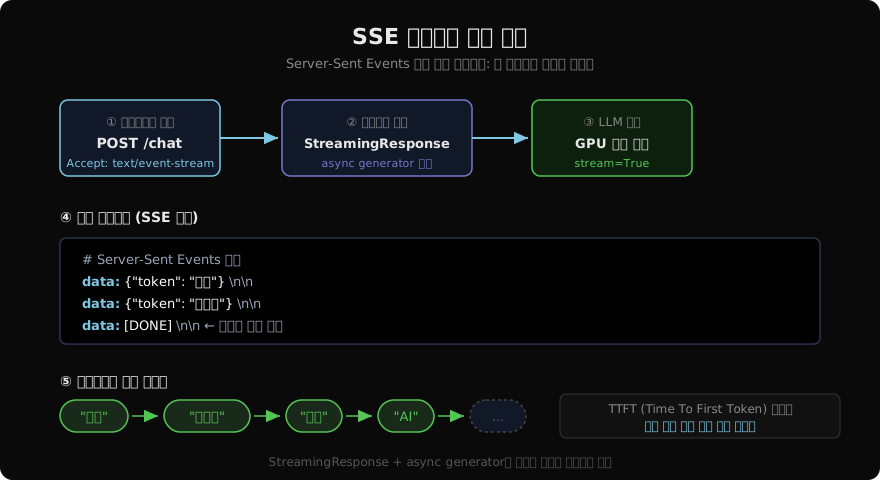
LLM의 특성상 전체 응답이 생성될 때까지 기다리면 사용자 경험이 나빠진다. 응답 시간이 10초인 모델도 첫 토큰을 0.3초 만에 내보낼 수 있다. Server-Sent Events(SSE)로 토큰을 즉시 스트리밍하면 체감 응답 속도가 크게 향상된다.
import anthropic

client = anthropic.Anthropic()

async def stream_llm_response(messages: list[dict], model: str, max_tokens: int):
    """Anthropic 스트리밍 API를 SSE 포맷으로 변환하는 async generator."""
    try:
        with client.messages.stream(
            model=model,
            max_tokens=max_tokens,
            messages=messages,
        ) as stream:
            for text in stream.text_stream:
                # SSE 포맷: data: {...}\n\n
                payload = json.dumps({"token": text}, ensure_ascii=False)
                yield f"data: {payload}\n\n"
            # 스트림 종료 신호
            yield "data: [DONE]\n\n"
    except anthropic.APIError as e:
        error_payload = json.dumps({"error": str(e)})
        yield f"data: {error_payload}\n\n"

@app.post("/chat")
async def chat_endpoint(
    request: ChatRequest,
    rate_limit: None = Depends(check_rate_limit),
):
    if request.stream:
        return StreamingResponse(
            stream_llm_response(request.messages, request.model, request.max_tokens),
            media_type="text/event-stream",
            headers={
                "Cache-Control": "no-cache",
                "X-Accel-Buffering": "no",  # nginx 버퍼링 비활성화
            },
        )
    # 비스트리밍 응답
    response = client.messages.create(
        model=request.model,
        max_tokens=request.max_tokens,
        messages=request.messages,
    )
    return {"content": response.content[0].text}
X-Accel-Buffering: no 헤더는 nginx를 통과할 때 응답이 버퍼링되지 않도록 한다. 이 헤더를 빠뜨리면 nginx가 토큰을 모아서 한 번에 보내 스트리밍 효과가 사라진다.
요청 큐와 동시성 제한
GPU 서버는 동시 처리 가능한 요청 수가 제한된다. vLLM의 경우 KV 캐시 메모리에 따라 최대 배치 크기가 정해진다. 이를 초과하면 OOM(Out of Memory)이 발생하거나 응답 시간이 폭발적으로 증가한다. Semaphore로 동시 추론 요청 수를 제한한다.
import asyncio
from collections import deque

# 동시 GPU 요청 제한
GPU_CONCURRENCY = 8
_semaphore = asyncio.Semaphore(GPU_CONCURRENCY)

# 대기 중인 요청 수 추적 (메트릭용)
_queue_depth = 0

async def stream_with_queue_control(messages, model, max_tokens):
    """Semaphore로 GPU 동시성을 제어하며 스트리밍."""
    global _queue_depth
    _queue_depth += 1
    try:
        async with _semaphore:
            _queue_depth -= 1
            async for chunk in stream_llm_response(messages, model, max_tokens):
                yield chunk
    except asyncio.CancelledError:
        # 클라이언트 연결 끊김 — 추론도 중단
        _queue_depth -= 1
        raise

async def check_queue_health():
    """큐 깊이가 임계값을 초과하면 503 반환."""
    if _queue_depth > GPU_CONCURRENCY * 3:
        raise HTTPException(
            status_code=503,
            detail={"error": "server_overloaded", "queue_depth": _queue_depth},
        )
큐 깊이가 GPU_CONCURRENCY * 3을 초과하면 새 요청을 즉시 거부한다(503). 무한정 대기시키면 클라이언트 타임아웃과 메모리 누수가 발생한다.
레이트 리미팅
서비스 안정성을 위해 사용자별, 티어별로 요청 수를 제한한다. Redis의 슬라이딩 윈도우 방식을 사용하면 토큰 버킷보다 구현이 단순하면서도 버스트 트래픽을 효과적으로 처리한다.
from fastapi import Header

RATE_LIMITS = {
    "free": {"requests_per_min": 10, "tokens_per_day": 50_000},
    "pro": {"requests_per_min": 60, "tokens_per_day": 500_000},
    "enterprise": {"requests_per_min": 300, "tokens_per_day": 5_000_000},
}

async def check_rate_limit(
    request: Request,
    x_user_id: str = Header(...),
    x_user_tier: str = Header(default="free"),
):
    """Redis 기반 슬라이딩 윈도우 레이트 리미팅."""
    limits = RATE_LIMITS.get(x_user_tier, RATE_LIMITS["free"])
    key = f"rl:{x_user_id}:min"
    now = time.time()
    window_start = now - 60

    pipe = redis_client.pipeline()
    # 만료된 요청 제거
    pipe.zremrangebyscore(key, 0, window_start)
    # 현재 요청 추가
    pipe.zadd(key, {str(now): now})
    # 윈도우 내 요청 수 확인
    pipe.zcard(key)
    # TTL 설정 (메모리 누수 방지)
    pipe.expire(key, 120)
    results = await pipe.execute()

    request_count = results[2]
    if request_count > limits["requests_per_min"]:
        raise HTTPException(
            status_code=429,
            detail={
                "error": "rate_limit_exceeded",
                "limit": limits["requests_per_min"],
                "window": "1m",
            },
            headers={"Retry-After": "60"},
        )
Retry-After 헤더를 추가해 클라이언트가 언제 재시도할 수 있는지 알 수 있게 한다. HTTP 429에 이 헤더가 없으면 클라이언트가 즉시 재시도해 thundering herd를 일으킨다.
헬스체크와 Graceful Shutdown
로드 밸런서가 인스턴스 상태를 판단하는 데 사용하는 헬스체크 엔드포인트를 구현한다. 단순히 200을 반환하는 것으로는 부족하다. Redis 연결, GPU 백엔드 도달 가능성까지 확인해야 한다.
import time

@app.get("/health")
async def health_check():
    """심층 헬스체크: Redis + GPU 백엔드 연결 확인."""
    checks = {}
    overall = "healthy"

    # Redis 체크
    try:
        await redis_client.ping()
        checks["redis"] = "ok"
    except Exception as e:
        checks["redis"] = f"error: {e}"
        overall = "degraded"

    # GPU 백엔드 체크 (vLLM /health 엔드포인트)
    try:
        resp = await http_client.get("http://vllm-server:8080/health", timeout=2.0)
        checks["llm_backend"] = "ok" if resp.status_code == 200 else "error"
        if resp.status_code != 200:
            overall = "degraded"
    except Exception as e:
        checks["llm_backend"] = f"unreachable: {e}"
        overall = "unhealthy"

    status_code = 200 if overall != "unhealthy" else 503
    return JSONResponse(
        status_code=status_code,
        content={
            "status": overall,
            "checks": checks,
            "timestamp": time.time(),
            "queue_depth": _queue_depth,
        },
    )

@app.get("/ready")
async def readiness_check():
    """Kubernetes readiness probe용 — 트래픽 수신 준비 여부."""
    if _queue_depth > GPU_CONCURRENCY * 2:
        return JSONResponse(status_code=503, content={"ready": False})
return {"ready": True}/health(liveness probe)와 /ready(readiness probe)를 분리하는 것이 중요하다. 큐가 넘쳐도 프로세스는 살아있어야 하지만 새 트래픽은 받으면 안 된다. Kubernetes는 이 두 가지를 별도로 처리한다.
구조화 로깅 (JSON Logs)
프로덕션에서 로그는 텍스트가 아닌 JSON으로 출력해야 한다. ELK 스택, Datadog, CloudWatch 같은 로그 수집 시스템이 파싱하기 쉽고, 필드별 필터링도 가능하다.
import logging
import json
import sys
from pythonjsonlogger import jsonlogger

def setup_logging():
    """JSON 구조화 로깅 설정."""
    handler = logging.StreamHandler(sys.stdout)
    formatter = jsonlogger.JsonFormatter(
        "%(asctime)s %(name)s %(levelname)s %(message)s",
        datefmt="%Y-%m-%dT%H:%M:%S",
    )
    handler.setFormatter(formatter)
    logging.root.setLevel(logging.INFO)
    logging.root.handlers = [handler]

logger = logging.getLogger("llm_api")

# 요청/응답 미들웨어
from fastapi import Request
from starlette.middleware.base import BaseHTTPMiddleware
import uuid

class RequestLoggingMiddleware(BaseHTTPMiddleware):
    async def dispatch(self, request: Request, call_next):
        request_id = str(uuid.uuid4())[:8]
        start = time.time()

        # 요청 로그
        logger.info("request_started", extra={
            "request_id": request_id,
            "method": request.method,
            "path": request.url.path,
            "user_id": request.headers.get("x-user-id"),
        })

        response = await call_next(request)
        latency_ms = (time.time() - start) * 1000

        # 응답 로그
        logger.info("request_completed", extra={
            "request_id": request_id,
            "status_code": response.status_code,
            "latency_ms": round(latency_ms, 2),
        })
        response.headers["X-Request-ID"] = request_id
        return response

app.add_middleware(RequestLoggingMiddleware)
Prometheus 메트릭
운영 중인 LLM 서비스에서 가장 중요한 메트릭은 세 가지다: 요청 레이턴시, 처리량(QPS), 오류율. prometheus-fastapi-instrumentator 라이브러리를 쓰면 기본 HTTP 메트릭을 자동으로 수집하지만, LLM 고유 메트릭(토큰 수, GPU 큐 깊이)은 직접 정의해야 한다.
from prometheus_client import Counter, Histogram, Gauge
from prometheus_fastapi_instrumentator import Instrumentator

# 기본 HTTP 메트릭 자동 수집
Instrumentator().instrument(app).expose(app)

# LLM 전용 메트릭
llm_tokens_total = Counter(
    "llm_tokens_total",
    "생성된 총 토큰 수",
    ["model", "type"],  # type: input | output
)
llm_latency_seconds = Histogram(
    "llm_latency_seconds",
    "LLM 응답 레이턴시 (TTFT 포함)",
    ["model"],
    buckets=[0.1, 0.5, 1.0, 2.0, 5.0, 10.0, 30.0],
)
llm_queue_depth = Gauge(
    "llm_queue_depth",
    "현재 대기 중인 요청 수",
)
llm_errors_total = Counter(
    "llm_errors_total",
    "LLM API 오류 수",
    ["model", "error_type"],
)

# 메트릭 업데이트 예시
async def stream_with_metrics(messages, model, max_tokens):
    start = time.time()
    token_count = 0
    llm_queue_depth.set(_queue_depth)

    try:
        async for chunk in stream_with_queue_control(messages, model, max_tokens):
            if '"token"' in chunk:
                token_count += 1
                if token_count == 1:
                    # TTFT (Time To First Token) 기록
                    llm_latency_seconds.labels(model=model).observe(time.time() - start)
            yield chunk

        llm_tokens_total.labels(model=model, type="output").inc(token_count)
    except Exception as e:
        llm_errors_total.labels(model=model, error_type=type(e).__name__).inc()
        raise
Prometheus가 /metrics 엔드포인트를 15초마다 스크레이핑한다. Grafana에서 이 데이터를 시각화해 p50/p95/p99 레이턴시, 오류율 알림을 설정한다.
Docker 컨테이너화
# Dockerfile
FROM python:3.11-slim

WORKDIR /app

# 의존성 먼저 복사 (레이어 캐시 활용)
COPY requirements.txt .
RUN pip install --no-cache-dir -r requirements.txt

COPY . .

# 비루트 사용자로 실행 (보안)
RUN useradd -m appuser
USER appuser

EXPOSE 8000

# Graceful shutdown을 위해 uvicorn 직접 실행
CMD ["uvicorn", "main:app", \
     "--host", "0.0.0.0", \
     "--port", "8000", \
     "--workers", "1", \
     "--timeout-keep-alive", "75", \
     "--timeout-graceful-shutdown", "30"]
LLM API 서버는 --workers 1로 단일 프로세스로 실행한다. Semaphore 기반 동시성 제어가 단일 프로세스 내에서만 동작하기 때문이다. 수평 확장은 Docker Compose나 Kubernetes로 컨테이너 수를 늘려서 한다.
docker-compose (GPU 지원)
# docker-compose.yml
version: "3.9"

services:
  nginx:
    image: nginx:alpine
    ports:
      - "80:80"
      - "443:443"
    volumes:
      - ./nginx.conf:/etc/nginx/nginx.conf:ro
    depends_on:
      - api1
      - api2

  api1:
    build: .
    environment:
      - ANTHROPIC_API_KEY=${ANTHROPIC_API_KEY}
      - REDIS_URL=redis://redis:6379
      - INSTANCE_ID=api1
    depends_on:
      - redis
    deploy:
      resources:
        reservations:
          devices:
            - driver: nvidia
              count: 0  # GPU 미사용 (API 프록시)
              capabilities: [gpu]

  api2:
    build: .
    environment:
      - ANTHROPIC_API_KEY=${ANTHROPIC_API_KEY}
      - REDIS_URL=redis://redis:6379
      - INSTANCE_ID=api2
    depends_on:
      - redis

  vllm:
    image: vllm/vllm-openai:latest
    command: ["--model", "meta-llama/Llama-3-8B-Instruct", "--port", "8080"]
    deploy:
      resources:
        reservations:
          devices:
            - driver: nvidia
              count: 1
              capabilities: [gpu]
    shm_size: "8gb"  # vLLM shared memory 요구사항

  redis:
    image: redis:7-alpine
    command: redis-server --maxmemory 2gb --maxmemory-policy allkeys-lru

  prometheus:
    image: prom/prometheus
    volumes:
      - ./prometheus.yml:/etc/prometheus/prometheus.yml:ro
    ports:
      - "9090:9090"
GPU 지원 Docker Compose를 실행하려면 NVIDIA Container Toolkit이 설치되어 있어야 한다. nvidia-smi 명령으로 확인 후 docker compose up -d로 전체 스택을 띄운다.
nginx 로드 밸런싱
# nginx.conf
upstream llm_api {
    least_conn;  # 연결 수가 적은 서버 우선 (레이턴시 최소화)
    server api1:8000 max_fails=3 fail_timeout=30s;
    server api2:8000 max_fails=3 fail_timeout=30s;
}

server {
    listen 80;

    # 스트리밍 응답을 위한 설정
    proxy_buffering off;
    proxy_read_timeout 120s;
    proxy_send_timeout 120s;

    location /chat {
        proxy_pass http://llm_api;
        proxy_set_header Host $host;
        proxy_set_header X-Real-IP $remote_addr;

        # SSE를 위한 필수 헤더
        proxy_set_header Connection "";
        proxy_http_version 1.1;
        chunked_transfer_encoding on;
    }

    location /health {
        proxy_pass http://llm_api;
        proxy_connect_timeout 2s;
        proxy_read_timeout 5s;
    }
}
least_conn 방식은 LLM API처럼 요청 처리 시간이 불균일한 서비스에 유리하다. 라운드로빈은 긴 요청이 특정 서버에 쌓이는 문제가 있다.
프로덕션 체크리스트
배포 전 반드시 확인할 항목들이다.
# 1. 환경 변수 검증
docker compose config  # .env 파일 파싱 오류 확인

# 2. 헬스체크 확인
curl http://localhost/health | jq .

# 3. 스트리밍 테스트
curl -N -X POST http://localhost/chat \
  -H "Content-Type: application/json" \
  -H "X-User-ID: test-user" \
  -d '{"messages":[{"role":"user","content":"안녕"}],"stream":true}'

# 4. 레이트 리미팅 테스트 (11번 연속 요청)
for i in $(seq 1 11); do
  curl -s -o /dev/null -w "%{http_code}\n" \
    -X POST http://localhost/chat \
    -H "X-User-ID: test-user" \
    -d '{"messages":[{"role":"user","content":"hi"}]}'
done
# 마지막 요청에서 429 확인

# 5. Prometheus 메트릭 노출 확인
curl http://localhost:9090/metrics | grep llm_

# 6. 로그 포맷 확인 (JSON 여부)
docker compose logs api1 | head -5 | python3 -m json.tool

# 7. GPU 메모리 사용량 확인 (자체 GPU 운영 시)
nvidia-smi --query-gpu=memory.used,memory.free --format=csv
주요 운영 지표 임계값: 레이턴시 p95 > 5s이면 GPU 스케일아웃, 오류율 > 1%이면 즉시 알림, 큐 깊이 > 20이면 503 반환.
배포 이후에는 모니터링이 절반이다. Grafana 대시보드에 TTFT(Time To First Token), 처리량(토큰/초), 오류율, 큐 깊이를 시각화하고 임계값 기반 알림을 설정하면 장애를 사전에 감지할 수 있다.
지난 글: 프롬프트 이터레이션: 체계적으로 개선하기
다음 글: LLM 비용 최적화: 더 저렴하게, 더 빠르게
읽어주셔서 감사합니다. 😊