

aiohttp와 httpx
비동기 HTTP 클라이언트 aiohttp와 httpx의 차이와 선택 기준, 세션을 재사용해 동시 요청을 보내는 패턴, asyncio.gather와 함께 수백 개 요청을 병렬 처리하는 방법을 설명합니다.
지난 글에서 동기 requests가 이벤트 루프를 멈춘다는 것을 봤다. asyncio 안에서 HTTP 요청을 제대로 하려면 처음부터 비동기로 만들어진 클라이언트가 필요하다. 파이썬 생태계에서 가장 널리 쓰이는 두 가지가 aiohttp와 httpx다.
두 라이브러리의 성격
둘 다 비동기 HTTP 요청을 지원하지만 지향점이 다르다. aiohttp는 비동기 전용이며 클라이언트와 서버를 모두 제공하는 오래된 라이브러리다. httpx는 requests와 거의 같은 API를 제공하면서 동기/비동기를 모두 지원하고 HTTP/2도 기본 지원한다.
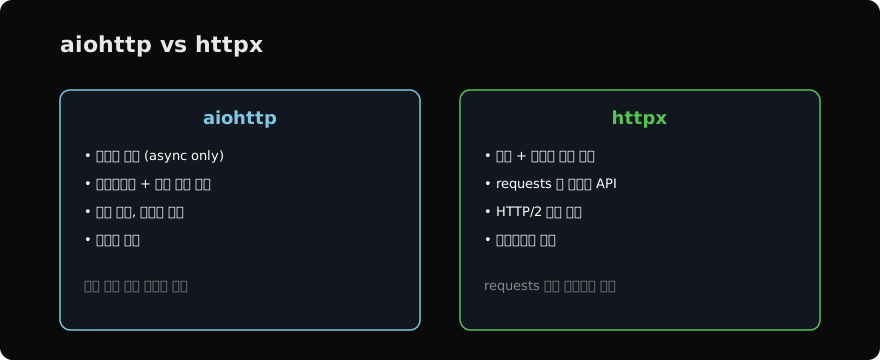
기존 requests 코드를 비동기로 옮기는 거라면 API가 친숙한 httpx가 부담이 적고, 비동기 서버까지 한 라이브러리로 다루거나 웹소켓이 필요하면 aiohttp가 어울린다.
aiohttp 기본 사용
aiohttp의 핵심은 ClientSession이다. 세션을 async with로 열고, 그 안에서 요청을 보낸다. 응답 본문도 await로 읽는다.
import asyncio
import aiohttp

async def fetch(session, url):
    async with session.get(url) as resp:
        return resp.status, await resp.text()

async def main():
    async with aiohttp.ClientSession() as session:
        status, body = await fetch(session, "https://example.com")
        print(status, len(body))

asyncio.run(main())
httpx 기본 사용
httpx는 AsyncClient를 쓴다. requests를 써 본 사람이라면 거의 그대로 읽힌다.
import asyncio
import httpx

async def main():
    async with httpx.AsyncClient() as client:
        resp = await client.get("https://example.com")
        print(resp.status_code, len(resp.text))

asyncio.run(main())
같은 httpx로 동기 코드도 짤 수 있다. with httpx.Client() as client: client.get(...)처럼 await만 빼면 된다. 동기/비동기 코드 구조가 거의 같아 이해하기 쉽다.
세션은 반드시 재사용한다
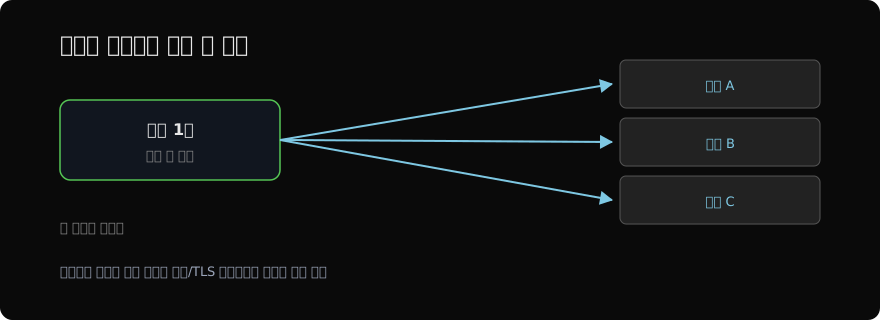
가장 중요한 원칙은 세션(클라이언트)을 요청마다 새로 만들지 않는 것이다. 세션은 연결 풀을 유지해 TCP 연결과 TLS 핸드셰이크를 재사용한다. 요청마다 세션을 새로 열면 그 비용이 매번 발생해 느려진다.
# ❌ 요청마다 세션 생성 — 비효율
async def bad(urls):
    results = []
    for url in urls:
        async with httpx.AsyncClient() as client:
            results.append((await client.get(url)).status_code)
    return results

# ✅ 세션 하나를 여러 요청이 공유
async def good(urls):
    async with httpx.AsyncClient() as client:
        return [(await client.get(u)).status_code for u in urls]
수백 개 요청을 동시에
세션 하나에서 asyncio.gather로 여러 요청을 묶으면 진짜 동시성이 나온다. 각 요청이 응답을 기다리는 동안 다른 요청이 진행되므로, 수백 개를 거의 동시에 처리할 수 있다.
import asyncio
import httpx

async def fetch(client, url):
    resp = await client.get(url)
    return resp.status_code

async def main(urls):
    async with httpx.AsyncClient() as client:
        results = await asyncio.gather(*(fetch(client, u) for u in urls))
    return results

urls = [f"https://example.com/page/{i}" for i in range(200)]
print(asyncio.run(main(urls)))
다만 동시 요청을 무한정 늘리면 상대 서버에 과부하를 주거나 로컬 자원이 고갈된다. 동시성을 제한하려면 asyncio.Semaphore로 한 번에 보내는 요청 수를 묶어 둔다. 세마포어는 뒤의 동기화 도구 글에서 자세히 다룬다.
import asyncio
import httpx

async def main(urls, limit=20):
    sem = asyncio.Semaphore(limit)
    async with httpx.AsyncClient() as client:
        async def fetch(url):
            async with sem:                  # 동시 20개로 제한
                return (await client.get(url)).status_code
        return await asyncio.gather(*(fetch(u) for u in urls))
이렇게 하면 안정적으로 대량 요청을 처리할 수 있다. 다음 글에서는 asyncio의 대안으로 더 안전한 동시성 모델을 제시하는 Trio와, 둘을 아우르는 AnyIO를 살펴본다.
지난 글: 블로킹 I/O와 asyncio
다음 글: Trio와 AnyIO
읽어주셔서 감사합니다. 😊
PALDYN / ARTICLE AI
글의 개념, 수식, 코드에 대해 물어보세요.
질문과 관련된 문단을 골라 답변의 문맥으로 사용합니다.생각 중 · 0초