

가상화(Virtualization)로 긴 목록 성능 최적화
수천~수만 개 아이템 목록을 DOM에 모두 올리지 않고 뷰포트에 보이는 것만 렌더링하는 가상화 기법을 react-window와 @tanstack/virtual을 사용해 실전 예제로 설명합니다.
지난 글에서 Profiler로 병목을 찾는 방법을 배웠다. 병목 원인 중 가장 극단적인 케이스는 수천 개 아이템을 한꺼번에 DOM에 마운트하는 긴 목록이다. memo나 useCallback으로 해결할 수 있는 수준이 아니다. 이때 필요한 것이 가상화(Virtualization) 다.
가상화란?
가상화는 화면에 보이는 아이템만 DOM에 존재하게 하고 나머지는 렌더링하지 않는 기법이다. 스크롤 위치에 따라 어떤 아이템을 보여줄지 계산하고, 화면 밖 아이템은 재활용하거나 언마운트한다.
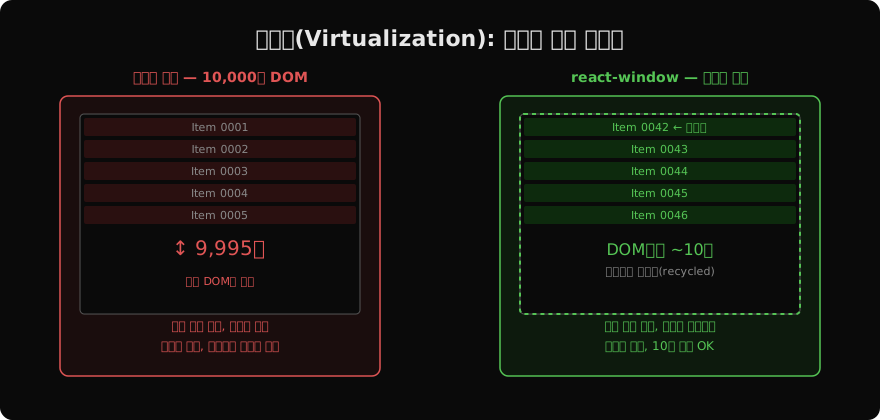
1만 개 아이템도 DOM에는 화면에 보이는 ~10개만 존재한다. 결과적으로:
- 초기 렌더 시간:
O(n)→ 상수에 가까움 - 메모리 사용량: 고정
- 스크롤 성능: 60fps 유지 가능
react-window 시작하기
npm install react-window
npm install @types/react-window  # TypeScript
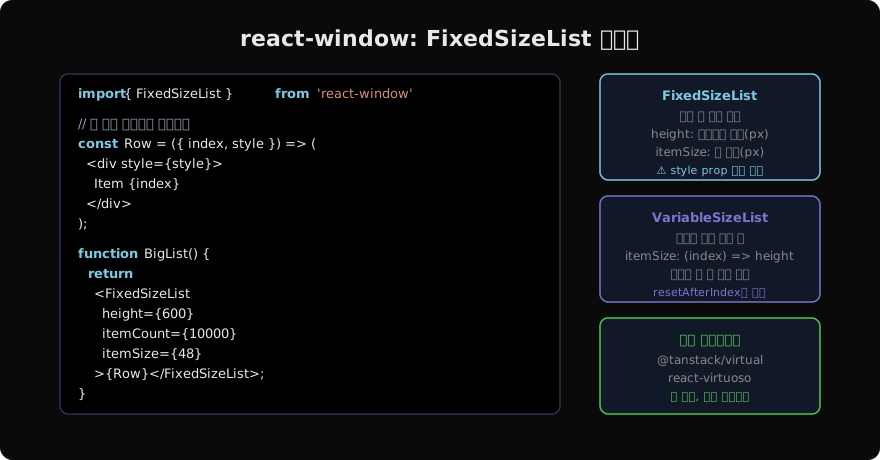
FixedSizeList: 모든 행 높이가 같을 때
import { FixedSizeList } from 'react-window';

type ItemData = { items: Product[] };

// Row 컴포넌트: index, style을 props로 받음
const Row = ({ index, style, data }: {
  index: number;
  style: React.CSSProperties;
  data: ItemData;
}) => (
  <div style={style}>  {/* style 필수! 위치·크기 계산값 */}
    <ProductCard product={data.items[index]} />
  </div>
);

function ProductList({ products }: { products: Product[] }) {
  const itemData: ItemData = useMemo(() => ({ items: products }), [products]);

  return (
    <FixedSizeList
      height={600}        // 컨테이너 높이 (픽셀)
      width="100%"        // 컨테이너 너비
      itemCount={products.length}  // 전체 아이템 수
      itemSize={80}       // 각 행 높이 (픽셀)
      itemData={itemData} // Row에 전달할 데이터
    >
      {Row}
    </FixedSizeList>
  );
}
⚠ Row에 전달되는 style prop을 반드시 최상위 <div>에 적용해야 한다. 이 값이 position: absolute + top, height 등 절대 위치 계산값이기 때문이다.
VariableSizeList: 행마다 높이가 다를 때
import { VariableSizeList } from 'react-window';

// 각 인덱스별 높이를 반환하는 함수
const getItemSize = (index: number) => {
  const item = items[index];
  return item.hasImage ? 120 : 60;
};

function DynamicList({ items }: { items: Item[] }) {
  const listRef = useRef<VariableSizeList>(null);

  return (
    <VariableSizeList
      height={600}
      width="100%"
      itemCount={items.length}
      itemSize={getItemSize}  // 함수
      ref={listRef}
    >
      {({ index, style }) => (
        <div style={style}>
          <ItemCard item={items[index]} />
        </div>
      )}
    </VariableSizeList>
  );
}getItemSize가 아이템의 높이를 반환하는 순수 함수여야 한다. 아이템 내용이 바뀌어 높이가 변경되면 listRef.current?.resetAfterIndex(changedIndex)를 호출해 캐시를 무효화한다.
FixedSizeGrid: 2D 그리드 가상화
이미지 갤러리, 스프레드시트 등 행·열 모두 가상화할 때 사용한다.
import { FixedSizeGrid } from 'react-window';

const Cell = ({ columnIndex, rowIndex, style }: {
  columnIndex: number;
  rowIndex: number;
  style: React.CSSProperties;
}) => {
  const item = items[rowIndex * COLUMN_COUNT + columnIndex];
  return (
    <div style={style}>
      <ImageTile image={item} />
    </div>
  );
};

<FixedSizeGrid
  columnCount={COLUMN_COUNT}
  columnWidth={200}
  height={600}
  rowCount={Math.ceil(items.length / COLUMN_COUNT)}
  rowHeight={200}
  width={880}
>
  {Cell}
</FixedSizeGrid>
@tanstack/virtual: 더 유연한 대안
react-window가 DOM 기반의 엄격한 구조를 요구하는 반면, @tanstack/virtual은 헤드리스 방식으로 더 자유로운 레이아웃을 지원한다.
import { useVirtualizer } from '@tanstack/react-virtual';

function VirtualList({ items }: { items: Item[] }) {
  const parentRef = useRef<HTMLDivElement>(null);

  const virtualizer = useVirtualizer({
    count: items.length,
    getScrollElement: () => parentRef.current,
    estimateSize: () => 60,  // 추정 높이
  });

  return (
    <div ref={parentRef} style={{ height: 600, overflow: 'auto' }}>
      <div style={{ height: virtualizer.getTotalSize() }}>
        {virtualizer.getVirtualItems().map((virtualItem) => (
          <div
            key={virtualItem.key}
            style={{
              position: 'absolute',
              top: 0,
              transform: `translateY(${virtualItem.start}px)`,
              height: virtualItem.size,
              width: '100%',
            }}
          >
            <ItemCard item={items[virtualItem.index]} />
          </div>
        ))}
      </div>
    </div>
  );
}@tanstack/virtual은 동적 높이, 역방향 스크롤, 무한 스크롤 등 복잡한 시나리오에 적합하다.
가상화 한계와 주의사항
가상화도 만능이 아니다.
- SEO: 가상화된 아이템은 HTML에 없으므로 크롤러가 볼 수 없다
- 접근성: 스크린 리더의 목록 탐색과 충돌할 수 있다 (
aria-rowcount등 추가 필요) - 스크롤 위치 복원: 페이지 이동 후 돌아올 때 스크롤 위치 유지가 까다롭다
- 중간 높이 측정: 아이템 실제 높이가 렌더 전에는 알 수 없어 추정값으로 시작해 측정 후 조정이 필요하다
아이템이 1,000개 미만이라면 가상화보다 페이지네이션이나 무한 스크롤 + 오래된 아이템 언마운트 방식이 더 단순하고 안전할 수 있다.
지난 글: React DevTools Profiler 활용법
다음 글: React Portal — DOM 경계 너머에 렌더링하기
읽어주셔서 감사합니다. 😊
PALDYN / ARTICLE AI
글의 개념, 수식, 코드에 대해 물어보세요.
질문과 관련된 문단을 골라 답변의 문맥으로 사용합니다.생각 중 · 0초