

국제화(i18n) — react-i18next로 다국어 지원 구현
react-i18next를 사용해 React 앱에 다국어 지원을 추가하는 방법을 설명합니다. 번역 파일 구조, 복수형 처리, Intl API를 활용한 날짜·숫자 포매팅, 언어 감지와 전환 패턴을 다룹니다.
지난 글에서 RHF와 Zod로 폼 유효성 검사를 구현했습니다. 이번에는 국제화(i18n)를 다룹니다. 전 세계 사용자를 대상으로 하는 서비스라면 언어, 날짜 형식, 숫자 형식이 달라져야 합니다. react-i18next는 React에서 가장 널리 사용되는 i18n 라이브러리로, 강력한 플러그인 생태계와 함께 실질적으로 표준 위치를 차지하고 있습니다.
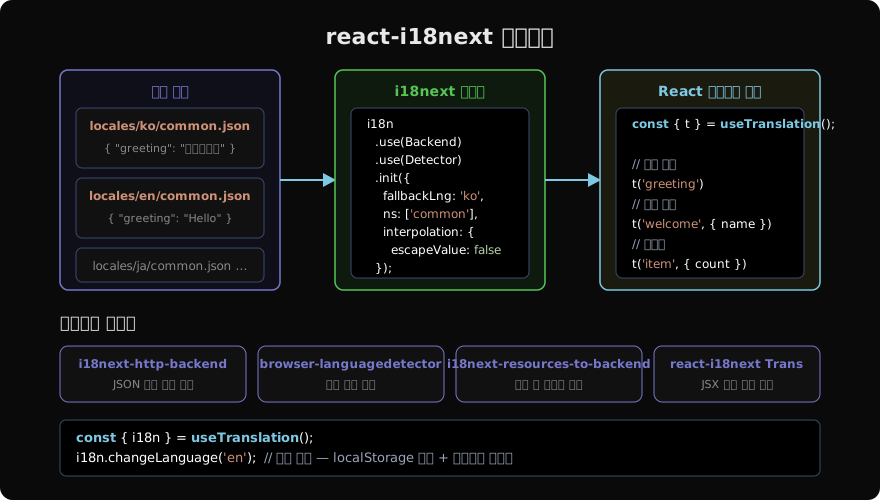
설치와 기본 설정
npm install i18next react-i18next i18next-http-backend i18next-browser-languagedetector// src/i18n.ts
import i18n from 'i18next';
import { initReactI18next } from 'react-i18next';
import Backend from 'i18next-http-backend';
import LanguageDetector from 'i18next-browser-languagedetector';
i18n
.use(Backend) // JSON 파일 HTTP 로드
.use(LanguageDetector) // 브라우저 언어 자동 감지
.use(initReactI18next) // React 바인딩
.init({
fallbackLng: 'ko', // 번역 없으면 한국어로 폴백
ns: ['common'], // 네임스페이스
defaultNS: 'common',
interpolation: {
escapeValue: false, // React가 XSS 처리하므로 불필요
},
});
export default i18n;// src/main.tsx
import './i18n'; // 앱 진입 전 초기화
import App from './App';번역 파일 구조
public/
└── locales/
    ├── ko/
    │   ├── common.json
    │   └── auth.json
    └── en/
        ├── common.json
        └── auth.json
// public/locales/ko/common.json
{
"greeting": "안녕하세요",
"welcome": "{{name}}님 환영합니다",
"item_one": "{{count}}개 항목",
"item_other": "{{count}}개 항목"
}// public/locales/en/common.json
{
"greeting": "Hello",
"welcome": "Welcome, {{name}}",
"item_one": "{{count}} item",
"item_other": "{{count}} items"
}점 표기법으로 중첩 키를 표현할 수 있습니다: "nav.home": "홈" 또는 객체 중첩 { "nav": { "home": "홈" } }.
컴포넌트에서 사용하기
import { useTranslation } from 'react-i18next';

function Header() {
  const { t, i18n } = useTranslation();

  return (
    <header>
      <h1>{t('greeting')}</h1>
      <p>{t('welcome', { name: '홍길동' })}</p>
      <p>{t('item', { count: 3 })}</p>

      <button onClick={() => i18n.changeLanguage('en')}>English</button>
      <button onClick={() => i18n.changeLanguage('ko')}>한국어</button>
    </header>
  );
}i18n.changeLanguage()는 언어를 전환하고 localStorage에 저장합니다. 다음 방문 시 LanguageDetector가 저장된 언어를 자동으로 복원합니다.
고급 패턴
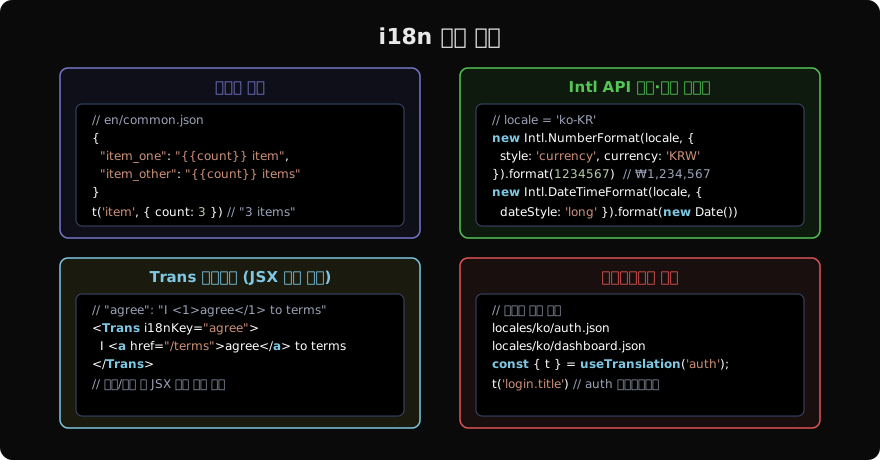
복수형 처리
영어처럼 단수/복수가 다른 언어를 위해 _one, _other 접미사로 복수형 규칙을 정의합니다.
// en/common.json
{
  "notification_one": "{{count}} notification",
  "notification_other": "{{count}} notifications"
}t('notification', { count: 1 }) // "1 notification"
t('notification', { count: 5 }) // "5 notifications"한국어는 단수/복수 구분이 없으므로 _other 하나만 정의해도 됩니다.
Intl API로 날짜·숫자 포매팅
날짜와 숫자는 번역 파일 대신 브라우저 내장 Intl API를 활용합니다. 로케일별 형식이 자동 처리됩니다.
// hooks/useFormatter.ts
export function useFormatter() {
  const { i18n } = useTranslation();
  const locale = i18n.language;

  const formatCurrency = (value: number, currency = 'KRW') =>
    new Intl.NumberFormat(locale, { style: 'currency', currency }).format(value);

  const formatDate = (date: Date, options?: Intl.DateTimeFormatOptions) =>
    new Intl.DateTimeFormat(locale, options ?? { dateStyle: 'medium' }).format(date);

  return { formatCurrency, formatDate };
}
const { formatCurrency, formatDate } = useFormatter();
formatCurrency(1234567) // 'ko': ₩1,234,567 / 'en': ₩1,234,567
formatDate(new Date()) // 'ko': 2026. 5. 25. / 'en': May 25, 2026Trans 컴포넌트 — JSX를 포함한 번역
링크나 굵은 텍스트 같은 JSX 요소를 번역 문자열 안에 포함해야 할 때 사용합니다.
// ko/common.json
{
  "agree": "<0>이용약관</0>에 동의합니다"
}
import { Trans } from 'react-i18next';
<Trans i18nKey="agree">
<a href="/terms">이용약관</a>에 동의합니다
</Trans>네임스페이스로 번역 파일 분리
대규모 앱에서는 기능별로 네임스페이스를 분리해 번들 크기를 관리합니다.
// 특정 네임스페이스만 로드
const { t } = useTranslation('auth');
t('login.title');  // auth.json의 login.title 키

// 여러 네임스페이스
const { t } = useTranslation(['common', 'dashboard']);
t('common:greeting');
t('dashboard:stats.title');
SSR/Next.js 환경
Next.js App Router에서는 next-intl이나 서버 컴포넌트를 고려한 설정이 필요합니다. next-i18next는 Pages Router 전용이므로 App Router에서는 next-intl을 권장합니다.
// next-intl 방식 (App Router)
import { getTranslations } from 'next-intl/server';

export default async function Page() {
  const t = await getTranslations('HomePage');
  return <h1>{t('title')}</h1>;
}
프로덕션 체크리스트
| 항목 | 방법 |
|---|---|
| 번역 키 누락 감지 | TypeScript as const + i18next-typescript-plugin |
| 언어 자동 감지 | LanguageDetector — navigator, localStorage, cookie 순서 |
| 번역 파일 지연 로드 | i18next-http-backend 또는 dynamic import |
| RTL 지원 | dir={i18n.dir()} — Arabic, Hebrew 등 |
| 날짜·숫자 | Intl API — 번역 파일 불필요 |
| 통화 | Intl.NumberFormat + currency 옵션 |
지난 글: 폼 유효성 검사 — RHF + Zod로 견고한 폼 만들기
다음 글: 웹 접근성(a11y) — ARIA와 키보드 내비게이션 구현
읽어주셔서 감사합니다. 😊
PALDYN / ARTICLE AI
글의 개념, 수식, 코드에 대해 물어보세요.
질문과 관련된 문단을 골라 답변의 문맥으로 사용합니다.생각 중 · 0초