

지식
AI
LLM 서빙 API 설계: OpenAI 호환 인터페이스 구축
FastAPI로 OpenAI 호환 LLM API를 설계하는 방법. 요청·응답 스키마, 엔드포인트 구조, 스트리밍 처리, 헬스체크, 미들웨어 설계까지 실전 가이드.
지난 글에서 KV 캐시 최적화로 GPU 메모리를 효율적으로 사용하는 방법을 알아봤다. 최적화된 추론 엔진이 있어도 외부에서 안정적으로 호출할 수 있는 API 레이어가 없으면 서비스가 되지 않는다. 이번 글은 LLM 추론 엔진을 실제 서비스로 연결하는 API 설계 전반을 다룬다.
OpenAI 호환 API를 선택하는 이유
LLM API 표준으로 OpenAI의 /v1/chat/completions 인터페이스가 사실상 표준이 됐다. vLLM, TGI, Ollama, LiteLLM 등 모든 주요 추론 엔진이 이 형식을 지원한다. 자체 서버를 OpenAI 호환으로 설계하면:
- 기존 OpenAI SDK (
openai패키지)를 그대로 사용할 수 있다 - 모델을 교체해도 클라이언트 코드를 수정하지 않아도 된다
- LangChain, LlamaIndex 등 생태계 도구와 즉시 연동된다
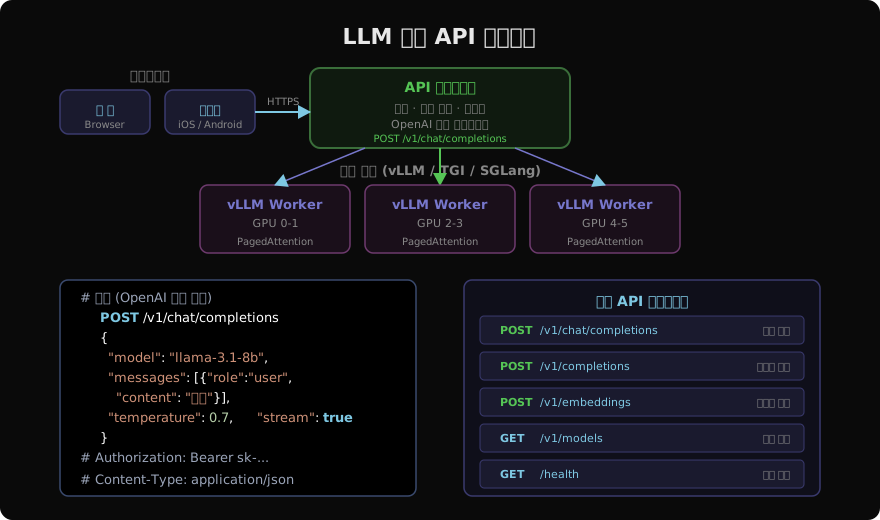
핵심 엔드포인트 설계
OpenAI 호환 서버의 필수 엔드포인트는 세 가지다.
from fastapi import FastAPI, HTTPException, Depends
from fastapi.middleware.cors import CORSMiddleware
from pydantic import BaseModel, Field
from typing import Optional, Literal
import time, uuid

app = FastAPI(title="LLM API Server", version="1.0.0")

# CORS 설정 (프론트엔드 연동 시 필수)
app.add_middleware(
    CORSMiddleware,
    allow_origins=["*"],
    allow_methods=["GET", "POST"],
    allow_headers=["*"],
)

# ── 요청 스키마 ──
class Message(BaseModel):
    role: Literal["system", "user", "assistant"]
    content: str

class ChatRequest(BaseModel):
    model: str
    messages: list[Message]
    temperature: float = Field(default=0.7, ge=0.0, le=2.0)
    max_tokens: Optional[int] = Field(default=None, le=32768)
    stream: bool = False
    top_p: float = Field(default=1.0, ge=0.0, le=1.0)
    frequency_penalty: float = Field(default=0.0, ge=-2.0, le=2.0)

# ── 응답 스키마 ──
class ChatCompletionChoice(BaseModel):
    index: int
    message: Message
    finish_reason: Literal["stop", "length", "content_filter"]

class UsageInfo(BaseModel):
    prompt_tokens: int
    completion_tokens: int
    total_tokens: int

class ChatCompletionResponse(BaseModel):
    id: str
    object: str = "chat.completion"
    created: int
    model: str
    choices: list[ChatCompletionChoice]
    usage: UsageInfo
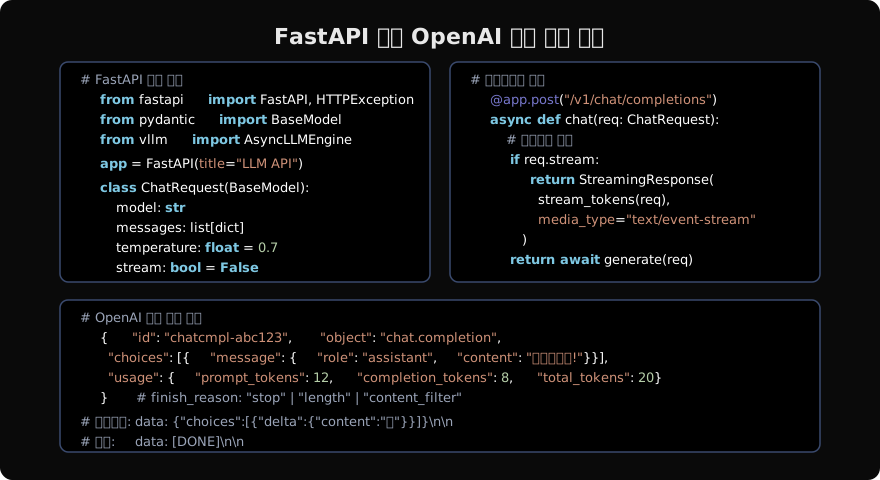
동기 vs 비동기 생성 엔드포인트
from vllm import AsyncLLMEngine, AsyncEngineArgs, SamplingParams
from fastapi.responses import StreamingResponse
import asyncio, json

# 엔진 초기화 (앱 시작 시 1회)
engine_args = AsyncEngineArgs(
    model="meta-llama/Llama-3.1-8B-Instruct",
    gpu_memory_utilization=0.92,
    enable_prefix_caching=True,
)
engine = AsyncLLMEngine.from_engine_args(engine_args)

def messages_to_prompt(messages: list[Message]) -> str:
    """메시지 리스트를 모델 프롬프트 형식으로 변환"""
    parts = []
    for m in messages:
        if m.role == "system":
            parts.append(f"<|system|>\n{m.content}")
        elif m.role == "user":
            parts.append(f"<|user|>\n{m.content}")
        elif m.role == "assistant":
            parts.append(f"<|assistant|>\n{m.content}")
    parts.append("<|assistant|>")
    return "\n".join(parts)

@app.post("/v1/chat/completions")
async def chat_completions(req: ChatRequest):
    prompt = messages_to_prompt(req.messages)
    params = SamplingParams(
        temperature=req.temperature,
        top_p=req.top_p,
        max_tokens=req.max_tokens or 1024,
        frequency_penalty=req.frequency_penalty,
    )
    request_id = str(uuid.uuid4())

    if req.stream:
        return StreamingResponse(
            _stream_generator(engine, prompt, params, request_id, req.model),
            media_type="text/event-stream",
            headers={"Cache-Control": "no-cache", "X-Accel-Buffering": "no"},
        )

    # 비스트리밍: 전체 결과 반환
    results = engine.generate(prompt, params, request_id)
    async for result in results:
        final = result
    output = final.outputs[0]
    return ChatCompletionResponse(
        id=f"chatcmpl-{request_id[:8]}",
        created=int(time.time()),
        model=req.model,
        choices=[ChatCompletionChoice(
            index=0,
            message=Message(role="assistant", content=output.text),
            finish_reason="stop" if output.finish_reason == "stop" else "length",
        )],
        usage=UsageInfo(
            prompt_tokens=len(final.prompt_token_ids),
            completion_tokens=len(output.token_ids),
            total_tokens=len(final.prompt_token_ids) + len(output.token_ids),
        ),
    )
스트리밍 제너레이터 구현
SSE(Server-Sent Events) 형식으로 토큰을 실시간 전송한다.
async def _stream_generator(engine, prompt, params, request_id, model):
    """OpenAI SSE 형식으로 토큰 스트리밍"""
    prev_len = 0
    async for result in engine.generate(prompt, params, request_id):
        output = result.outputs[0]
        new_text = output.text[prev_len:]
        prev_len = len(output.text)

        if new_text:
            chunk = {
                "id": f"chatcmpl-{request_id[:8]}",
                "object": "chat.completion.chunk",
                "created": int(time.time()),
                "model": model,
                "choices": [{
                    "index": 0,
                    "delta": {"content": new_text},
                    "finish_reason": None,
                }],
            }
            yield f"data: {json.dumps(chunk, ensure_ascii=False)}\n\n"

    # 종료 청크
    end_chunk = {
        "id": f"chatcmpl-{request_id[:8]}",
        "object": "chat.completion.chunk",
        "model": model,
        "choices": [{"index": 0, "delta": {}, "finish_reason": "stop"}],
    }
    yield f"data: {json.dumps(end_chunk)}\n\n"
    yield "data: [DONE]\n\n"
헬스체크와 모델 목록 엔드포인트
@app.get("/health")
async def health():
    return {"status": "ok", "timestamp": int(time.time())}

@app.get("/v1/models")
async def list_models():
    return {
        "object": "list",
        "data": [{
            "id": "llama-3.1-8b-instruct",
            "object": "model",
            "owned_by": "meta",
            "permission": [],
        }],
    }

# 임베딩 엔드포인트 (검색·RAG용)
class EmbeddingRequest(BaseModel):
    model: str
    input: str | list[str]

@app.post("/v1/embeddings")
async def create_embeddings(req: EmbeddingRequest):
    texts = [req.input] if isinstance(req.input, str) else req.input
    # 임베딩 모델은 별도 (sentence-transformers 등)
    embeddings = embedding_model.encode(texts).tolist()
    return {
        "object": "list",
        "data": [{"object": "embedding", "index": i, "embedding": e}
                 for i, e in enumerate(embeddings)],
        "usage": {"prompt_tokens": sum(len(t.split()) for t in texts),
                  "total_tokens": sum(len(t.split()) for t in texts)},
    }
인증 미들웨어
from fastapi.security import HTTPBearer, HTTPAuthorizationCredentials
import secrets

VALID_API_KEYS = {"sk-prod-xxxx", "sk-dev-yyyy"}  # 환경변수로 관리
security = HTTPBearer()

async def verify_api_key(
    credentials: HTTPAuthorizationCredentials = Depends(security)
):
    if credentials.credentials not in VALID_API_KEYS:
        raise HTTPException(status_code=401, detail="Invalid API key")
    return credentials.credentials

# 엔드포인트에 인증 의존성 추가
@app.post("/v1/chat/completions")
async def chat_completions(
    req: ChatRequest,
    api_key: str = Depends(verify_api_key),  # 인증 추가
):
    ...
클라이언트에서 호출하기
OpenAI SDK를 사용하면 base_url만 바꿔서 자체 서버를 호출할 수 있다.
from openai import OpenAI

# base_url을 자체 서버로 지정
client = OpenAI(
    api_key="sk-prod-xxxx",
    base_url="http://localhost:8000/v1",
)

# 일반 호출
response = client.chat.completions.create(
    model="llama-3.1-8b-instruct",
    messages=[{"role": "user", "content": "파이썬의 장점은?"}],
    temperature=0.7,
)
print(response.choices[0].message.content)

# 스트리밍 호출
stream = client.chat.completions.create(
    model="llama-3.1-8b-instruct",
    messages=[{"role": "user", "content": "파이썬의 장점은?"}],
    stream=True,
)
for chunk in stream:
    if chunk.choices[0].delta.content:
        print(chunk.choices[0].delta.content, end="", flush=True)
서버 실행
# 개발 환경
uvicorn main:app --host 0.0.0.0 --port 8000 --reload

# 프로덕션 (다중 워커, gunicorn + uvicorn)
gunicorn main:app \
  -w 1 \
  -k uvicorn.workers.UvicornWorker \
  --bind 0.0.0.0:8000 \
  --timeout 300 \
  --keep-alive 5
# LLM 추론은 CPU 바운드가 아니므로 워커 1개가 일반적
정리
LLM API 설계의 핵심은 OpenAI 호환성이다. 표준 인터페이스를 따르면 클라이언트 코드 재사용, 생태계 통합, 모델 교체 유연성을 모두 얻을 수 있다. FastAPI + vLLM의 조합은 비동기 스트리밍과 높은 처리량을 동시에 제공하는 가장 실용적인 스택이다.
지난 글: KV 캐시 완전 해설: LLM 추론 메모리의 핵심
다음 글: LLM 스트리밍 완전 가이드: SSE부터 WebSocket까지
읽어주셔서 감사합니다. 😊