

LLM 스트리밍 완전 가이드: SSE부터 WebSocket까지
LLM 응답을 실시간으로 전송하는 SSE 스트리밍 원리, FastAPI 서버 구현, Python·JavaScript 클라이언트, WebSocket 대안, 오류 처리와 재연결 전략까지 완전 해설.
지난 글에서 OpenAI 호환 API 서버의 기본 구조를 설계했다. LLM의 특성상 응답 생성에 수 초에서 수십 초가 걸리는데, 사용자가 완성된 응답을 기다리게 하면 UX가 크게 떨어진다. 스트리밍은 첫 토큰부터 즉시 전송해 ChatGPT처럼 타이핑되는 효과를 만든다.
스트리밍이 필요한 이유
LLM은 토큰을 하나씩 순차적으로 생성한다. 500토큰(약 375단어) 응답을 초당 50토큰으로 생성하면 완료까지 10초가 걸린다. 비스트리밍 방식에서는 사용자가 10초 동안 빈 화면을 본다. 스트리밍은 첫 토큰(TTFT, Time To First Token)을 0.3~2초 내에 보여줘서 체감 대기 시간을 10배 이상 줄인다.
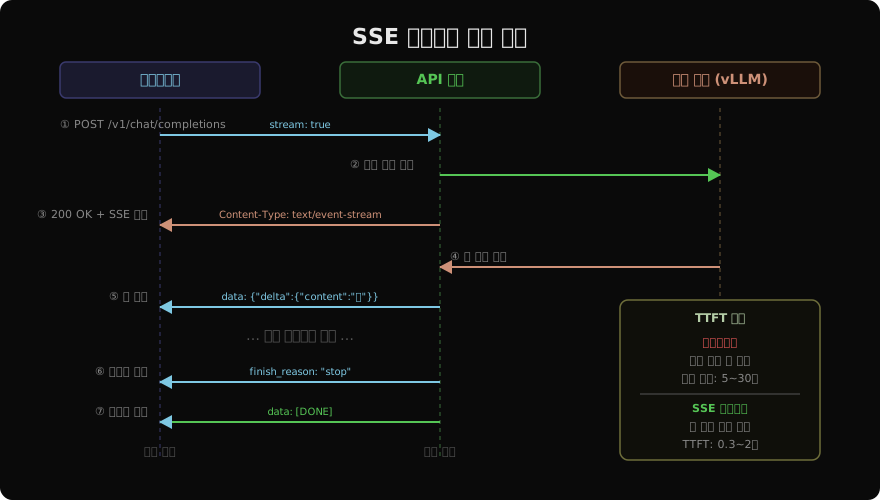
SSE(Server-Sent Events) 프로토콜
SSE는 서버에서 클라이언트로 단방향 실시간 메시지를 보내는 HTTP 표준 프로토콜이다. OpenAI가 LLM 스트리밍에 SSE를 채택했고, 이후 모든 LLM API의 표준이 됐다.
# SSE 데이터 형식 (HTTP 응답 본문)
HTTP/1.1 200 OK
Content-Type: text/event-stream
Cache-Control: no-cache
Connection: keep-alive

data: {"id":"chatcmpl-xyz","choices":[{"delta":{"role":"assistant"},"finish_reason":null}]}

data: {"id":"chatcmpl-xyz","choices":[{"delta":{"content":"안"},"finish_reason":null}]}

data: {"id":"chatcmpl-xyz","choices":[{"delta":{"content":"녕"},"finish_reason":null}]}

data: {"id":"chatcmpl-xyz","choices":[{"delta":{"content":"하세요"},"finish_reason":"stop"}]}

data: [DONE]
각 메시지는 data: 접두사로 시작하고, 빈 줄(\n\n)로 구분된다. [DONE]은 스트림 종료를 알리는 관례적 신호다.
FastAPI 스트리밍 서버 구현
from fastapi import FastAPI
from fastapi.responses import StreamingResponse
from vllm import AsyncLLMEngine, AsyncEngineArgs, SamplingParams
import json, uuid, time

app = FastAPI()
engine = AsyncLLMEngine.from_engine_args(
    AsyncEngineArgs(model="meta-llama/Llama-3.1-8B-Instruct")
)

async def token_stream(prompt: str, params: SamplingParams, req_id: str, model: str):
    """토큰을 SSE 청크로 변환하는 비동기 제너레이터"""
    prev_len = 0
    created = int(time.time())

    async for output in engine.generate(prompt, params, req_id):
        token_output = output.outputs[0]
        new_text = token_output.text[prev_len:]
        prev_len = len(token_output.text)

        if not new_text:
            continue

        chunk = {
            "id": f"chatcmpl-{req_id[:8]}",
            "object": "chat.completion.chunk",
            "created": created,
            "model": model,
            "choices": [{
                "index": 0,
                "delta": {"content": new_text},
                "finish_reason": None,
            }],
        }
        yield f"data: {json.dumps(chunk, ensure_ascii=False)}\n\n"

    # 종료 시그널
    final_chunk = {
        "id": f"chatcmpl-{req_id[:8]}",
        "object": "chat.completion.chunk",
        "created": created,
        "model": model,
        "choices": [{"index": 0, "delta": {}, "finish_reason": "stop"}],
    }
    yield f"data: {json.dumps(final_chunk)}\n\n"
    yield "data: [DONE]\n\n"

@app.post("/v1/chat/completions")
async def chat(req: dict):
    if not req.get("stream"):
        # 비스트리밍 처리 (생략)
        ...

    prompt = format_messages(req["messages"])
    params = SamplingParams(
        temperature=req.get("temperature", 0.7),
        max_tokens=req.get("max_tokens", 1024),
    )
    req_id = str(uuid.uuid4())

    return StreamingResponse(
        token_stream(prompt, params, req_id, req.get("model", "")),
        media_type="text/event-stream",
        headers={
            "Cache-Control": "no-cache",
            "X-Accel-Buffering": "no",  # Nginx 버퍼링 비활성화
            "Transfer-Encoding": "chunked",
        },
    )
클라이언트 구현
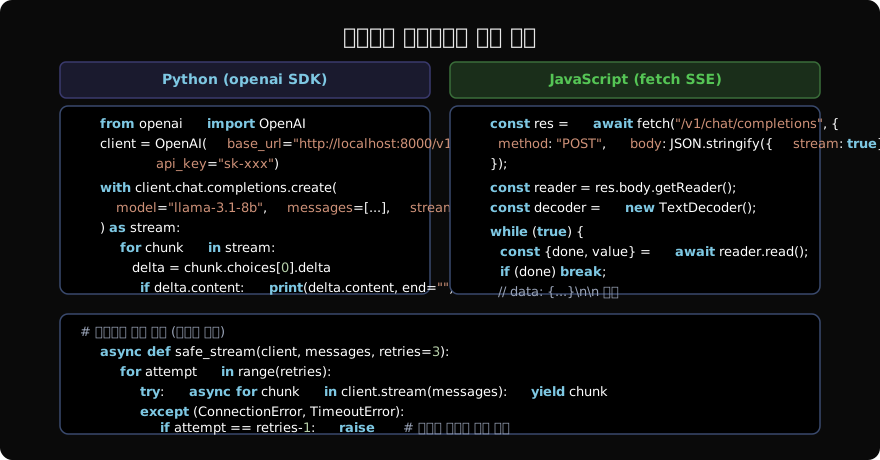
Python 비동기 클라이언트
import asyncio
from openai import AsyncOpenAI

async def stream_chat(question: str):
    client = AsyncOpenAI(
        base_url="http://localhost:8000/v1",
        api_key="sk-xxx",
    )

    full_text = ""
    async with client.chat.completions.stream(
        model="llama-3.1-8b-instruct",
        messages=[{"role": "user", "content": question}],
    ) as stream:
        async for chunk in stream:
            delta = chunk.choices[0].delta
            if delta.content:
                print(delta.content, end="", flush=True)
                full_text += delta.content

    print()  # 줄바꿈
    return full_text

asyncio.run(stream_chat("한국의 4계절을 설명해줘"))
JavaScript/TypeScript 클라이언트
async function streamChat(question: string): Promise<string> {
  const response = await fetch("/v1/chat/completions", {
    method: "POST",
    headers: {
      "Content-Type": "application/json",
      "Authorization": "Bearer sk-xxx",
    },
    body: JSON.stringify({
      model: "llama-3.1-8b-instruct",
      messages: [{ role: "user", content: question }],
      stream: true,
    }),
  });

  const reader = response.body!.getReader();
  const decoder = new TextDecoder();
  let fullText = "";

  while (true) {
    const { done, value } = await reader.read();
    if (done) break;

    const lines = decoder.decode(value).split("\n");
    for (const line of lines) {
      if (!line.startsWith("data: ")) continue;
      const data = line.slice(6).trim();
      if (data === "[DONE]") return fullText;

      const chunk = JSON.parse(data);
      const content = chunk.choices?.[0]?.delta?.content ?? "";
      if (content) {
        fullText += content;
        // React 상태 업데이트 또는 DOM 조작
        document.getElementById("output")!.textContent = fullText;
      }
    }
  }
  return fullText;
}
EventSource API (브라우저 기본 SSE)
POST가 아닌 GET 요청을 쓰는 경우, 브라우저의 기본 EventSource API를 사용할 수 있다. 단, OpenAI 호환 API는 POST를 사용하므로 직접 fetch를 써야 한다.
// GET 기반 SSE (서버 설계에 따라 선택)
const source = new EventSource("/stream?q=안녕하세요");

source.onmessage = (event) => {
  if (event.data === "[DONE]") {
    source.close();
    return;
  }
  const chunk = JSON.parse(event.data);
  console.log(chunk.choices[0].delta.content);
};

source.onerror = () => {
  // EventSource는 자동 재연결됨
  console.log("재연결 중...");
};
WebSocket 대안
SSE는 서버→클라이언트 단방향이다. 실시간 양방향 통신(예: 멀티턴 음성 대화)이 필요하면 WebSocket을 쓴다.
from fastapi import WebSocket

@app.websocket("/ws/chat")
async def websocket_chat(ws: WebSocket):
    await ws.accept()

    try:
        while True:
            # 클라이언트 메시지 수신
            data = await ws.receive_json()
            messages = data["messages"]

            # 스트리밍 응답 전송
            prompt = format_messages(messages)
            params = SamplingParams(max_tokens=1024)
            req_id = str(uuid.uuid4())

            async for output in engine.generate(prompt, params, req_id):
                token = output.outputs[0].text
                await ws.send_json({
                    "type": "token",
                    "content": token,
                })

            await ws.send_json({"type": "done"})

    except Exception:
        await ws.close()
Nginx 프록시 설정
스트리밍은 프록시 서버의 버퍼링 설정이 중요하다. Nginx가 응답을 버퍼링하면 토큰이 묶음으로 전달돼 스트리밍 효과가 사라진다.
location /v1/ {
    proxy_pass http://llm_backend;
    proxy_http_version 1.1;

    # 스트리밍 필수 설정
    proxy_buffering off;           # 버퍼링 비활성화
    proxy_cache off;
    proxy_read_timeout 300s;       # 긴 생성 시간 허용
    proxy_send_timeout 300s;

    # SSE 연결 유지
    proxy_set_header Connection "";
    chunked_transfer_encoding on;
}
오류 처리와 재연결
import asyncio

async def resilient_stream(client, messages: list, max_retries: int = 3):
    """재시도 로직을 포함한 안전한 스트리밍"""
    for attempt in range(max_retries):
        try:
            buffer = ""
            async with client.chat.completions.stream(
                model="llama-3.1-8b-instruct",
                messages=messages,
            ) as stream:
                async for chunk in stream:
                    content = chunk.choices[0].delta.content or ""
                    buffer += content
                    yield content
            return  # 성공하면 종료

        except Exception as e:
            if attempt == max_retries - 1:
                raise  # 최대 재시도 초과

            # 지수 백오프
            wait = 2 ** attempt
            print(f"스트림 오류 ({e}), {wait}초 후 재시도...")
            await asyncio.sleep(wait)

            # 이미 출력한 부분은 제외하고 재시작 (중복 방지)
            messages = messages + [
                {"role": "assistant", "content": buffer},
                {"role": "user", "content": "[이어서 계속해줘]"},
            ]
정리
스트리밍은 LLM 서비스의 UX를 결정하는 핵심 기능이다:
- SSE: HTTP 표준, POST 지원, OpenAI 호환 방식 (대부분의 경우)
- WebSocket: 양방향 통신 필요 시 (음성·실시간 대화)
- Nginx 설정:
proxy_buffering off필수 - 클라이언트: Python은
openai.AsyncOpenAI, JS는fetch+ReadableStream - 오류 처리: 재연결 시 이미 출력된 내용 추적해 중복 방지
지난 글: LLM 서빙 API 설계: OpenAI 호환 인터페이스 구축
다음 글: LLM API 속도 제한: Rate Limiting 전략과 구현
읽어주셔서 감사합니다. 😊