

Spring Boot Actuator — 운영 모니터링 엔드포인트 완전 정복
Spring Boot Actuator의 핵심 엔드포인트(/health, /metrics, /info, /env)를 이해하고, 보안 설정과 커스텀 엔드포인트 구현 방법을 실전 코드로 정리합니다.
지난 글에서 테스트 픽스처 격리 전략을 살펴봤다. 테스트를 잘 갖춰 배포한 애플리케이션도 운영 중에 문제가 생길 수 있다. 이런 상황에서 “지금 서비스가 살아 있는가?”, “DB 연결은 정상인가?”, “요청 처리 시간이 얼마인가?” 같은 질문에 즉각 답할 수 있어야 한다. Spring Boot Actuator는 이 질문들에 답하는 HTTP 엔드포인트를 자동으로 제공한다.
Spring Boot Actuator란
Actuator는 Spring Boot 애플리케이션의 운영(Operation) 측면을 노출하는 기능이다. 의존성 하나를 추가하면 수십 개의 내장 엔드포인트가 자동으로 등록된다.
<!-- pom.xml -->
<dependency>
    <groupId>org.springframework.boot</groupId>
    <artifactId>spring-boot-starter-actuator</artifactId>
</dependency>
Gradle이라면:
// build.gradle
implementation 'org.springframework.boot:spring-boot-starter-actuator'
기본적으로 /actuator/health와 /actuator/info만 웹으로 노출된다. 나머지 엔드포인트는 활성화 설정이 필요하다.
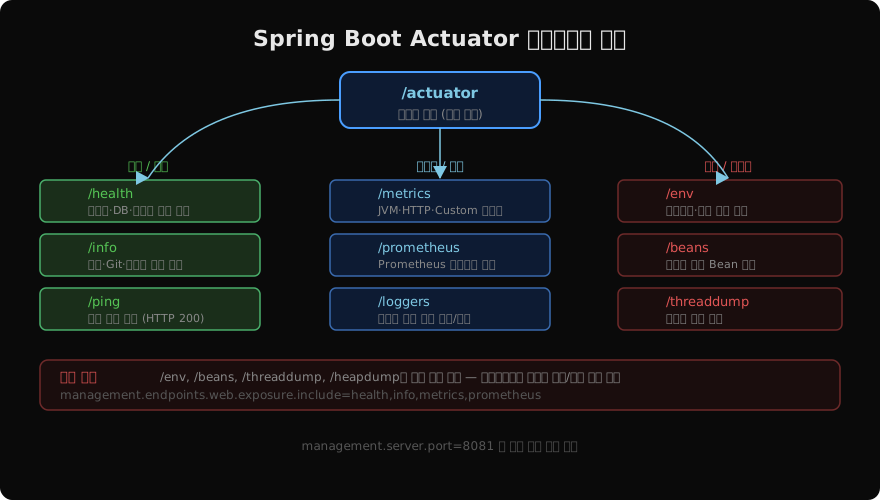
핵심 엔드포인트 상세 분석
/health — 서비스 생존 확인
/health는 가장 자주 쓰이는 엔드포인트다. Kubernetes, AWS ELB, Prometheus 등 대부분의 인프라 도구가 이 엔드포인트로 서비스 가용성을 확인한다.
# 기본 응답: status만
GET /actuator/health
{"status":"UP"}

# 상세 응답 (설정 필요)
GET /actuator/health
{
  "status": "UP",
  "components": {
    "db": {"status": "UP", "details": {"database": "PostgreSQL"}},
    "diskSpace": {"status": "UP", "details": {"total": 53687091200}},
    "redis": {"status": "UP"}
  }
}
상세 정보 노출 설정:
management:
  endpoint:
    health:
      show-details: always   # always | never | when-authorized
      show-components: always
/metrics — 메트릭 수집
/metrics는 JVM, HTTP 요청, 스레드풀 등 다양한 메트릭을 제공한다.
# 사용 가능한 메트릭 목록
GET /actuator/metrics
{
  "names": [
    "jvm.memory.used",
    "http.server.requests",
    "hikaricp.connections.active",
    ...
  ]
}

# 특정 메트릭 상세 조회
GET /actuator/metrics/http.server.requests?tag=uri:/api/users&tag=status:200
/loggers — 런타임 로그 레벨 변경
운영 중 로그 레벨을 재시작 없이 변경할 수 있다.
# 현재 로그 레벨 확인
GET /actuator/loggers/com.example.service

# 로그 레벨 변경 (POST)
POST /actuator/loggers/com.example.service
Content-Type: application/json
{"configuredLevel": "DEBUG"}
보안 설정 — 반드시 필요
/env, /beans, /heapdump 같은 엔드포인트는 민감 정보를 노출할 수 있다. 프로덕션 환경에서는 노출 엔드포인트를 최소화하고, Spring Security로 인증을 요구해야 한다.
# application.yml — 최소 노출 원칙
management:
  server:
    port: 8081              # 별도 포트로 분리 (방화벽 활용)
  endpoints:
    web:
      exposure:
        include: health,info,metrics,prometheus
  endpoint:
    health:
      show-details: when-authorized
// Spring Security와 Actuator 통합
@Configuration
public class ActuatorSecurityConfig {
@Bean
@Order(1) // Actuator 보안 규칙 우선 적용
public SecurityFilterChain actuatorSecurity(HttpSecurity http) throws Exception {
return http
.securityMatcher(EndpointRequest.toAnyEndpoint())
.authorizeHttpRequests(auth -> auth
.requestMatchers(EndpointRequest.to("health", "info")).permitAll()
.anyRequest().hasRole("ACTUATOR_ADMIN")
)
.httpBasic(Customizer.withDefaults())
.build();
}
}커스텀 엔드포인트 구현
내장 엔드포인트 외에 비즈니스 도메인에 특화된 엔드포인트를 직접 만들 수 있다.
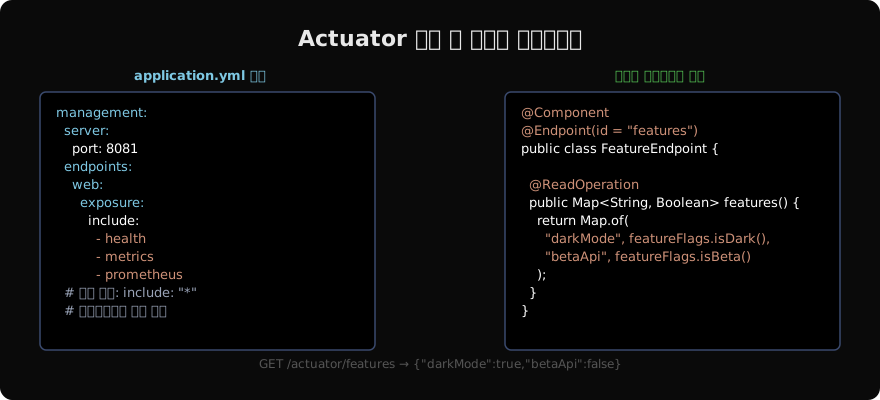
@Component
@Endpoint(id = "cache-stats")  // /actuator/cache-stats
public class CacheStatsEndpoint {

    private final CacheManager cacheManager;

    public CacheStatsEndpoint(CacheManager cacheManager) {
        this.cacheManager = cacheManager;
    }

    @ReadOperation  // GET
    public Map<String, Object> cacheStats() {
        return cacheManager.getCacheNames().stream()
            .collect(Collectors.toMap(
                name -> name,
                name -> {
                    Cache cache = cacheManager.getCache(name);
                    return Map.of("size", getCacheSize(cache));
                }
            ));
    }

    @DeleteOperation  // DELETE
    public void evictAll() {
        cacheManager.getCacheNames()
            .forEach(name -> cacheManager.getCache(name).clear());
    }
}
@ReadOperation = GET, @WriteOperation = POST, @DeleteOperation = DELETE에 매핑된다.
/info 엔드포인트 활용
빌드 정보와 Git 커밋 정보를 /info로 노출하면 배포 버전을 쉽게 확인할 수 있다.
# application.yml
management:
  info:
    git:
      mode: full    # simple | full
    build:
      enabled: true
    env:
      enabled: true

info:
  app:
    name: my-service
    version: ${project.version:unknown}
    environment: ${spring.profiles.active:default}
// build.gradle: Git 정보 포함
plugins {
id 'com.gorylenko.gradle-git-properties' version '2.4.1'
}
springBoot {
buildInfo() // META-INF/build-info.properties 생성
}이렇게 설정하면 GET /actuator/info로 현재 배포 버전, Git 브랜치, 커밋 해시를 확인할 수 있어 운영 디버깅에 유용하다.
지난 글: Spring 테스트 — 픽스처 격리 전략 완전 정복
다음 글: Spring Boot Actuator — 커스텀 HealthIndicator 구현
읽어주셔서 감사합니다. 😊
PALDYN / ARTICLE AI
글의 개념, 수식, 코드에 대해 물어보세요.
질문과 관련된 문단을 골라 답변의 문맥으로 사용합니다.생각 중 · 0초