

Spring Boot Actuator — 커스텀 HealthIndicator 구현
HealthIndicator 인터페이스를 구현해 외부 API, 메시지 큐, 비즈니스 규칙을 /health 엔드포인트에 통합하고, CompositeHealthContributor로 계층적 헬스 체크를 구성하는 방법을 실전 코드로 설명합니다.
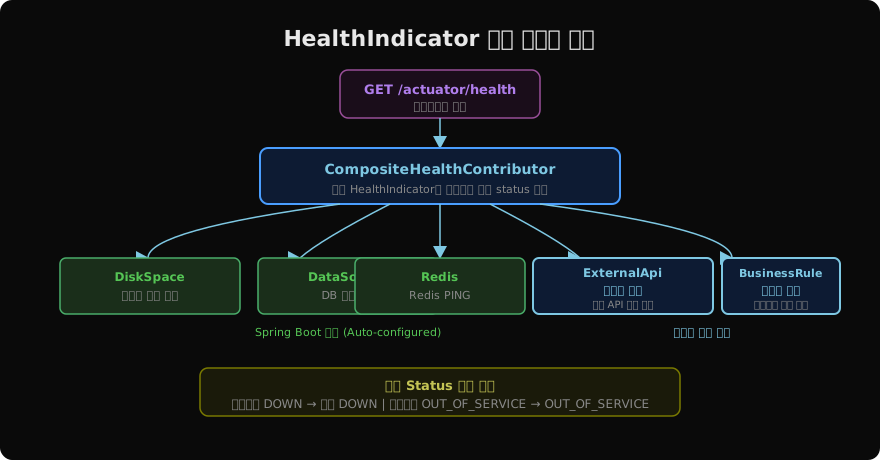
지난 글에서 Spring Boot Actuator의 기본 엔드포인트와 보안 설정을 살펴봤다. Actuator의 /health 엔드포인트는 DB, 디스크, Redis 같은 표준 인프라를 자동으로 감지해 상태를 보고한다. 하지만 실무에서는 여기에 더해 외부 결제 API가 응답하는가, Kafka 토픽이 정상인가, 큐 쌓임이 임계치를 넘지 않는가 같은 비즈니스 도메인에 특화된 헬스 체크가 필요하다. 커스텀 HealthIndicator를 구현하면 이 모든 것을 /health 하나에 통합할 수 있다.
HealthIndicator 인터페이스
Spring Boot의 헬스 체크 시스템은 HealthIndicator 인터페이스 하나에 의존한다.
@FunctionalInterface
public interface HealthIndicator extends HealthContributor {
    Health health();
}
구현 클래스를 Spring Bean으로 등록하면 Actuator가 자동으로 감지하고 /health에 포함시킨다. Bean 이름이 엔드포인트 경로가 된다. externalApiHealthIndicator → /actuator/health/externalApi
외부 API 헬스 체크 구현
실무에서 가장 흔한 커스텀 헬스 체크는 외부 API 연동 상태 확인이다.
@Component  // Bean 이름: paymentApiHealthIndicator → /health/paymentApi
public class PaymentApiHealthIndicator implements HealthIndicator {

    private final PaymentClient paymentClient;
    private final String apiBaseUrl;

    public PaymentApiHealthIndicator(
            PaymentClient paymentClient,
            @Value("${payment.api.url}") String apiBaseUrl) {
        this.paymentClient = paymentClient;
        this.apiBaseUrl = apiBaseUrl;
    }

    @Override
    public Health health() {
        try {
            long start = System.currentTimeMillis();
            paymentClient.ping();
            long responseTime = System.currentTimeMillis() - start;

            if (responseTime > 3000) {
                // 응답은 왔지만 너무 느림 → WARN 상태
                return Health.status("WARN")
                        .withDetail("url", apiBaseUrl)
                        .withDetail("responseTime", responseTime + "ms")
                        .withDetail("threshold", "3000ms")
                        .build();
            }

            return Health.up()
                    .withDetail("url", apiBaseUrl)
                    .withDetail("responseTime", responseTime + "ms")
                    .build();

        } catch (ConnectTimeoutException e) {
            return Health.down()
                    .withDetail("url", apiBaseUrl)
                    .withDetail("error", "connection timeout")
                    .build();
        } catch (Exception e) {
            return Health.down(e)
                    .withDetail("url", apiBaseUrl)
                    .build();
        }
    }
}
Health 빌더의 주요 메서드:
| 메서드 | 설명 | HTTP Status |
|---|---|---|
Health.up() | 정상 | 200 |
Health.down() | 장애 | 503 |
Health.outOfService() | 의도적 비활성화 | 503 |
Health.status("WARN") | 커스텀 상태 | 200 |
.withDetail(key, value) | 상세 정보 추가 | — |
큐 백로그 헬스 체크
메시지 큐의 쌓임 정도를 헬스 체크에 반영하는 예다.
@Component
public class KafkaLagHealthIndicator implements HealthIndicator {

    private final KafkaConsumerLagMonitor lagMonitor;

    @Override
    public Health health() {
        Map<String, Long> lags = lagMonitor.getLagByTopic();
        long maxLag = lags.values().stream().mapToLong(Long::longValue).max().orElse(0);

        if (maxLag > 100_000) {
            return Health.outOfService()
                    .withDetail("maxLag", maxLag)
                    .withDetail("threshold", 100_000)
                    .withDetail("lagByTopic", lags)
                    .build();
        }

        if (maxLag > 10_000) {
            return Health.status("WARN")
                    .withDetail("maxLag", maxLag)
                    .withDetail("lagByTopic", lags)
                    .build();
        }

        return Health.up()
                .withDetail("maxLag", maxLag)
                .build();
    }
}
CompositeHealthContributor — 계층적 헬스 체크
여러 외부 API를 각각의 HealthIndicator로 구현하면 /health 응답이 너무 많은 컴포넌트로 흩어진다. CompositeHealthContributor를 사용하면 관련 헬스 체크를 그룹으로 묶을 수 있다.
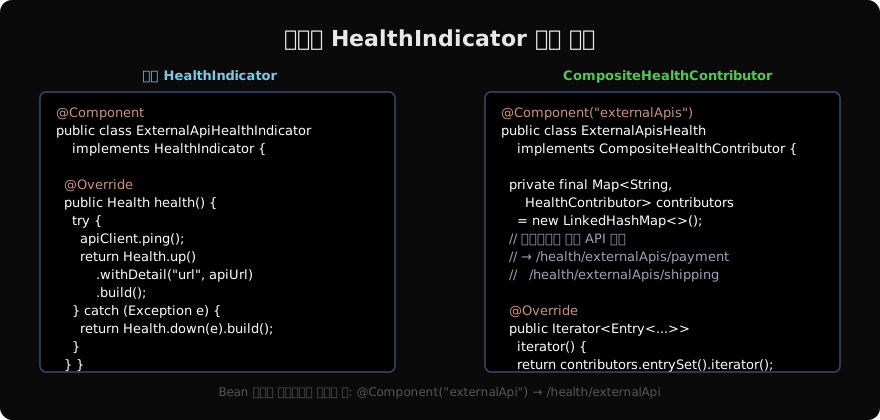
@Component("paymentServices")  // /health/paymentServices
public class PaymentServicesHealth implements CompositeHealthContributor {

    private final Map<String, HealthContributor> contributors = new LinkedHashMap<>();

    public PaymentServicesHealth(
            PaymentGatewayHealthIndicator paymentGateway,
            FraudDetectionHealthIndicator fraudDetection,
            SettlementApiHealthIndicator settlementApi) {

        contributors.put("gateway", paymentGateway);       // /health/paymentServices/gateway
        contributors.put("fraud", fraudDetection);         // /health/paymentServices/fraud
        contributors.put("settlement", settlementApi);     // /health/paymentServices/settlement
    }

    @Override
    public HealthContributor getContributor(String name) {
        return contributors.get(name);
    }

    @Override
    public Iterator<Map.Entry<String, HealthContributor>> iterator() {
        return contributors.entrySet().iterator();
    }
}
응답 구조:
{
  "status": "UP",
  "components": {
    "paymentServices": {
      "status": "UP",
      "components": {
        "gateway": {"status": "UP"},
        "fraud": {"status": "UP"},
        "settlement": {"status": "WARN", "details": {"lag": "1500ms"}}
      }
    }
  }
}
헬스 체크 성능 고려사항
헬스 체크는 자주 호출된다. 실제 API 호출을 매번 실행하면 부하가 생긴다. 다음 전략을 고려하자.
@Component
public class CachedExternalApiHealthIndicator implements HealthIndicator {

    private volatile Health cachedHealth = Health.unknown().build();
    private volatile long lastCheck = 0;
    private static final long TTL_MS = 30_000; // 30초 캐시

    @Override
    public Health health() {
        long now = System.currentTimeMillis();
        if (now - lastCheck > TTL_MS) {
            cachedHealth = performCheck();
            lastCheck = now;
        }
        return cachedHealth;
    }

    private Health performCheck() {
        try {
            externalApiClient.ping();
            return Health.up().build();
        } catch (Exception e) {
            return Health.down(e).build();
        }
    }
}
또는 @Scheduled로 주기적으로 백그라운드 체크를 돌리고 결과를 캐시해 두는 방법도 효과적이다.
커스텀 Status 순서 정의
WARN 같은 커스텀 Status가 전체 헬스 집계에서 어떤 우선순위를 갖는지 설정할 수 있다.
management:
  endpoint:
    health:
      status:
        order: DOWN, OUT_OF_SERVICE, WARN, UNKNOWN, UP
        http-mapping:
          WARN: 200       # WARN은 HTTP 200 반환 (서비스 가동 중)
          DOWN: 503
          OUT_OF_SERVICE: 503
지난 글: Spring Boot Actuator — 운영 모니터링 엔드포인트 완전 정복
다음 글: Micrometer + Prometheus — Spring Boot 메트릭 수집과 시각화
읽어주셔서 감사합니다. 😊
PALDYN / ARTICLE AI
글의 개념, 수식, 코드에 대해 물어보세요.
질문과 관련된 문단을 골라 답변의 문맥으로 사용합니다.생각 중 · 0초