

Spring CORS 설정 완전 정복: @CrossOrigin부터 Security 연동까지
@CrossOrigin, WebMvcConfigurer, CorsFilter 세 가지 CORS 설정 방식의 차이와 사용 시나리오, Preflight 요청 처리 원리, Spring Security와의 연동 방법, 환경별 Origin 관리를 코드 예제와 함께 완전히 정리합니다.
지난 글에서 파일 업로드·다운로드 처리를 살펴봤습니다. REST API를 외부 프론트엔드와 연결하다 보면 반드시 마주치는 것이 CORS(Cross-Origin Resource Sharing) 오류입니다. 이번에는 CORS가 왜 발생하는지부터 Spring에서 설정하는 세 가지 방법, 그리고 Spring Security와 함께 사용할 때의 주의점까지 정리합니다.
CORS가 발생하는 이유
브라우저는 Same-Origin Policy(동일 출처 정책)에 따라 스크립트가 다른 출처(프로토콜·도메인·포트 중 하나라도 다르면 다른 출처)의 응답을 읽는 것을 차단합니다. 프론트엔드(https://app.example.com)가 API(https://api.example.com)를 호출하면 출처가 다르기 때문에 브라우저가 CORS 오류를 냅니다.
CORS는 서버가 응답 헤더에 허용 정보를 담아 브라우저에게 “이 출처의 요청을 허용한다”고 알려주는 표준입니다.
Preflight 요청
브라우저는 단순 요청(Simple Request)이 아닌 경우, 실제 요청을 보내기 전에 OPTIONS 메서드로 사전 요청(Preflight)을 보냅니다.
OPTIONS /api/users HTTP/1.1
Origin: https://app.example.com
Access-Control-Request-Method: POST
Access-Control-Request-Headers: Content-Type, Authorization
서버가 이 요청에 적절한 응답 헤더를 보내야 실제 요청이 전송됩니다.
HTTP/1.1 200 OK
Access-Control-Allow-Origin: https://app.example.com
Access-Control-Allow-Methods: GET, POST, PUT, DELETE
Access-Control-Allow-Headers: Content-Type, Authorization
Access-Control-Max-Age: 3600Access-Control-Max-Age는 Preflight 결과를 캐싱하는 시간(초)입니다. 3600초로 설정하면 1시간 동안 같은 요청에 대해 Preflight를 생략합니다.
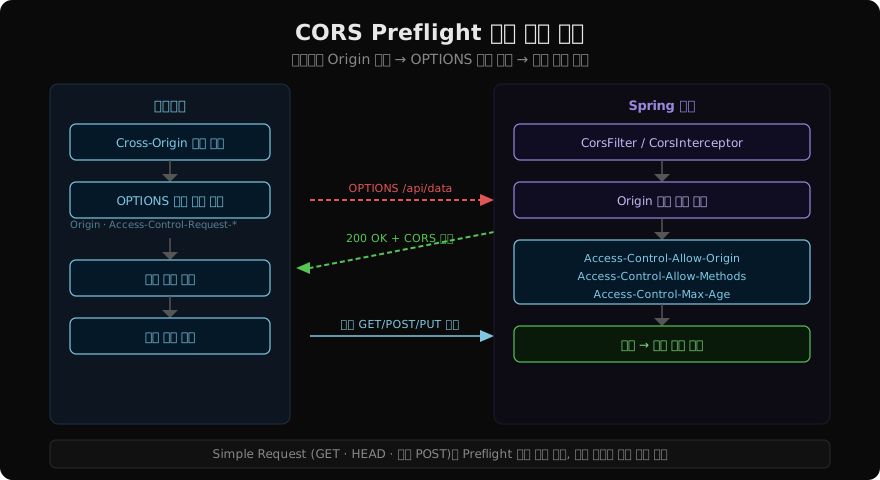
Simple Request(Preflight 없이 바로 전송되는 경우)의 조건:
- 메서드: GET, HEAD, POST 중 하나
- 헤더: 기본 헤더 외
Accept,Accept-Language,Content-Language,Content-Type(값이 제한됨)만 포함 Content-Type이application/x-www-form-urlencoded,multipart/form-data,text/plain중 하나
REST API에서 JSON 요청(Content-Type: application/json)을 보내거나 Authorization 헤더를 포함하면 Preflight가 발생합니다.
방법 1: @CrossOrigin (컨트롤러 수준)
개별 컨트롤러나 메서드에 적용하는 가장 세밀한 방법입니다.
@RestController
@RequestMapping("/api/v1/users")
@CrossOrigin(
    origins = "https://app.example.com",
    methods = {RequestMethod.GET, RequestMethod.POST},
    allowedHeaders = "*",
    allowCredentials = "true",
    maxAge = 3600
)
public class UserController {

    // 이 컨트롤러 내 모든 메서드에 CORS 허용

    @CrossOrigin(origins = "https://admin.example.com") // 메서드별 추가 설정
    @GetMapping("/admin-only")
    public List<UserDto> adminList() { /* ... */ }
}
컨트롤러 수준 @CrossOrigin과 메서드 수준 @CrossOrigin이 함께 있으면 두 설정이 합쳐집니다. 빠른 테스트나 특정 엔드포인트에만 다른 CORS 정책이 필요할 때 유용하지만, 설정이 코드 곳곳에 흩어지므로 프로덕션 전체 적용에는 적합하지 않습니다.
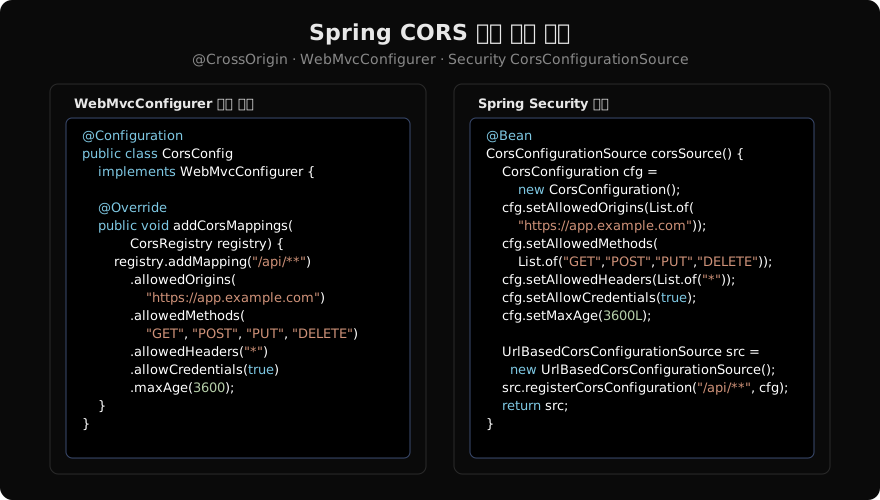
방법 2: WebMvcConfigurer.addCorsMappings() (전역 설정)
모든 컨트롤러에 일관된 CORS 정책을 적용하는 권장 방법입니다.
@Configuration
public class CorsConfig implements WebMvcConfigurer {

    @Value("${app.cors.allowed-origins}")
    private List<String> allowedOrigins;

    @Override
    public void addCorsMappings(CorsRegistry registry) {
        registry.addMapping("/api/**")
                .allowedOrigins(allowedOrigins.toArray(new String[0]))
                .allowedMethods("GET", "POST", "PUT", "PATCH", "DELETE", "OPTIONS")
                .allowedHeaders("*")
                .exposedHeaders("X-Total-Count", "X-Page-Number") // 클라이언트가 읽을 수 있는 헤더
                .allowCredentials(true)
                .maxAge(3600);

        // 공개 API는 모든 출처 허용, credentials 없음
        registry.addMapping("/api/public/**")
                .allowedOriginPatterns("*")
                .allowedMethods("GET")
                .allowCredentials(false);
    }
}allowedOrigins("*")와 allowCredentials(true)는 함께 사용할 수 없습니다. 쿠키/인증 정보를 포함한 CORS 요청에는 구체적인 출처를 명시해야 합니다. 와일드카드와 credentials를 모두 사용하려면 allowedOriginPatterns("*")를 써야 합니다(Spring 5.3+).
방법 3: CorsFilter (Spring Security와 함께)
Spring Security를 사용하는 경우, Security 필터 체인이 DispatcherServlet보다 먼저 실행됩니다. 따라서 WebMvcConfigurer의 CORS 설정은 인증 필터가 먼저 요청을 차단해버리면 적용되지 않을 수 있습니다. 이때는 CorsConfigurationSource를 Bean으로 등록하고 Security 설정에 연결해야 합니다.
@Bean
public CorsConfigurationSource corsConfigurationSource() {
    CorsConfiguration configuration = new CorsConfiguration();
    configuration.setAllowedOrigins(List.of("https://app.example.com"));
    configuration.setAllowedMethods(
            List.of("GET", "POST", "PUT", "PATCH", "DELETE", "OPTIONS"));
    configuration.setAllowedHeaders(List.of("*"));
    configuration.setAllowCredentials(true);
    configuration.setMaxAge(3600L);

    UrlBasedCorsConfigurationSource source =
            new UrlBasedCorsConfigurationSource();
    source.registerCorsConfiguration("/api/**", configuration);
    return source;
}

@Bean
public SecurityFilterChain filterChain(HttpSecurity http) throws Exception {
    http
        .cors(cors -> cors.configurationSource(corsConfigurationSource()))
        .csrf(csrf -> csrf.disable())
        // ...
    ;
    return http.build();
}
Security 설정에 .cors()를 명시하면 Spring Security가 Preflight(OPTIONS) 요청을 인증 없이 통과시킵니다. 이 설정이 없으면 OPTIONS 요청에 401이 반환되어 CORS 오류가 발생합니다.
환경별 Origin 관리
개발, 스테이징, 프로덕션마다 허용 Origin이 다릅니다. application.properties와 프로파일을 활용합니다.
# application.properties (공통)
app.cors.allowed-origins=https://app.example.com

# application-local.properties (로컬 개발)
app.cors.allowed-origins=http://localhost:3000,http://localhost:5173

# application-staging.properties
app.cors.allowed-origins=https://staging.example.com,https://app.example.com@Configuration
public class CorsConfig implements WebMvcConfigurer {
@Value("${app.cors.allowed-origins}")
private String[] allowedOrigins;
@Override
public void addCorsMappings(CorsRegistry registry) {
registry.addMapping("/api/**")
.allowedOrigins(allowedOrigins)
.allowedMethods("GET", "POST", "PUT", "DELETE")
.allowedHeaders("*")
.allowCredentials(true)
.maxAge(3600);
}
}CORS 설정 방법 비교
| 방법 | 적용 범위 | Spring Security 호환 | 권장 상황 |
|---|---|---|---|
@CrossOrigin | 컨트롤러/메서드 | 부분적 | 특정 엔드포인트에만 다른 정책 필요 시 |
WebMvcConfigurer | 전역 | Preflight가 Security에 먼저 도달하면 문제 발생 | Security 미사용 또는 Security에서 별도 처리 시 |
CorsConfigurationSource | 전역 | 완벽 호환 | Spring Security 사용 시 권장 |
자주 하는 실수와 해결
문제 1: allowedOrigins("*") + allowCredentials(true)
쿠키·세션 기반 인증과 와일드카드 Origin은 함께 사용할 수 없습니다.
→ allowedOriginPatterns("*") 또는 구체적인 Origin 명시
문제 2: Spring Security 사용 시 Preflight(OPTIONS)에 401 반환
Security 필터가 CORS 처리 전에 인증을 요구합니다.
→ .cors()와 CorsConfigurationSource를 Security 설정에 명시
문제 3: 개발 중 localhost:3000에서 CORS 오류
로컬 프로파일에서 localhost:3000을 허용하지 않은 경우입니다.
→ application-local.properties에 http://localhost:3000 추가
문제 4: exposedHeaders 미설정으로 클라이언트가 헤더를 못 읽음
Access-Control-Expose-Headers를 설정하지 않으면 Content-Type 등 기본 헤더 외에는 JavaScript에서 읽을 수 없습니다.
→ exposedHeaders("X-Total-Count", "X-Custom-Header") 추가
정리
- CORS는 브라우저의 Same-Origin Policy에 의해 서버가 허용 헤더를 응답에 포함해야 해결된다
- Simple Request가 아닌 경우 Preflight(OPTIONS)가 먼저 전송되며, Spring에서 자동 처리된다
- Spring Security를 사용한다면
CorsConfigurationSource를 Security 설정에 직접 연결하는 것이 가장 안전하다 allowedOrigins("*")와allowCredentials(true)는 함께 사용할 수 없으며,allowedOriginPatterns("*")로 대체한다- 환경별 Origin은 프로파일 프로퍼티로 분리해 관리한다
지난 글: Spring Boot 파일 업로드·다운로드 완전 정복: MultipartFile부터 스트리밍까지
다음 글: Spring MVC 비동기 컨트롤러 완전 정복: Callable·DeferredResult·@Async
읽어주셔서 감사합니다. 😊
PALDYN / ARTICLE AI
글의 개념, 수식, 코드에 대해 물어보세요.
질문과 관련된 문단을 골라 답변의 문맥으로 사용합니다.생각 중 · 0초