

Spring Boot 파일 업로드·다운로드 완전 정복: MultipartFile부터 스트리밍까지
MultipartFile로 파일을 업로드받고 디스크·클라우드 스토리지에 저장하는 방법, 대용량 파일 다운로드 시 ResponseEntity<Resource>와 StreamingResponseBody를 활용한 스트리밍 응답, 파일 크기·MIME 타입 검증과 경로 트래버설 방지까지 실전 패턴을 정리합니다.
지난 글에서 요청 전후로 공통 로직을 끼워 넣는 필터와 인터셉터를 살펴봤습니다. 이번에는 API에서 빠질 수 없는 파일 처리—업로드, 저장, 다운로드—를 Spring Boot에서 다루는 방법을 코드 예제와 함께 완전히 정리합니다.
멀티파트 업로드 설정
Spring Boot는 기본적으로 멀티파트 업로드를 지원합니다. application.properties로 제한값을 조정합니다.
# 파일 하나의 최대 크기
spring.servlet.multipart.max-file-size=50MB
# 요청 전체의 최대 크기 (파일 여러 개 포함)
spring.servlet.multipart.max-request-size=200MB
# 메모리 임계값: 초과 시 임시 파일로 기록
spring.servlet.multipart.file-size-threshold=2MB
# 임시 파일 저장 위치 (비워두면 시스템 기본 디렉터리)
spring.servlet.multipart.location=/tmp/upload
파일이 max-file-size를 초과하면 MaxUploadSizeExceededException이 발생합니다. 이를 @ExceptionHandler로 잡아 400 응답을 내보냅니다.
@ExceptionHandler(MaxUploadSizeExceededException.class)
public ResponseEntity<ErrorResponse> handleMaxSize(
        MaxUploadSizeExceededException ex) {
    return ResponseEntity.badRequest()
            .body(ErrorResponse.of(400, "파일 크기가 제한을 초과했습니다"));
}
MultipartFile API
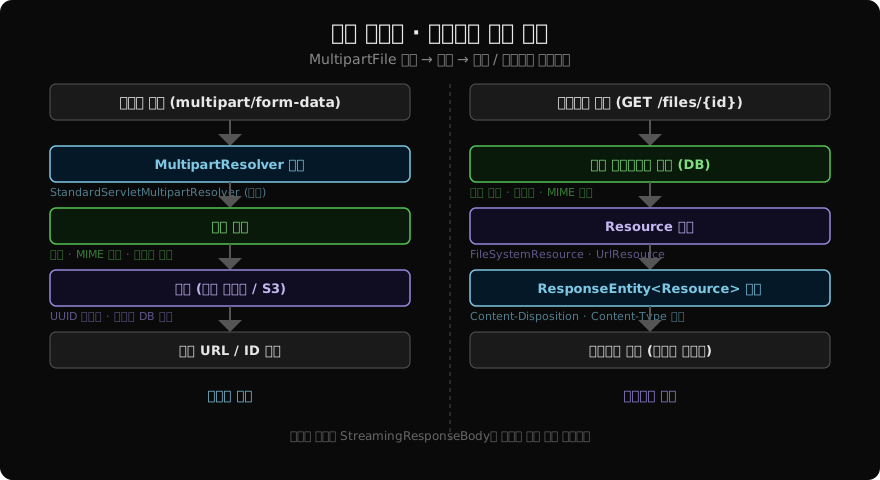
컨트롤러에서 @RequestParam MultipartFile 또는 @ModelAttribute로 파일을 수신합니다.
@PostMapping("/upload")
public ResponseEntity<FileDto> upload(
        @RequestParam("file") MultipartFile file,
        @RequestParam(value = "description", required = false) String description) {

    if (file.isEmpty()) {
        throw new BadRequestException("파일이 비어 있습니다");
    }

    String savedName = fileService.store(file, description);
    return ResponseEntity.status(HttpStatus.CREATED)
            .body(FileDto.of(savedName, file.getOriginalFilename()));
}MultipartFile이 제공하는 주요 메서드:
| 메서드 | 설명 |
|---|---|
getOriginalFilename() | 클라이언트가 보낸 원본 파일명 |
getContentType() | MIME 타입 (image/png 등) |
getSize() | 파일 크기 (바이트) |
isEmpty() | 빈 파일 여부 |
getBytes() | 바이트 배열로 읽기 (소용량에만 사용) |
getInputStream() | 스트림으로 읽기 (대용량) |
transferTo(File dest) | 파일 시스템에 직접 저장 |
파일 저장 서비스
@Service
public class FileStorageService {

    private final Path storageRoot;

    public FileStorageService(@Value("${app.file.storage-path:/data/files}") String path) {
        this.storageRoot = Paths.get(path).toAbsolutePath().normalize();
        try {
            Files.createDirectories(this.storageRoot);
        } catch (IOException e) {
            throw new StorageException("파일 저장 디렉터리를 생성할 수 없습니다", e);
        }
    }

    public String store(MultipartFile file) {
        String originalName = StringUtils.cleanPath(
                Objects.requireNonNull(file.getOriginalFilename()));

        // 경로 트래버설 방지
        if (originalName.contains("..")) {
            throw new BadRequestException("잘못된 파일명: " + originalName);
        }

        String extension = getExtension(originalName);
        validateExtension(extension);

        // UUID로 물리 파일명 생성 (원본명은 DB에 저장)
        String storedName = UUID.randomUUID() + "." + extension;
        Path target = storageRoot.resolve(storedName);

        try {
            Files.copy(file.getInputStream(), target,
                       StandardCopyOption.REPLACE_EXISTING);
        } catch (IOException e) {
            throw new StorageException("파일 저장 실패", e);
        }
        return storedName;
    }

    public Resource loadAsResource(String filename) {
        Path filePath = storageRoot.resolve(filename).normalize();

        // 저장 루트 밖으로 나가지 않는지 확인
        if (!filePath.startsWith(storageRoot)) {
            throw new BadRequestException("잘못된 파일 경로");
        }

        Resource resource = new FileSystemResource(filePath);
        if (!resource.exists()) {
            throw new NotFoundException("파일을 찾을 수 없습니다: " + filename);
        }
        return resource;
    }

    private String getExtension(String filename) {
        int dotIdx = filename.lastIndexOf('.');
        return (dotIdx >= 0) ? filename.substring(dotIdx + 1).toLowerCase() : "";
    }

    private void validateExtension(String ext) {
        Set<String> allowed = Set.of("jpg", "jpeg", "png", "gif", "pdf", "docx");
        if (!allowed.contains(ext)) {
            throw new BadRequestException("허용되지 않는 파일 형식: " + ext);
        }
    }
}UUID.randomUUID()로 물리 파일명을 생성하면 원본 파일명에 포함된 특수문자, 한글, 경로 문자(../)를 완전히 차단할 수 있습니다. 원본 파일명은 DB에 별도로 저장해 다운로드 시 Content-Disposition 헤더에 활용합니다.
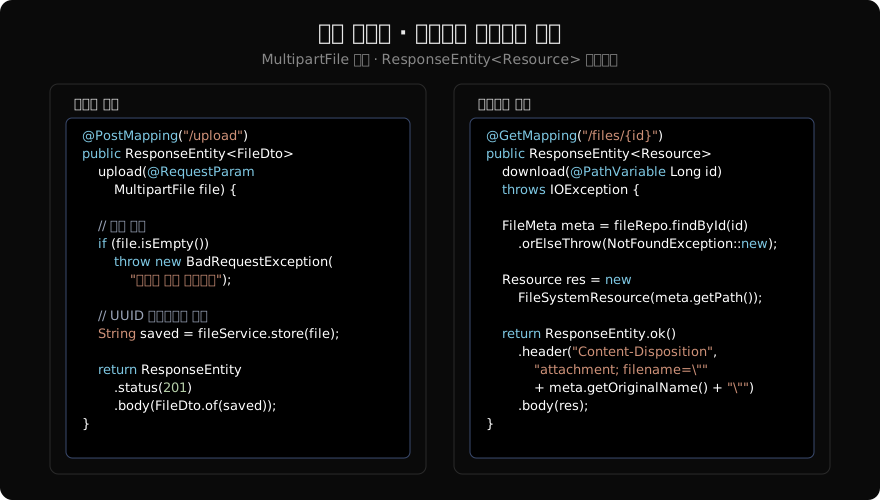
파일 다운로드: ResponseEntity<Resource>
@GetMapping("/files/{id}")
public ResponseEntity<Resource> download(@PathVariable Long id) {
    FileMeta meta = fileRepository.findById(id)
            .orElseThrow(() -> new NotFoundException("파일 없음: " + id));

    Resource resource = fileStorageService.loadAsResource(meta.getStoredName());

    String encodedName;
    try {
        // RFC 5987 형식으로 한글 파일명 인코딩
        encodedName = URLEncoder.encode(
                meta.getOriginalName(), StandardCharsets.UTF_8)
                .replaceAll("\\+", "%20");
    } catch (Exception e) {
        encodedName = "download";
    }

    return ResponseEntity.ok()
            .contentType(MediaType.parseMediaType(meta.getContentType()))
            .header(HttpHeaders.CONTENT_DISPOSITION,
                    "attachment; filename*=UTF-8''" + encodedName)
            .body(resource);
}
Content-Disposition: attachment는 브라우저가 파일을 다운로드하도록 합니다. inline으로 바꾸면 브라우저에서 직접 열 수 있는 파일(PDF, 이미지)은 새 탭에서 열립니다.
한글 파일명을 위해 filename*=UTF-8'' 형식(RFC 5987)을 사용합니다. 구형 브라우저 호환이 필요하다면 filename과 filename* 를 함께 보냅니다.
Content-Disposition: attachment; filename="report.pdf"; filename*=UTF-8''%EB%B3%B4%EA%B3%A0%EC%84%9C.pdf대용량 파일: StreamingResponseBody
파일이 수백 MB를 넘어간다면 ResponseEntity<Resource> 방식은 JVM 힙에 파일 전체를 올릴 위험이 있습니다. StreamingResponseBody를 사용하면 출력 스트림에 직접 쓰기 때문에 메모리 부담 없이 스트리밍할 수 있습니다.
@GetMapping("/files/{id}/stream")
public ResponseEntity<StreamingResponseBody> streamDownload(
        @PathVariable Long id) {

    FileMeta meta = fileRepository.findById(id)
            .orElseThrow(() -> new NotFoundException("파일 없음: " + id));

    Path filePath = fileStorageService.resolve(meta.getStoredName());

    StreamingResponseBody body = outputStream -> {
        try (InputStream in = Files.newInputStream(filePath)) {
            byte[] buffer = new byte[8192];
            int bytesRead;
            while ((bytesRead = in.read(buffer)) != -1) {
                outputStream.write(buffer, 0, bytesRead);
            }
        }
    };

    return ResponseEntity.ok()
            .contentType(MediaType.APPLICATION_OCTET_STREAM)
            .header(HttpHeaders.CONTENT_DISPOSITION,
                    "attachment; filename=\"" + meta.getOriginalName() + "\"")
            .body(body);
}StreamingResponseBody는 기본적으로 스레드 풀에서 실행됩니다. 실행 스레드를 분리하려면 AsyncTaskExecutor를 설정합니다.
여러 파일 동시 업로드
@PostMapping("/upload/multiple")
public ResponseEntity<List<FileDto>> uploadMultiple(
        @RequestParam("files") List<MultipartFile> files) {

    if (files.size() > 10) {
        throw new BadRequestException("한 번에 최대 10개까지 업로드 가능합니다");
    }

    List<FileDto> results = files.stream()
            .filter(f -> !f.isEmpty())
            .map(f -> {
                String stored = fileStorageService.store(f);
                return FileDto.of(stored, f.getOriginalFilename());
            })
            .toList();

    return ResponseEntity.status(HttpStatus.CREATED).body(results);
}
MIME 타입 검증
확장자 검증만으로는 파일 내용을 조작한 공격(예: .jpg로 위장한 실행 파일)을 막기 어렵습니다. Apache Tika나 Files.probeContentType()으로 실제 MIME 타입을 확인합니다.
// Apache Tika 사용 (의존성 추가 필요)
import org.apache.tika.Tika;

private final Tika tika = new Tika();

private void validateContentType(MultipartFile file) throws IOException {
    String detected = tika.detect(file.getInputStream());
    Set<String> allowed = Set.of(
            "image/jpeg", "image/png", "image/gif",
            "application/pdf", "application/msword"
    );
    if (!allowed.contains(detected)) {
        throw new BadRequestException("허용되지 않는 파일 형식: " + detected);
    }
}
보안 체크리스트
- UUID 파일명: 원본 파일명을 물리 경로에 사용하지 않는다
- 경로 트래버설:
..를 포함한 경로 차단,resolve().normalize()후 루트 경로 포함 여부 확인 - 확장자 + MIME 타입 이중 검증: 확장자만으로는 불충분
- 파일 크기 제한:
spring.servlet.multipart.max-file-size+ 비즈니스 레이어 검증 - 임시 파일 정리:
transferTo()또는try-with-resources로 스트림을 닫아 임시 파일 자동 삭제 - Content-Type 응답 헤더: 다운로드 시 정확한 MIME 타입 지정,
application/octet-stream은 최후 수단
정리
spring.servlet.multipart.*속성으로 크기 제한을 설정하고, 초과 시MaxUploadSizeExceededException을 핸들링한다- UUID 파일명으로 물리 저장, 원본명은 DB에 보관해 다운로드 시
Content-Disposition에 활용한다 - 소용량은
ResponseEntity<Resource>, 대용량은StreamingResponseBody로 스트리밍한다 - 경로 트래버설 방지, 확장자 + MIME 타입 이중 검증이 핵심 보안 요소다
지난 글: Spring 인터셉터 vs 서블릿 필터: 차이점과 실전 활용 가이드
다음 글: Spring CORS 설정 완전 정복: @CrossOrigin부터 Security 연동까지
읽어주셔서 감사합니다. 😊
PALDYN / ARTICLE AI
글의 개념, 수식, 코드에 대해 물어보세요.
질문과 관련된 문단을 골라 답변의 문맥으로 사용합니다.생각 중 · 0초