

완전성 검사 — switch와 never로 빠진 케이스 잡기
TypeScript 완전성 검사(Exhaustiveness Check)를 assertNever 패턴, switch 문, never 타입으로 구현하는 방법을 완전히 정리합니다.
지난 글에서 판별 유니언으로 상태를 모델링하는 방법을 살펴봤다. 이번에는 그 연장선에서 완전성 검사(Exhaustiveness Check)를 다룬다. 판별 유니언에 새로운 변체(variant)를 추가했을 때, 처리 코드를 빠뜨리면 컴파일러가 즉시 알려주도록 만드는 기법이다.
문제: 빠진 케이스를 런타임에야 알게 된다
type Shape =
  | { kind: "circle";   radius: number }
  | { kind: "square";   side: number }
  | { kind: "triangle"; base: number; height: number };

function area(shape: Shape): number {
  switch (shape.kind) {
    case "circle": return Math.PI * shape.radius ** 2;
    case "square": return shape.side ** 2;
    // triangle 빠뜨림!
  }
  // TypeScript가 경고하지 않으면 런타임에야 버그 발견
}
"triangle" 케이스를 추가하고 switch 처리를 빠뜨려도 기본 TypeScript 설정에서는 컴파일 오류가 나지 않는다. noImplicitReturns 옵션이 활성화돼 있으면 경고가 뜨지만, 완전히 믿을 수 없다.
assertNever 패턴
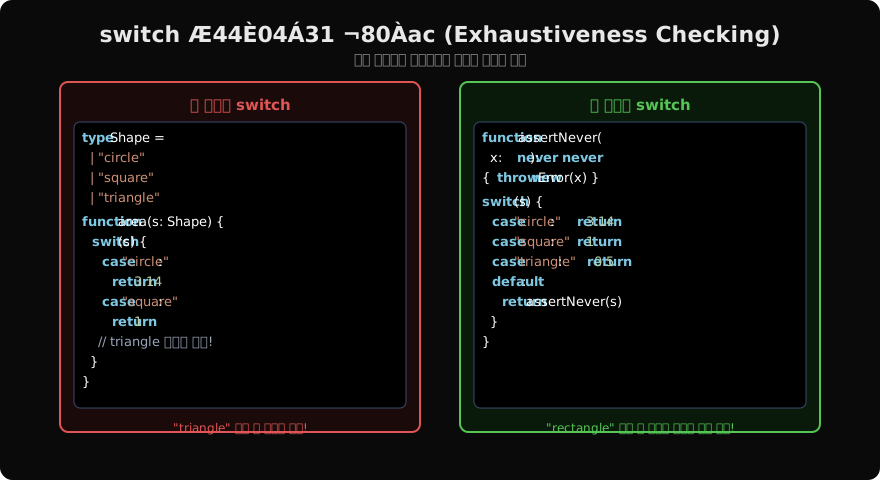
never 타입을 이용한 assertNever 함수를 만들면 컴파일 타임에 빠진 케이스를 강제할 수 있다.
function assertNever(x: never): never {
  throw new Error(`Unexpected value: ${JSON.stringify(x)}`);
}

function area(shape: Shape): number {
  switch (shape.kind) {
    case "circle":   return Math.PI * shape.radius ** 2;
    case "square":   return shape.side ** 2;
    case "triangle": return 0.5 * shape.base * shape.height;
    default:
      return assertNever(shape); // 모든 케이스 처리되면 shape: never
  }
}switch가 모든 경우를 처리하면 default 분기의 shape는 never 타입이 된다. assertNever는 never를 매개변수로 받으므로 정상 컴파일된다. 만약 새로운 변체를 추가하고 케이스를 빠뜨리면 default 분기의 shape가 never가 아닌 타입이 되어 컴파일 오류가 발생한다.
// 새 변체 추가
type Shape =
  | { kind: "circle";   radius: number }
  | { kind: "square";   side: number }
  | { kind: "triangle"; base: number; height: number }
  | { kind: "pentagon"; sides: number[] }; // 추가

// switch에서 "pentagon" 처리 빠뜨리면
// default 분기에서 TS2345 오류 발생 ✅
never 타입의 원리
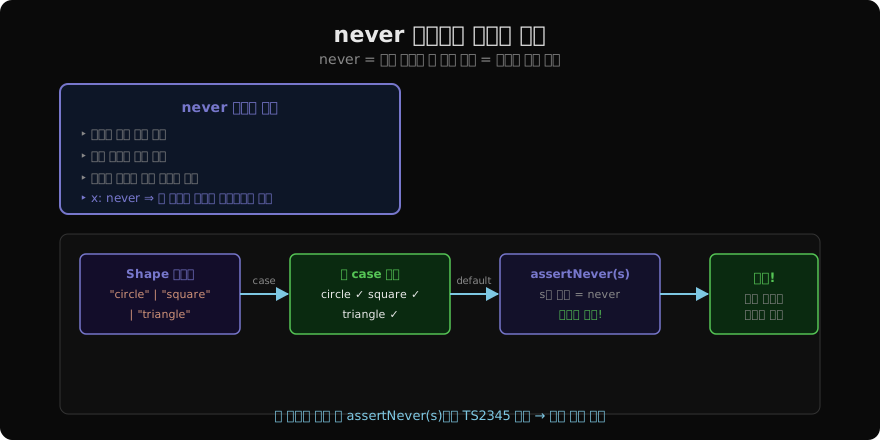
never는 절대 발생할 수 없는 값의 타입이다. 모든 유니언 멤버를 처리하고 나면 남는 타입이 없으므로 never가 된다.
type Result = string | number;

function process(val: Result) {
  if (typeof val === "string") {
    // val: string
    return val.toUpperCase();
  }
  if (typeof val === "number") {
    // val: number
    return val.toFixed(2);
  }
  // val: never — 여기까지 오는 값은 없음
  const _: never = val; // 완전성 확인
}
유틸리티 타입으로 추상화
팀 코드베이스에서 반복 사용하려면 유틸리티 타입으로 만들 수 있다.
// 완전성 검사 헬퍼
function exhaustiveCheck(x: never, message?: string): never {
  throw new Error(message ?? `Unhandled case: ${JSON.stringify(x)}`);
}

// 사용
function describe(shape: Shape): string {
  switch (shape.kind) {
    case "circle":   return `원 (반지름 ${shape.radius})`;
    case "square":   return `정사각형 (변 ${shape.side})`;
    case "triangle": return `삼각형`;
    default:
      return exhaustiveCheck(shape, `알 수 없는 도형: ${shape}`);
  }
}
if-else 체인에서 완전성 검사
switch 외에도 if-else 체인에서 사용할 수 있다.
function renderState<T>(state: AsyncState<T>): string {
  if (state.status === "idle")    return "대기 중";
  if (state.status === "loading") return "로딩 중";
  if (state.status === "success") return `완료: ${state.data}`;
  if (state.status === "error")   return `오류: ${state.error.message}`;
  return assertNever(state);
}
실무 팁
완전성 검사는 세 가지 이점을 동시에 제공한다. 첫째, 새 변체 추가 시 처리 코드를 빠뜨리면 컴파일 오류로 즉시 알 수 있다. 둘째, IDE 자동완성이 각 분기에서 정확한 타입을 제공한다. 셋째, 런타임 assertNever가 예외를 던지므로 프로덕션에서도 디버깅이 쉽다.
ESLint @typescript-eslint/switch-exhaustiveness-check 규칙을 함께 활성화하면 assertNever가 없는 switch도 경고로 잡아준다.
지난 글: 판별 유니언 — 타입 안전한 상태 모델링
다음 글: 단언 함수 — asserts 키워드와 불변식 검사
읽어주셔서 감사합니다. 😊
PALDYN / ARTICLE AI
글의 개념, 수식, 코드에 대해 물어보세요.
질문과 관련된 문단을 골라 답변의 문맥으로 사용합니다.생각 중 · 0초