

첫 번째 TypeScript 프로그램: Hello World부터 타입 추론까지
TypeScript로 첫 번째 프로그램을 작성합니다. 타입 어노테이션과 타입 추론의 차이, 함수 파라미터와 반환 타입 선언, 변수 타입 선언의 기본을 실습 예제로 완전히 익힙니다.
지난 글에서 TypeScript Playground를 소개했다. 이제 실제로 TypeScript 코드를 작성해보자. 첫 프로그램부터 타입 추론까지, TypeScript 코딩의 기본을 손에 익히는 것이 이 글의 목표다.
Hello, TypeScript!
가장 간단한 프로그램부터 시작한다.
// src/hello.ts
const message: string = "Hello, TypeScript!";
console.log(message);
# 실행
tsc src/hello.ts && node src/hello.js
# Hello, TypeScript!
# ts-node로 바로 실행
npx ts-node src/hello.ts
# Hello, TypeScript!message: string이 타입 어노테이션이다. 변수명 뒤에 : 타입명을 붙이는 문법이다. 그런데 사실 이 경우엔 타입 어노테이션을 생략해도 된다. TypeScript는 초기값 "Hello, TypeScript!"에서 string 타입을 자동으로 추론한다.
// 타입 어노테이션 없어도 완전히 동일하게 동작
const message = "Hello, TypeScript!";  // string으로 자동 추론
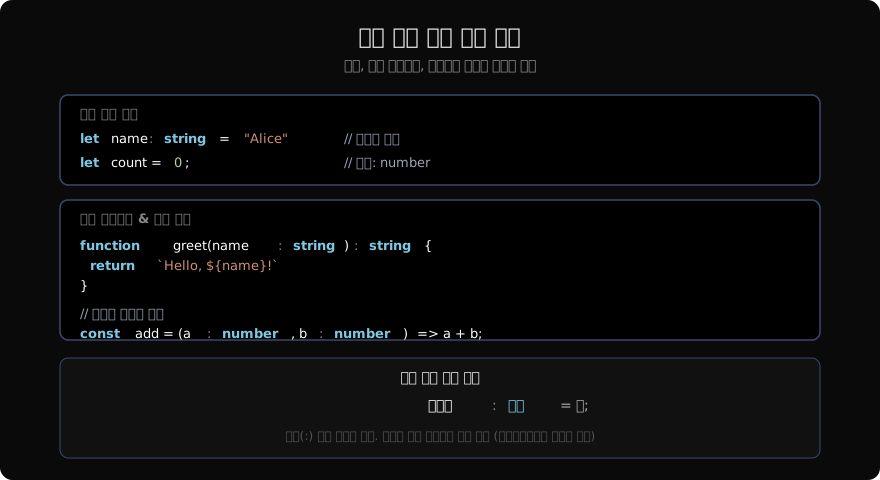
타입 어노테이션 기본 문법
TypeScript의 타입 어노테이션은 항상 같은 패턴을 따른다.
// 변수
let 변수명: 타입 = 값;

// 함수 파라미터
function 함수명(파라미터명: 타입): 반환타입 {
  // ...
}

// 화살표 함수
const 함수명 = (파라미터명: 타입): 반환타입 => {
  // ...
};
실제 예시:
// 변수 선언
let age: number = 25;
let name: string = "Alice";
let active: boolean = true;
let scores: number[] = [95, 87, 91];

// 함수
function greet(name: string): string {
  return `안녕하세요, ${name}님!`;
}

// 화살표 함수
const double = (n: number): number => n * 2;

// 콜백
const doubled = scores.map((score: number): number => score * 2);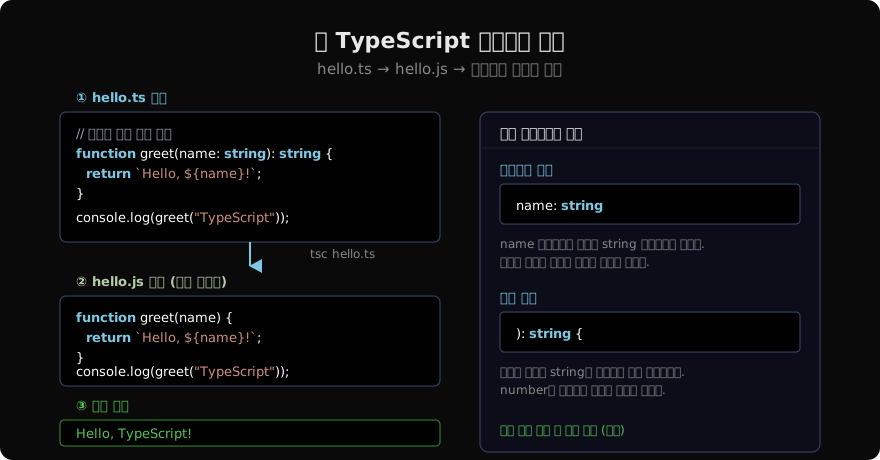
타입 추론
TypeScript의 강점 중 하나는 타입을 명시하지 않아도 자동으로 추론한다는 것이다.
// 추론 예시 — 타입을 쓰지 않았지만 TypeScript는 모두 알고 있다
const name = "Alice";          // string
const age = 30;                // number
const active = true;           // boolean
const scores = [95, 87, 91];  // number[]
const user = { id: 1, name: "Bob" };  // { id: number; name: string }
변수 위에 마우스를 올리면 IDE에서 추론된 타입을 즉시 확인할 수 있다.
추론이 잘 작동하는 경우
// 초기값이 있는 변수 — 추론 가능
const price = 9900;          // number
const greeting = `안녕`;     // string

// 함수 반환값 — 본문에서 추론 가능
function add(a: number, b: number) {
  return a + b;  // 반환 타입: number (자동 추론)
}

// 배열 요소 타입 — 추론 가능
const items = [1, 2, 3];  // number[]
items.map(x => x * 2);    // x는 number로 추론됨
타입을 명시해야 하는 경우
// 초기값 없는 변수 — 명시 필요
let count: number;  // 나중에 할당 예정
count = 0;

// 함수 파라미터 — 항상 명시 권장
function processInput(data: string): void {
  console.log(data.toUpperCase());
}

// 복잡한 객체 — 명시로 의도를 명확히
interface Config {
  host: string;
  port: number;
  ssl: boolean;
}

const config: Config = {
  host: "localhost",
  port: 3000,
  ssl: false
};
실전 예제: 할일 관리 프로그램
간단한 할일(Todo) 관리 프로그램을 작성해보자.
// src/todo.ts

// 타입 정의
interface Todo {
  id: number;
  title: string;
  completed: boolean;
  createdAt: Date;
}

// 할일 목록 관리
class TodoList {
  private todos: Todo[] = [];
  private nextId: number = 1;

  add(title: string): Todo {
    const todo: Todo = {
      id: this.nextId++,
      title,
      completed: false,
      createdAt: new Date(),
    };
    this.todos.push(todo);
    return todo;
  }

  complete(id: number): boolean {
    const todo = this.todos.find(t => t.id === id);
    if (!todo) return false;
    todo.completed = true;
    return true;
  }

  getAll(): Todo[] {
    return [...this.todos];  // 복사본 반환
  }

  getPending(): Todo[] {
    return this.todos.filter(t => !t.completed);
  }
}

// 사용
const list = new TodoList();

list.add("TypeScript 기초 학습");
list.add("첫 프로젝트 시작");
list.add("타입 어노테이션 연습");

list.complete(1);

console.log("전체 할일:", list.getAll().length);
console.log("남은 할일:", list.getPending().length);

// TypeScript가 검사하는 것들:
// - add()에 string 외의 타입을 넘기면 오류
// - complete()에 number 외의 타입을 넘기면 오류
// - Todo 인터페이스에 없는 프로퍼티 접근 시 오류
변수 재할당과 타입 보호
let status = "pending";  // string으로 추론

status = "active";   // OK (string)
status = 42;         // Error: number는 string에 할당 불가
status = null;       // Error: strictNullChecks 활성화 시

// null 가능하게 하려면 유니언 타입 사용
let flexStatus: string | null = "pending";
flexStatus = null;   // OK
flexStatus = 42;     // Error: number는 string | null에 할당 불가
const vs let과 타입 추론
const와 let은 타입 추론 방식이 다르다.
const status = "active";   // 타입: "active" (리터럴 타입)
let mood = "happy";        // 타입: string (넓은 타입)

// const는 변경 불가이므로 더 좁은 타입으로 추론
// let은 재할당 가능이므로 더 넓은 타입으로 추론
이 차이는 나중에 리터럴 타입과 유니언 타입을 다룰 때 중요하게 활용된다.
타입스크립트 작성 규칙 요약
실전에서 바로 적용할 수 있는 원칙들이다.
// ✓ DO: 함수 파라미터 타입은 항상 명시
function process(data: string): void { ... }

// ✓ DO: 초기값 없는 변수는 타입 명시
let result: number;

// ✓ DO: 반환 타입은 명시하거나 추론에 맡기기 (일관성 유지)
function getCount(): number { return 42; }
function getCount() { return 42; }  // 추론에 맡겨도 OK

// ✗ AVOID: 타입 없는 파라미터
function process(data) { ... }  // Error with noImplicitAny

// ✗ AVOID: any 남발
function process(data: any): any { ... }  // 타입 안전성 포기

// ✓ DO: any 대신 unknown 또는 제네릭 사용
function process<T>(data: T): T { ... }
정리
TypeScript 코딩의 핵심은 타입 어노테이션과 타입 추론의 조화다. 초기값이 있는 변수는 추론에 맡기고, 함수 파라미터와 반환 타입은 명시하는 것이 일반적인 스타일이다. strict: true 모드에서 TypeScript가 요구하는 타입 안전성에 익숙해지면 코드 품질이 자연스럽게 높아진다.
지난 글: TypeScript Playground: 설치 없이 브라우저에서 실험하기
다음 글: TypeScript 기본 타입: 타입 시스템의 구성 요소
읽어주셔서 감사합니다. 😊
PALDYN / ARTICLE AI
글의 개념, 수식, 코드에 대해 물어보세요.
질문과 관련된 문단을 골라 답변의 문맥으로 사용합니다.생각 중 · 0초