

타입 좁히기(Narrowing) 기초 — 유니언 타입을 안전하게 다루는 방법
TypeScript 타입 좁히기(narrowing)의 개념, typeof·truthy·equality 체크, 타입 서술어(type predicate) 등 기본 기법을 코드 예시와 흐름도로 정리합니다.
지난 글에서 this 매개변수를 살펴봤다. 이번에는 타입 좁히기(Type Narrowing) 의 기초를 다룬다. 유니언 타입을 사용하면 하나의 변수가 여러 타입을 가질 수 있는데, 특정 지점에서 더 구체적인 타입으로 좁혀 안전하게 사용하는 기법이 타입 좁히기다.
타입 좁히기란
TypeScript 컴파일러는 코드의 흐름을 분석해 특정 시점에서 변수가 가질 수 있는 타입을 추적한다. 이 분석 과정에서 타입이 더 구체적으로 결정되는 것을 타입 좁히기라고 한다.
function processId(id: string | number) {
  // 이 시점: id는 string | number
  console.log(id);

  if (typeof id === "string") {
    // 이 블록: id는 string
    console.log(id.toUpperCase()); // OK
  } else {
    // 이 블록: id는 number (string이 아닌 나머지)
    console.log(id.toFixed(2)); // OK
  }

  // 다시 이 시점: id는 string | number
}
if (typeof id === "string") 블록 안에서 TypeScript는 id가 반드시 string임을 안다. else 블록에서는 string이 아닌 나머지, 즉 number임을 안다.
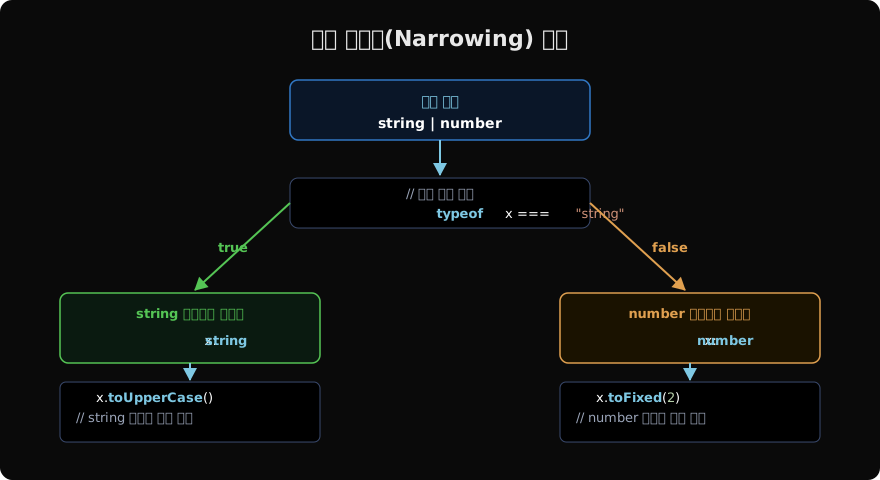
typeof를 이용한 좁히기
typeof 연산자는 JavaScript에서 원시 타입을 구분하는 가장 기본적인 방법이다. TypeScript는 typeof 체크를 인식해 타입을 좁힌다.
function describe(value: string | number | boolean | null | undefined) {
  if (typeof value === "string") {
    // value: string
    return `문자열: ${value.length}자`;
  }
  if (typeof value === "number") {
    // value: number
    return `숫자: ${value.toFixed(2)}`;
  }
  if (typeof value === "boolean") {
    // value: boolean
    return `불리언: ${value}`;
  }
  // value: null | undefined
  return "값 없음";
}typeof가 반환하는 문자열: "string", "number", "bigint", "boolean", "symbol", "undefined", "object", "function".
주의: typeof null === "object"이므로 null 체크에는 typeof를 쓰지 않는다.
truthiness(참/거짓) 체크
JavaScript의 falsy 값(false, 0, "", null, undefined, NaN)을 이용한 조건문으로 타입을 좁힐 수 있다.
function greet(name: string | null) {
  if (name) {
    // name: string (null이 falsy이므로 제거됨)
    console.log(`Hello, ${name.toUpperCase()}`);
  } else {
    // name: string | null — "" 도 falsy이므로 string이 남을 수 있음
    console.log("Hello, stranger");
  }
}

// 빈 문자열도 걸러야 할 때
function greetStrict(name: string | null | undefined) {
  if (name != null) {
    // name: string (null과 undefined만 제거)
    console.log(`Hello, ${name}`);
  }
}
truthiness 체크는 null과 undefined 모두를 걸러내지만, 빈 문자열 ""이나 0도 falsy이므로 의도치 않은 값이 걸릴 수 있다. != null 체크가 더 안전한 경우가 많다.
equality(동등성) 체크
===, !==, ==, != 비교도 타입 좁히기로 인식된다.
function compare(x: string | number, y: string | boolean) {
  if (x === y) {
    // x === y가 성립하면 공통 타입만 가능
    // x: string, y: string (교집합)
    console.log(x.toUpperCase()); // string 메서드 사용 가능
  }
}

// null/undefined 체크 패턴
function process(value: string | null | undefined) {
  // == null은 null과 undefined 모두 걸러냄
  if (value == null) {
    return "없음";
  }
  // value: string
  return value.trim();
}

// 리터럴 타입 좁히기
type Direction = "left" | "right" | "up" | "down";

function move(dir: Direction) {
  if (dir === "left" || dir === "right") {
    // dir: "left" | "right"
    return "수평 이동";
  }
  // dir: "up" | "down"
  return "수직 이동";
}
타입 서술어(Type Predicate)
is 키워드를 사용한 반환 타입으로 커스텀 타입 가드 함수를 만들 수 있다.
// 타입 서술어: "value is string" 형태
function isString(value: unknown): value is string {
  return typeof value === "string";
}

function processValue(value: string | number | boolean) {
  if (isString(value)) {
    // value: string — isString이 true를 반환했으므로
    console.log(value.toUpperCase());
  }
}

// 복잡한 타입 가드
interface Cat {
  meow(): void;
}

interface Dog {
  bark(): void;
}

function isCat(animal: Cat | Dog): animal is Cat {
  return "meow" in animal;
}

function makeSound(animal: Cat | Dog) {
  if (isCat(animal)) {
    animal.meow(); // Cat
  } else {
    animal.bark(); // Dog
  }
}
타입 서술어(value is T)는 함수의 반환값이 true일 때 컴파일러에게 “이 값은 T 타입이다”라고 알려주는 명시적 계약이다. 런타임 로직은 개발자가 직접 구현하며, TypeScript는 그 약속을 신뢰한다.
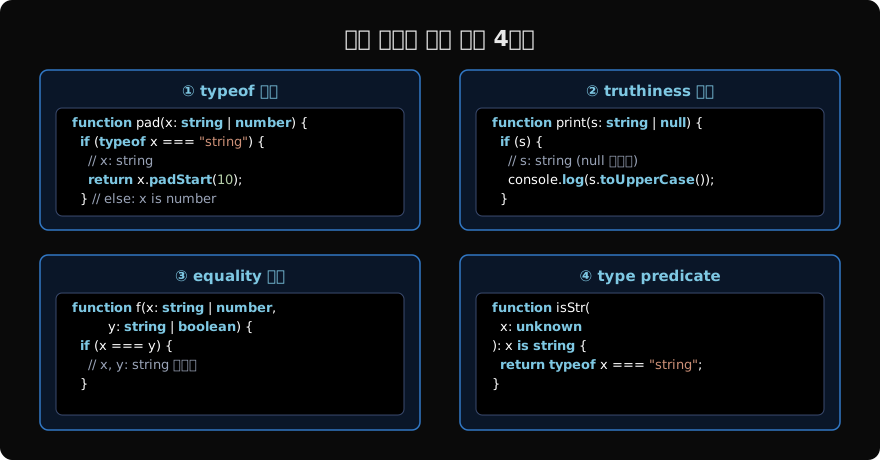
여러 타입을 동시에 좁히기
여러 타입이 관여할 때는 조건을 조합해 좁힌다.
type StringOrNumber = string | number;
type MaybeNull<T> = T | null;

function processNullable(value: MaybeNull<StringOrNumber>) {
  if (value === null) {
    return 0;
  }
  // value: string | number (null 제거됨)

  if (typeof value === "string") {
    return value.length;
  }
  // value: number (string도 제거됨)
  return value;
}
TypeScript는 각 조건문을 통과한 후의 타입을 추적해 최종적으로 남은 타입을 결정한다.
배열과 함께하는 좁히기
Array.isArray()도 TypeScript가 인식하는 타입 좁히기 방법이다.
function flatten(value: string | string[]) {
  if (Array.isArray(value)) {
    // value: string[]
    return value.join(", ");
  }
  // value: string
  return value;
}

// 중첩 타입
function processData(data: string | number | (string | number)[]) {
  if (Array.isArray(data)) {
    // data: (string | number)[]
    return data.map(String).join(", ");
  }
  // data: string | number
  return String(data);
}
좁히기 실패 패턴
타입 좁히기가 예상대로 동작하지 않는 경우를 알아두면 버그를 예방할 수 있다.
// ❌ 변수에 저장하면 좁히기 정보 손실
const checks = typeof value === "string";
if (checks) {
  value.toUpperCase(); // ❌ TypeScript는 checks와 value의 관계를 추적하지 않음
}

// ✅ 직접 조건으로 사용
if (typeof value === "string") {
  value.toUpperCase(); // OK
}

// ❌ 클로저 내에서의 좁히기
let val: string | null = "hello";
if (val !== null) {
  setTimeout(() => {
    val.toUpperCase(); // ❌ TS2531: 클로저 실행 시점에 val이 변경됐을 수 있음
  }, 1000);
}

// ✅ 지역 변수에 할당
if (val !== null) {
  const safeVal = val; // safeVal: string (재할당 불가)
  setTimeout(() => {
    safeVal.toUpperCase(); // OK
  }, 1000);
}
TypeScript의 타입 좁히기는 제어 흐름 분석(Control Flow Analysis) 기반이다. 변수에 좁혀진 타입을 저장하거나 클로저로 전달하면 컴파일러가 관계를 추적하지 못할 수 있다.
다음 글에서는 typeof와 instanceof를 이용한 좁히기를 더 깊이 살펴본다.
지난 글: this 매개변수 — 메서드와 this 타입 처리
다음 글: typeof와 instanceof 타입 가드 — 원시 타입과 클래스 인스턴스 구분
읽어주셔서 감사합니다. 😊
PALDYN / ARTICLE AI
글의 개념, 수식, 코드에 대해 물어보세요.
질문과 관련된 문단을 골라 답변의 문맥으로 사용합니다.생각 중 · 0초