

Notifications API 완전 이해
브라우저 Notifications API의 권한 요청, NotificationOptions, 이벤트 핸들러, Service Worker 연동, Push API와의 결합까지 정리합니다.
지난 글에서 Geolocation API를 살펴봤습니다. 이번에는 Notifications API를 정리합니다. 브라우저 알림은 사용자가 앱 탭을 보고 있지 않아도 시스템 레벨에서 메시지를 전달할 수 있게 해줍니다.
Notifications API란
Notification 생성자로 OS 수준의 알림을 표시합니다. 알림은 사용자가 브라우저를 최소화하거나 다른 탭에 있어도 나타납니다. Service Worker와 결합하면 앱이 완전히 닫혀 있어도 Push 서버에서 알림을 받을 수 있습니다.
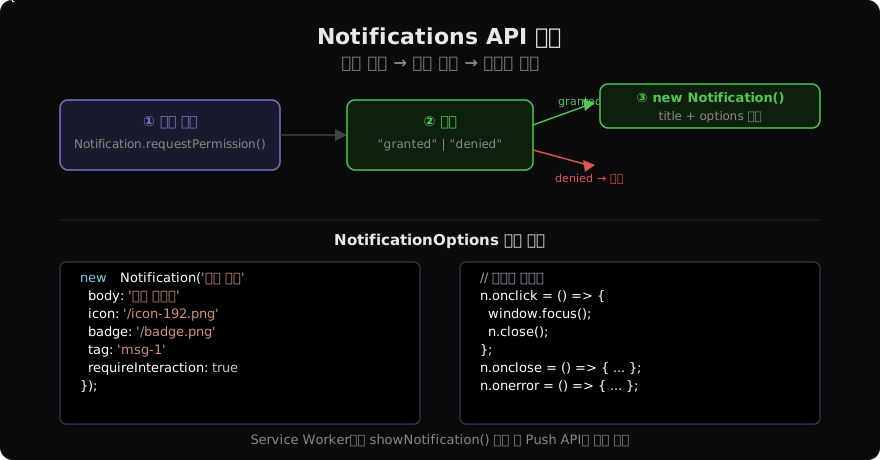
권한 요청
알림을 표시하기 전에 반드시 사용자 허가를 받아야 합니다.
async function requestNotificationPermission() {
  if (!('Notification' in window)) {
    console.warn('이 브라우저는 알림을 지원하지 않습니다.');
    return false;
  }

  if (Notification.permission === 'granted') return true;
  if (Notification.permission === 'denied') return false;

  // 'default' 상태일 때만 요청
  const permission = await Notification.requestPermission();
  return permission === 'granted';
}Notification.permission은 세 가지 상태입니다:
"default": 아직 결정하지 않음 (요청 가능)"granted": 허가됨"denied": 거부됨 (재요청 불가 — 브라우저 설정에서만 변경 가능)
알림 생성
async function showNotification() {
  const granted = await requestNotificationPermission();
  if (!granted) return;

  const notification = new Notification('새 메시지 도착', {
    body: '홍길동님이 메시지를 보냈습니다.',
    icon: '/icons/notification-icon.png', // 알림 아이콘
    badge: '/icons/badge-72.png',          // 상태바 아이콘 (모바일)
    tag: 'message-1',                       // 같은 tag면 기존 알림 교체
    requireInteraction: true,               // 사용자 클릭 전까지 유지
    silent: false,                          // 소리/진동 여부
    data: { url: '/messages/1' },           // 커스텀 데이터
  });

  // 이벤트 핸들러
  notification.onclick = () => {
    window.focus();
    window.location.href = notification.data.url;
    notification.close();
  };

  notification.onclose = () => console.log('알림 닫힘');
  notification.onerror = (e) => console.error('알림 오류:', e);

  // 5초 후 자동 닫기
  setTimeout(() => notification.close(), 5000);
}
tag — 알림 중복 방지
같은 tag 값을 가진 알림은 새로운 알림이 기존 알림을 교체합니다. 동일한 채팅방에서 여러 메시지가 와도 알림이 쌓이지 않게 할 때 유용합니다.
// 채팅방 ID를 tag로 사용
new Notification('홍길동', {
  body: '오늘 저녁 뭐 먹을까요?',
  tag: 'chat-room-42',
});

// 잠시 후 같은 채팅방에서 새 메시지 → 기존 알림 교체
new Notification('홍길동', {
  body: '파스타 어때요?',
  tag: 'chat-room-42',
  renotify: true, // 교체할 때도 소리/진동 다시 울림
});
Service Worker와 연동
Service Worker를 통하면 앱이 열려 있지 않아도 알림을 표시할 수 있습니다.
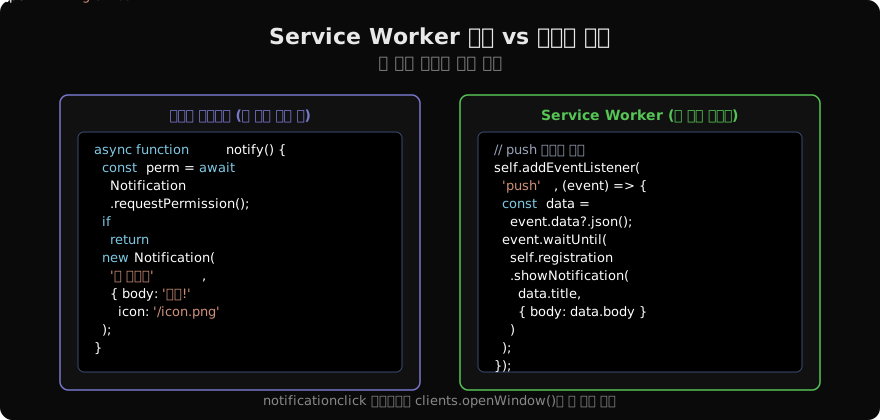
// service-worker.js
self.addEventListener('push', (event) => {
  const data = event.data?.json() ?? { title: '알림', body: '내용 없음' };
  event.waitUntil(
    self.registration.showNotification(data.title, {
      body: data.body,
      icon: '/icon-192.png',
      data: { url: data.url ?? '/' },
    })
  );
});

self.addEventListener('notificationclick', (event) => {
  event.notification.close();
  event.waitUntil(
    clients.matchAll({ type: 'window', includeUncontrolled: true }).then((clientList) => {
      const targetUrl = event.notification.data.url;
      for (const client of clientList) {
        if (client.url === targetUrl && 'focus' in client) return client.focus();
      }
      return clients.openWindow(targetUrl);
    })
  );
});
Actions — 알림 버튼
Service Worker의 showNotification에서만 사용할 수 있는 기능입니다.
self.registration.showNotification('주문 확인', {
  body: '주문 #1042를 승인하시겠습니까?',
  icon: '/icon.png',
  actions: [
    { action: 'confirm', title: '승인', icon: '/icons/check.png' },
    { action: 'reject', title: '거절', icon: '/icons/x.png' },
  ],
  tag: 'order-1042',
});

self.addEventListener('notificationclick', (event) => {
  const { action, notification } = event;
  notification.close();
  if (action === 'confirm') event.waitUntil(confirmOrder(notification.data.orderId));
  if (action === 'reject') event.waitUntil(rejectOrder(notification.data.orderId));
});
권한 상태 모니터링
navigator.permissions로 알림 권한 변화를 실시간 감지합니다.
const status = await navigator.permissions.query({ name: 'notifications' });
console.log('현재 권한:', status.state);

status.addEventListener('change', () => {
  console.log('권한 변경됨:', status.state);
  if (status.state === 'denied') showPermissionDeniedMessage();
});
UX 가이드라인
권한 요청 타이밍: 페이지 진입 직후 권한을 요청하면 거부율이 높습니다. 사용자가 알림이 필요한 기능(채팅, 주문 추적 등)을 사용하려 할 때 컨텍스트를 설명하고 요청하세요.
알림 빈도: 너무 잦은 알림은 사용자를 이탈시킵니다. 배치·집약(grouping)을 활용하세요.
클릭 처리: onclick에서 반드시 관련 페이지로 이동하거나 포커스를 이동해 알림의 맥락을 제공하세요.
지난 글: Geolocation API 완전 이해
다음 글: Permissions API 완전 이해
읽어주셔서 감사합니다. 😊
PALDYN / ARTICLE AI
글의 개념, 수식, 코드에 대해 물어보세요.
질문과 관련된 문단을 골라 답변의 문맥으로 사용합니다.생각 중 · 0초